Tutorial: Playing MP3 Files with VS1053B and FRDM Board

I want to make some noise with this post!!! This tutorial is about adding music and sound capabilities to the Freescale Freedom board, and to have a lot of fun with it :-). I need this ability for a larger project working on for a while. But I thought I share that sub-part how to play sound files. So with this tutorial I can turn my Freescale Freedom board into a music or sound player :-). And adding sounds is a cool way for any project, and as the music is stored on an SD card it fits easily hours of music or sounds.

MP3 Player with FRDM-KL25Z

MP3 Player with FRDM-KL25Z and Adafruit Music Maker MP3 Shield

Continue reading

Recovering the FRDM-K64F Bootloader, or: Cloning the Program of a Microcontroller

The Freescale FRDM-K64F and FRDM-K22F have a different OpenSDA (v2) firmware on it: unlike the earlier (v1), that firmware is open and not protected which is a great thing. However, it has the disadvantage if you use the wrong SWD/JTAG header on your board, the bootloader on the K20 OpenSDA microcontroller is gone 😦

Two SWD Headers on FRDM-K64F Board

Two SWD Headers on FRDM-K64F Board

Continue reading

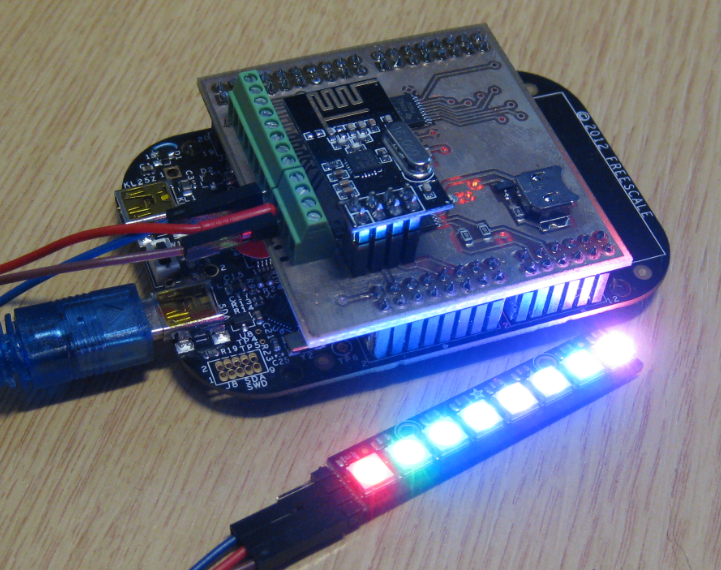
NeoShield: WS2812 RGB LED Shield with DMA and nRF24L01+

In my earlier post I used a hacked together shield for building a clock based on Adafruit’s NeoPixel/WS2812 (“LED Clock with Kitchen Hot Pan Protector“). The new design supports now 8 parallel data streams, integrated realtime clock and wireless connectivity with the nRF24L01+ module.

NeoPixel Shield for FRDM Boards

NeoPixel Shield for FRDM Boards

Continue reading

Tutorial: FreeRTOS with the Kinetis SDK and Processor Expert

Freescale had announced at FTF back in April this year that they will use Kinetis Design Studio  and the Kinetis SDK for all new Kinetis devices. The switch from CodeWarrior to Kinetis Design Studio (see “Comparing CodeWarrior with Kinetis Design Studio“) was not much of big deal for my projects (although CodeWarrior still has better features), and projects are rather easily portable. However, the move to the Kinetis SDK has been massively disruptive: Before it was easy to move projects from one device to another with Processor Expert, even from S08 to ColdFire to Kinetis. Now with the Kinetis SDK everything is very different. At least Freescale now officially supports FreeRTOS, and for myself as a big fan of that open source RTOS, that was some good news.

Blinking Red LED with FreeRTOS Task using Kinetis SDK, FreeRTOS and Processor Expert

Blinking Red LED with FreeRTOS Task using Kinetis SDK, FreeRTOS and Processor Expert

So in this tutorial I’m showing how FreeRTOS can be used with the Kinetis Design Studio. That makes at least using the Kinetis SDK bit more familiar to me :-).

Continue reading

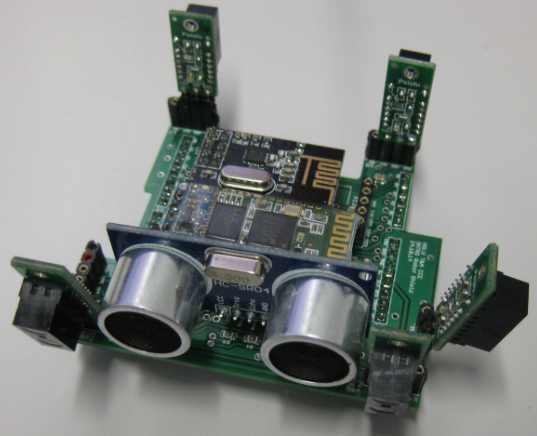
Sumo Robot Sensor Shield

The PCB’s for the Sumo robot (see “New Sumo Robot Assembled, and looking good!“) arrived. It is the ‘production’ version of that shield I have shown in “Sensor and Communication Shield for Sumo Robot” which adds following to the robot:

  1. Ultrasonic module
  2. Bluetooth module
  3. nRF24L01+ module
  4. I2C I/O Expander for 8 extra I/Os
  5. One general purpose I/O header
  6. One general purpose I2C header
  7. Up to 6 infrared distance sensors
Sensor Shield

Sensor Shield

Continue reading

Debugging Failure: Check List and Hints

I think the biggest frustration point for any new or even seasoned engineer is the debugging phase: my application finally builds fine, but I’m not able to connect and download it to the target board :-(. In my view the debugging part is the most fragile part of the development process. I’m always very relieved if I can connect to a brand new board, because I know if it does not work, then the problem could be a very bad one, costing my several hours or even days to overcome it.

Remote Communication Error

Remote Communication Error, what now?

Continue reading

RAM Target with Kinetis Design Studio and FRDM-K64F

Newer microcontroller have increase RAM areas, making it suitable to run the application from RAM instead of FLASH. For the FRDM-K64F board and the Kinetis Design Studio (V1.1.1), I have explored how to run the application out of RAM instead of FLASH memory, both for P&E and Segger connections.

MK64FN1M0VLL12

MK64FN1M0VLL12

Continue reading

Illustrated Step-by-Step Instructions: Updating the Freescale Freedom Board Firmware

I have received a bunch of Freescale FRDM boards to be used in an Embedded Systems programming crash course. There are multiple issues with the boards coming from the factory:

  1. They come with an old bootloader which is not compatible with Windows 8.x
  2. They have an old and outdated firmware on the board only supports a MSD bootloader

This post is a step-by-step instruction how to update Freescale FRDM boards (e.g. FRDM-KL25Z) to the latest firmware.

FRDM Board

FRDM Board

Continue reading

Export and Import Processor Expert Component Settings

When I create a new Processor Expert project for a board I already have the components configured, then an easy way to transfer components from one project to another is to copy-paste the components. In the ‘source’ project I select the components I want to use, choose Copy (or CTRL+C shortcut on Windows):

Copy of Processor Expert Components

Copy of Processor Expert Components

Continue reading