Unknown's avatar

About Erich Styger

Embedded is my passion....

Tutorial: Timer (LED) with Processor Expert for Kinetis

In the ‘Pre-LDD age’, setting up a periodic timer event with Processor was really easy. With the concept of LED’s (see “There is a Time and Date for both Worlds”) things are a bit different. But once things are clear, it is not that hard. So here I’m doing a very exciting thing: blinking an LED using a timer! 😎

So I’m going to have an LED blinking every second. I’m using the TWR-K60N512 with an ARM Cortex-M4 and the Eclipse based CodeWarrior for MCU10.2. But it is easy to adopt it to any other Kinetis board.

Continue reading →

Eclipse Debugging with Strings – Part 2

Maybe a better title for this post would be “Eclipse Debugging with Strings Attached’? Digging a bit more into the domain of string debugging, things are not always the way I wish they are.

I’m using here CodeWarrior for MCU10.2, which is based on Eclipse 3.6. Let’s use the following piece of code with the ARM Cortex-M4 Kinetis K60 core and the Freescale ARM compiler:

char buf[] = "abcd";
char *p = &buf[0];

unsigned char ubuf[]="ABCD";
unsigned char *up = &ubuf[0];

signed char sbuf[]="1234";
signed char *sp = &sbuf[0];

Continue reading →

Eclipse Debugging with Strings

Here I am: past midnight, and debugging why my Kinetis ARM Cortex-M4 K60N512 application. So now you know what keeps me up at night :-). Stepping through some code which is using all kind of strings:

Debugging the K60 with Eclipse and CodeWarrior

Debugging the K60 with Eclipse and CodeWarrior

The challenge is: how to debug my strings?

Continue reading →

Please Check Your License

The good thing with many vendors is: they offer development tools free of charge. And the limitations are typically reasonable for many projects. The Eclipse based CodeWarrior for MCU10 is not an exception: it comes in a free (‘Special’) Edition which allows up to 128 KByte of code to download for my ARM/Kinetis projects.

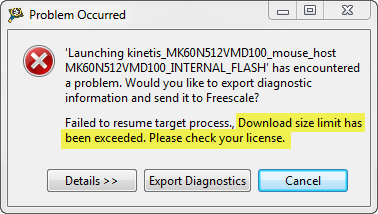
But, when I tried to debug an Example I have downloaded from the web, I get this dialog:

“Download size limit has been exceeded. Please check your license.”

Download Size Limit Has Been Exceeded

Download Size Limit Has Been Exceeded

Continue reading →

A Shell for the Freedom KL25Z Board

I’m a big fan of physical UART/RS-232 ports on boards. So I was somewhat disappointed not to see a serial 9pin connector on the Freedom KL25Z board. But it is perfectly understood that for this price costs are critical, and a serial header or connector is pushing the budget for that board very likely out of the water. Still, I want serial connectivity for my applications.

Freedom Board with RGB LED

Freedom Board with RGB LED

Continue reading →

Virtual COM/USB CDC for OSBDM/OSJTAG

Many new notebooks do not have a serial port any more: everything is USB. This can lead to problems (see USB or not: CDC with Processor Expert) as many embedded targets  use normal RS-232. In my classes I’m using the Tower boards: some Tower boards have an on-board 2 pin RS-232 header, e.g. the Tower TWR-MCF52259. Others like the TWR-K60N512 use the added TWR-SER board. The Tower boards have as well a USB capable S08JM60 which is used for debugging (OSBDM/OSJTAG), so why not using the OSBDM microcontroller as Serial-to-USB gateway?

Continue reading →

CodeWarrior Flash Programming from a DOS Shell

I can do test automation or standalone flash programming using the Debugger Shell. But this requires me to use a view inside of Eclipse. What would be nice is to do such things from a lower level: from a Windows Command window (CMD or DOS Shell). This is possible with usage of Eclipse/CodeWarrior in command line mode.

Continue reading →

Standalone Flash Programmer

In Scripting, the Debugger Shell and Debugger Shell: Test Automation I was exploring how to use the Debugger Shell for automation. For my lectures at the university I need to program multiple boards with the same application. I don’t want (and need) a debugger for this: all what I need is a ‘Standalone Flash Programmer’: the ability to flash one or multiple boards without debugging.

Continue reading →

Show Workspace Location in the Title Bar

A central concept of the Eclipse framework is the concept of a workspace. The workspace holds project and project references, among with other settings. I’m using multiple workspaces all the time, and in parallel. How to know which workspace I’m using? By default, the CodeWarrior Eclipse IDE main window comes up like this:

Default CodeWarrior Eclipse Main Frame

Default CodeWarrior Eclipse Main Frame

Continue reading →