The Eclipse IDE is in my view the best IDE in the world :-). But it is not the fastest one: All the functionality and comfort has a price, and such a Java and highly flexible IDE requires its resources. The Eclipse community is continuously addressing that concern, and for example the Eclipse Juno 4.2 IDE in CodeWarrior for MCU10.5 shows this nicely: things are much smoother compared to the Eclipse Indigo 3.7 in MCU10.4. But if you feel that you do not want to use Processor Expert because it is too slow, then I have a trick how to improve performance by a factor of 10 :-).
Author Archives: Erich Styger
Link Order: Using Multiple Definitions with ARM GNU Linker and Eclipse
Sometimes I have ‘multiple definitions’ in my projects: this means that I have functions defined in one source files, and I need to ‘overwrite’ one or more with a version in another source file. For example I have a source file with utility functions (Utility.c), and I want to overwrite some of these functions with a different implementation in a different file (MyUtility.c). How can I do this?
FRDM Board Bootloader fails with Windows 8.1 Preview
Microsoft has released the Windows 8.1 Preview. So you can try out the next update of Windows 8. In short: Do NOT use Windows 8.1 Preview if you are using a Freescale FRDM board! Otherwise you will not be able to change the OpenSDA firmware (MSD or debug application).
❗ Update: P&E has released a new firmware v114 which combines USB CDC, MSD bootloader and debug application, and this firmware fixes the issue described in this post.
Well, I have not used it personally: I never use ‘test’ or ‘preview’ versions on my ‘production’ machine. It is ok to try things out on separate ‘scratch’ machines, but not on something I need to have stable for my work. Well, some of the students in my INTRO class were not able to resist and downloaded and installed Windows 8.1 Preview on their machines. With the result that the OpenSDA Bootloader does not work with Windows 8.1 Preview:
❗ It seems that the problem exists as well with the Windows 8.1 ‘final’ release.
Kinetis K60 Crowdfunding Board
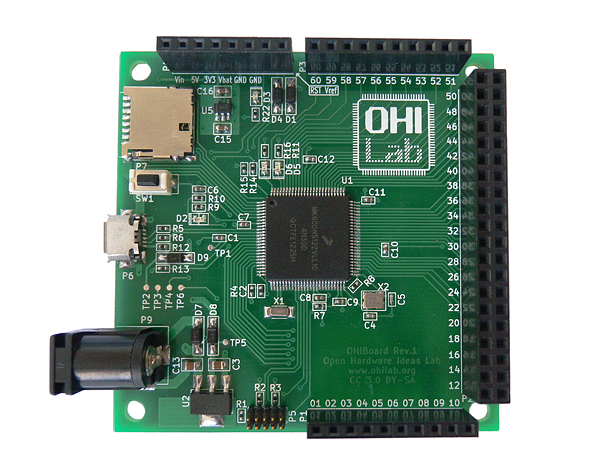
Crowd-funding is getting even more popular, and I was pointed to this project: a crowd-funded open hardware board based on the Freescale Kinetis K60 device, featured on Indiegogo:
FRDM Board not responding? Check your Virus Scanner!
In case you have this problem with the FRDM boards: You are using the FRDM bootloader mode (it shows up as BOOTLOADER) or the MSD mode (e.g. it shows up as FRDM-KL25Z) (see OpenSDA on the Freedom KL25Z Board) and it does not respond any more, or does not work as expected, then read on…
Compiling Documentation and Presentations: LaTeX
If you are not in the academic world, then you might wonder about that ‘LaTeX‘ in the title. and no, it is not about that latex rubber material ;-), it is about ‘la-tek’ 🙂
In short, it is a programming language and tool set to ‘compile’ documents. Originally, TeX has been designed and mostly written by Donald Knuth and released in 1978. Since then, it has been evolved and TeX (or LaTeX) is widely used in academia.
Changing Initialization Sequence in Processor Expert
Now I have implemented a watchdog with Processor Expert for my system. But what I have found out? I ended up with a looping system, and the watchdog did not fire 😦
What went wrong?
Zumo Robot assembled
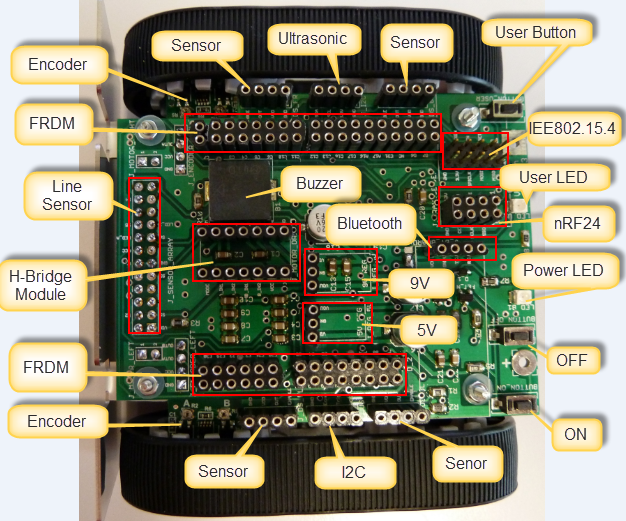
This week we were busy with building and documenting the first robots based on the Zumo Robot Chassis PCB.
Chassis Base PCB
The chassis is designed to hook up the FRDM-KL25Z board from Freescale. It is using parts from Pololu (chassis, motors, DC-DC converter, line sensor, H-Bridge, encoders):
Overview of ARM Microcontrollers and Tools
In this semester course, students (and myself too, of course :-)) are building a Mini Sumo Robot. That robot is using the Freescale FRDM-KL25Z board with an ARM Cortex-M0+ on it. Today I’ll give an introduction to the ARM core to the class, and timing is right: this morning I have found an excellent overview about ARM microcontroller and tools written by Jay Carlson.: Getting Started with ARM Microcontrollers.
Optimized BitIO_LDD Programming with Processor Expert
In my tutorial “Bits and Pins with Kinetis” I showed how to use the BitIO_LDD approach for Bit I/O access. I do not like this LDD (logical device driver) approach for several reasons:
- It requires an extra ‘device handle’ passed to the functions, even if such a device handle is not needed or desired.
- The code efficiency/size is negatively impacted by this.
Luckily, there is a way to hack around this 🙂