Using Segger Real Time Terminal (RTT) with Eclipse

I have used semihosting more and more in my projects. However, there are several disadvantage of using it:

  • Without special handlers, it only works with an active debug connection going on. Without a debugger attached, the application blocks otherwise.
  • Because it needs debugger interactions, it is rather slow (only several hundreds of bytes per second)

The good news is that Segger supports with their debug probes a faster approach with what they name Real Time Terminal (RTT). And it even runs without a debugger attached to the board: all what I need is a Segger J-Link probe (or Segger J-Link OpenSDA) plus a telnet client.
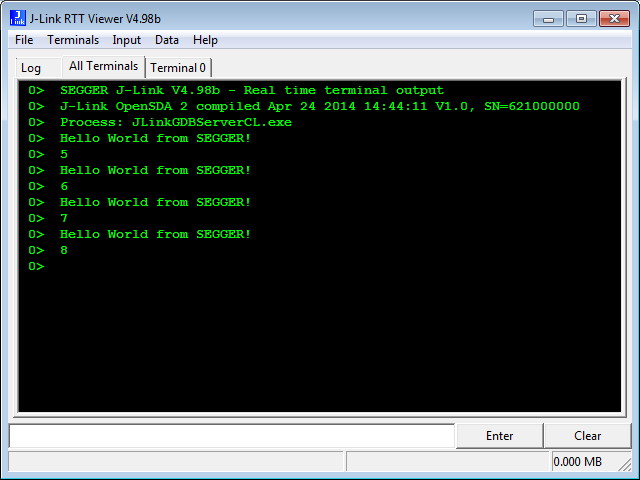
Segger RTT Viewer

Segger RTT Viewer

Continue reading

Merging NXP LPCXpresso IDE with Freescale Kinetis Design Studio, Processor Expert and Kinetis SDK

So NXP announced here a $40 Billion Merger with Freescale. Frequent readers of my blog will know that I’m using in my own and university projects many Freescale devices with Eclipse based tools (Eclipse Kepler/Luna, Emprog ThunderBench, Atollic TrueSTUDIO, Freescale CodeWarrior and of Freescale Kinetis Design Studio) in combination with Processor Expert. In a few projects I have used NXP devices with the CodeRed Eclipse base tools too. So I was curious how that merger of the two silicon companies could look like, if you merge the Freescale and NXP Eclipse based tools, and mix it with Processor Expert and the Freescale Kinetis SDK? The result looks like this:

LPCXpresso v7.7.2 with Processor Expert and Kinetis SDK

LPCXpresso v7.7.2 with Processor Expert and Kinetis SDK

Continue reading

Semihosting for Kinetis Design Studio V3.0.0 and GNU ARM Embedded (launchpad)

Freescale has released the v3.0.0 version of the Kinetis Design Studio: this one comes with a great positive change: instead of a custom toolchain, it is coming with the standard GNU ARM Embedded (launchpad) toolchain from ARM. Beside of better code density and less RAM needed, there is one change which affects semihosting. Previously, semihosting was enabled by default in the V2.0.0 libraries. Now semihosting needs to be turned on. This post is how to do this.

Semihosting Console with Output in Eclipse

Semihosting Console with Output in Eclipse

Continue reading

Solving “The connected emulator does not support serial wire output (SWO)” for Segger J-Link

SWO (Serial Wire Output) is a cool feature defined by ARM as part of the CoreSight debug block. However, not every debug connection supports SWO, as it requries extra pins routed from the microcontroller to the debug JTAG/SWD header.

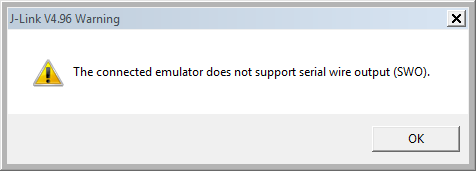
If I’m using the Segger J-Link, and if my hardware does not support SWO, I will get a dialog telling me “The connected emulator does not support serial wire output (SWO).”

The connected emulator does not support serial wire output (SWO)

The connected emulator does not support serial wire output (SWO)

Continue reading

GDB Client and Server: Unlocking GDB

In case you face problems with launching GDB: Then I have a quick solution (well: workaround): kill the GDB server and or client process. The problem can show up in many way, but in general gdb is stuck or does not respond:

GDB stuck?

GDB stuck?

But it could be an error message like this too:

Error in services launch sequence
Starting J-Link GDB Server timed out.

Continue reading

Semihosting with GNU ARM Embedded (Launchpad) and Kinetis Design Studio

A while back I wrote two articles about Semihosting: “Semihosting with GNU ARM Embedded (LaunchPad) and GNU ARM Eclipse Debug Plugins” and Semihosting with Kinetis Design Studio. With using the GNU ARM Embedded (lauchpad) in my Kinetis Design Studio, time for a ‘summary’ post :-).

Semihosting Output in Console

Semihosting Output in Console

Continue reading

Command Line Programming and Debugging with GDB

Eclipse with GDB is great: it comes with a graphical front end for debugging. But sometimes it is all about to download a program. Is it really necessary to launch an IDE like Eclipse to program or quickly debug a board? With the GNU Debugger (GDB), the answer is ‘no’: GDB comes with a command line debugger which is designed exactly for this: providing a command line interface for programming/downloading and debugging, bypassing any GUI (Graphical User Interface).

Combination of GDB Debugging Probes and Boards

Combination of GDB Debugging Probes and Boards (P&E, Segger and FRDM-KL25Z)

Continue reading

Attaching to a Running Target with Segger J-Link, GDB and Eclipse

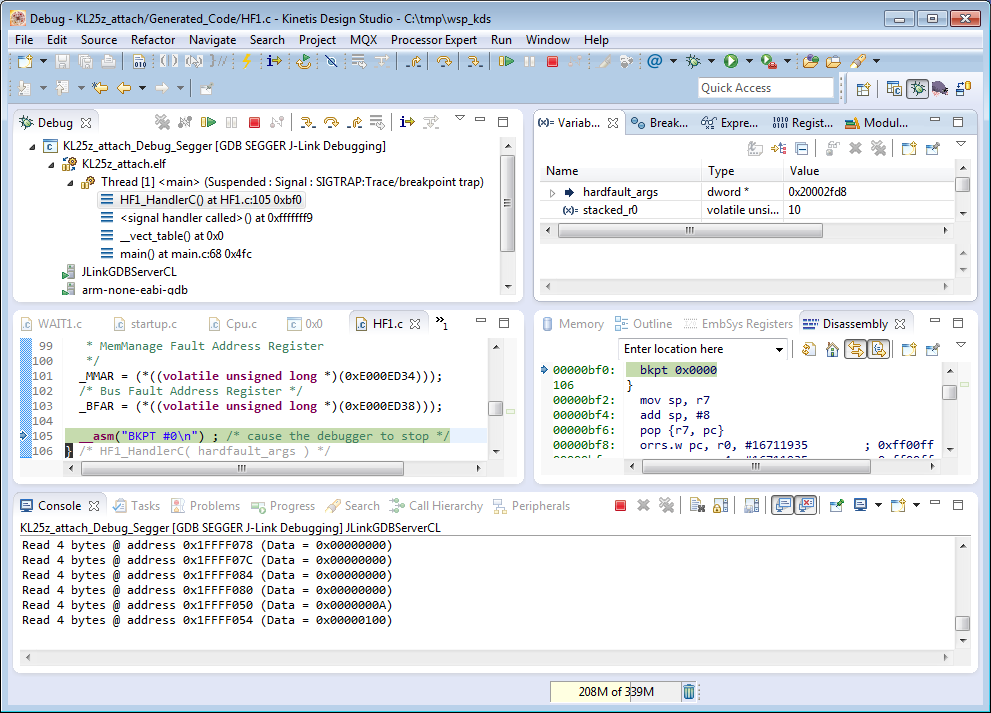
This happens several times for me: I have a board running for a while (even for days), and then it crashes or is stuck somewhere. Yes, I usually use a watchdog do recover from that situation. But it would be good to know and debug the problem. With CodeWarrior I had the functionality in the debugger to ‘attach’ or ‘connect’ to a running (stuck/crashed) board. However, with Eclipse/Kinetis Design Studio/GDB this is a different debugger, and not possible. At connection time with the debugger the target does a reset, so I don’t know any more where the application crashed. But now I have a solution, at least with the Segger GDB :-).

Debug Hard Fault Attached Target

Debug Hard Fault Attached Target

Continue reading

Tutorial: How to Erase the FLASH with the GNU GDB debugger

I have several applications where I store application specific information in the microcontroller FLASH memory (see “Configuration Data: Using the Internal FLASH instead of an external EEPROM“). I have run into issues recently with the Segger J-Link GDB server as by default it does *not* erase all the FLASH memory. So the question is: How can I erase all (or part) of the FLASH memory with GDB (e.g. in Kinetis Design Studio or in Eclipse)?

Memory Monitor with Erased Flash

Memory Monitor with Erased Flash

Continue reading

RAM Target with Kinetis Design Studio and FRDM-K64F

Newer microcontroller have increase RAM areas, making it suitable to run the application from RAM instead of FLASH. For the FRDM-K64F board and the Kinetis Design Studio (V1.1.1), I have explored how to run the application out of RAM instead of FLASH memory, both for P&E and Segger connections.

MK64FN1M0VLL12

MK64FN1M0VLL12

Continue reading