FreeRTOS ARM Thread Debugging with Eclipse and GDB

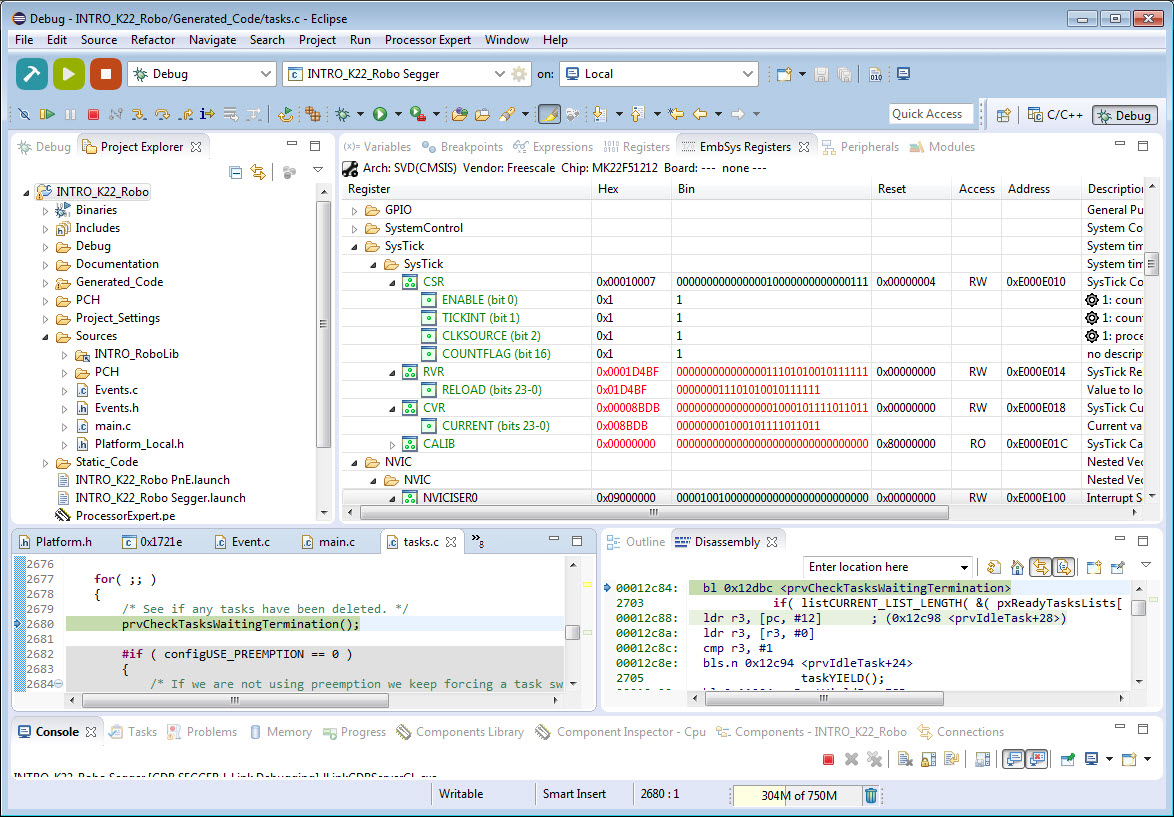
FreeRTOS is probably the most popular RTOS used and I love it: it is efficient, has a lot of features, simple and easy to use. But despite its popularity, debugging it with open source tools as with Eclipse and GDB is really not that user-friendly: debugging threads/tasks is a pain compared to commercial solutions. For my university classes this semester I was looking for something easy to use by my students. Finally I managed to use a GDB helper which makes things easier now: I can switch task threads in Eclipse with GDB now πŸ™‚

Switched to Shell Task

Switched to Shell Task

Continue reading

Freescale CMSIS-SVD Register Files with Eclipse MARS and EmbSysRegView

In “How to Add Register Details View in Eclipse” I showed how to add the Register detail support in Eclipse using the EmbSysRegView plugin. This was for Luna/Mars, and for the version v0.2.4 of the plugins.

Since then, there is a new version of Eclipse (MARS, see “Going to Mars: Building a DIY Eclipse IDE for ARM Embedded Microcontrollers“) and the EmbSysRegView plugin has been updated to v2.0.5. Makes everything much simple, so here is an updated post with the details how to add register detail view to Eclipse Mars.

Eclipse Mars

Eclipse Mars

Continue reading

Going to Mars: Building a DIY Eclipse IDE for ARM Embedded Microcontrollers

It has been a while since I published my ‘build my own DIY IDE’ (see “DIY Free Toolchain for Kinetis: Part 1 – GNU ARM Build Tools“). I have used that approaches in my classes successfully. Now a new semester is coming up, so time to update the instructions using the latest Eclipse IDE (Mars) and tools (GCC ARM Embedded (launchpad) with GNU ARM Eclipse).

Eclipse Mars Splash Screen

Eclipse Mars Splash Screen

Continue reading

Overview: From Snippets to Code Generation

To build an application for a modern microcontroller today is not a simple thing. Well, it depends what ‘simple’ means. But compared to the ‘old days of 8bit micro controllers’ (which are still in use!) developing for a complex 32bit device is definitely a different thing. Not only the complexity has changed, but as well the breath of tools and helpers. In my view, the only constant is ‘change’, and I have changed the way how to develop several times in my career. In this post I present several different techniques I’m using in my development.

Processor Expert CPU View

Processor Expert CPU View

Continue reading

Tutorial: Adafruit WS2812B NeoPixels with the Freescale FRDM-K64F Board – Part 1: Hardware

This is Part 1 of a Mini Series. Manya has challenged herself to use the Adafruit NeoPixels (WS2812B RBG LEDs) with the Freescale FRDM-K64F board and the Kinetis SDK (see “Let’s play with Freescale FRDM-K64F“). I did a while back that with the FRDM-KL25Z board (see “NeoShield: WS2812 RGB LED Shield with DMA and nRF24L01+“). I used Processor Expert in my project (without the Kinetis SDK), and with this setup it is very easy. However, Manya wanted to do this with the Kinetis SDK and without Processor Expert. No surprise to me, she has found out that this setup with the Kinetis SDK and without the usage of Processor Expert is much more challenging (see “Not done yet!!“). I promised to Manya to give her a helping hand, so here we go! πŸ™‚

Adafruit 8x8 NeoPixel Shield with Freescale FRDM-K64F Board

Adafruit 8×8 NeoPixel Shield with Freescale FRDM-K64F Board

Continue reading

Improve Eclipse Performance with Increased Heap Size

I noticed that especially working with several projects in my workspace, Eclipse got sluggish and slowly responding. I have in Eclipse the Heap Monitor/Status enabled (see “Show Heap Status in Eclipse“):

Heap Status at the Limit

Heap Status at the Limit

So the used heap of the Java VM is hitting a limit of about 500 MByte, and seems to be trashing around? How to increase that heap size?

Continue reading

Unboxing the Freescale FRDM-KL43Z Board

I’m preparing for the next semester at the university starting in September this year. As part of that, I’m currently evaluating the Freescale Kinetis FRDM-KL43Z board:

FRDM-KL43Z Board Unpacked

FRDM-KL43Z Board Unpacked

Continue reading

How to use Kinetis Design Studio!!

Getting the hands on an embedded project has always been exciting for me. So, here I am again with my blog trying to provide you with an easy to use guide for the Kinetis Design Studio 3.0.0 (KDS_3.0.0). Well, as you all know I am an intern at Freescale working for the first time on KDS, I will tell you what all we can do to start working on it with a perspective of a novice. But personally I feel KDS is one of the most encouraging IDE you can work on. So how do I start with my code for our NeoMatrix board? I am currently working with one of the demo codes for the NeoMatrix:

https://mcuoneclipse.com/2015/07/10/lets-play-with-freescale-frdm-k64f/

So, my first task is to write the code in KDS for the NeoMatrix_Demo. How do I do that? After opening the KDS 3.0.0, I need to go to File and select New and then Kinetis Project. You can see that the New Kinetis Project wizard appears once you click the File>New> Kinetis Project. Type a name and click next.

b6f10 Continue reading

FreeRTOS Continuous Trace Streaming

Key to successfully implementing embedded applications these days is to have detailed visibility into what is going on with the application on the board. For this, I’m using the FreeRTOS+Trace from Percepio to inspect the runtime behaviour. Stop-Mode debugging is very useful, but visibility into the runtime is even more important. FreeRTOS+Trace is a tool to accomplish this, but it requires to dump the data off the target to the host (see “Updated Percepio Tracealyzer and Trace Library to Version V2.7.0“). Usually, I’m using the GDB debugger for this, and that works for shorter trace sequences like a few seconds. Yes, I can combine them, but it painful to stop, dump and continue. So what if I could collect trace for several minutes or hours without the need to stop the application? Why not stream the data to the host directly?

So here is it: I’m now able to get almost unlimited trace streaming off the target, witout user intervention. I can trace my application for hours πŸ™‚

Trace Recording

Trace Recording for almost one hour

Continue reading

Tutorial: Using Processor Expert and FreeRTOS with Kinetis SDK V1.2

Freescale has released the new Kinetis SDK v1.2 back in May. Because of the changes in v1.2, previous applications (or my tutorials) do not work any more :-(. So time to write a new tutorial: how I can use Processor Expert with FreeRTOS for the Kinetis SDK v1.2.

Blinky Task with FreeRTOS and Kinetis SDK in KDS v3.0.0

Blinky Task with FreeRTOS and Kinetis SDK in KDS v3.0.0

Continue reading