FTF: FRDM-K64F, Kinetis Design Studio and Kinetis SDK

I’m attending the Freescale Technology Forum (FTF) in Dallas this year: As they say here: “everything is bigger in Texas”, that’s the motto of this conference ;-). The conference is packed, and I have a hard time to keep up with all the things going on. My focus is obviously everything around Eclipse and ARM microcontroller. The conference started yesterday afternoon with hands-on labs, and I was in the one were Freescale presented the new ‘Kinetis Design Studio’: a free of charge/unlimited Eclipse tool chain based on Eclipse Kepler, GCC and GDB. Freescale presented their new software library ‘Kinetis SDK’. And: There is a new Freedom board which gets handed out to the attendees: the FRDM-K64F :-).

Texas Style Glass Coverage

Texas Style Glass Coverage

Continue reading

Zumo Robots in Bucharest

Freescale opened its doors for students in Bucharest on March 28th. At the event there were more than 80 students and professors from Bucharest and across Romania with participation of the universities from Cluj, Constanta, Craiova, Iasi and Pitesti.

Two Sumo Bots

Two Sumo Bots


Continue reading

RNet Stack as Component, nRF24L01+ with Software SPI

The great thing with Processor Expert is: it writes the code for me :-). I’m using now the RNet wireless stack in more than 10 different projects, and keeping the projects up-to-date with the RNet stack sources in a traditional way gets harder and harder: I  need to make sure the paths are pointing to the right place, and if I pass the project to somebody else, I have to make sure all the sources are packaged with that project. Processor Expert makes things simpler: it can generate the source files into my project, and I can easily configure it.

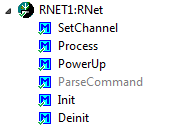
So instead to copy and support files by hand, I decided to package the RNet stack files into a Processor Expert component: all still normal C files, but easier to configure and distribute.

RNet Component

RNet Component

Continue reading

Starting Point for Kinetis Low Power LLS Mode

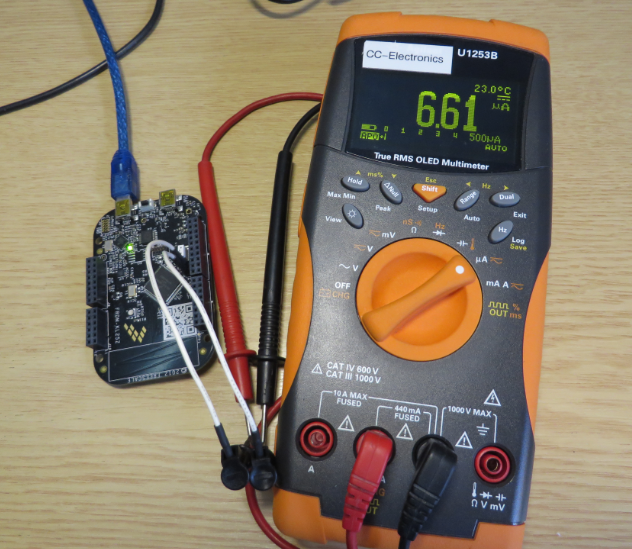
In “IoT: FreeRTOS Down to the Micro Amps” I’m using an application with FreeRTOS to get down in micro amps low power mode. Well, nearly all or my applications are using FreeRTOS because it makes the application scalable and extensible. Still, for anyone not used to an RTOS, that might be a hard start. So here we go: how to get into the Kinetis Low Power LLS Mode *without* an RTOS.

Power Measurement

Power Measurement

Continue reading

Tutorial: Thermal Printer, Part 1: Hardware Setup with FRDM Board

One of my embedded projects is to measure the running time in a sports event (see “Sports Timing System in a Lunch Box“). The recorded time is stored in an EEPROM plus sent over USB or wireless connection to the host. It would be great if I could print out the time and ranking directly, so if there is no PC, the system can be small and tiny. So here is my next project and tutorial: Printing with the Freedom board!

Hello World on the Printer with FRDM-KL25Z

Hello World on the Printer with FRDM-KL25Z

Continue reading

First Steps with the Freescale TWR-K64F120M

Naturally, I have several project ideas lingering around. No time to make them all (for now). One of it is interfacing the Raspberry Pi camera with a microcontroller. To store the images, I need plenty of RAM on the device, and so far the Kinetis microcontroller did not have that. Finally, Freescale announced the K64F120 a few months back, and my ordered TWR-K64F120M board arrived on my desk, waiting to be used: Finally I get an ARM Cortex-M4F with 1 MByte of FLASH and 256 KByte of RAM :-).

TWR-K64F120M Box

TWR-K64F120M Box

Continue reading

FreeRTOS V8.0.0 Final Release available as Processor Expert Component

The final FreeRTOS V8.0.0 has been released last week: time to update the Processor Expert component for it, and this time it is really a major release 🙂 : from V7.5.0 to V8.0.0:

FreeRTOS V8.0.0 Processor Expert Component

FreeRTOS V8.0.0 Processor Expert Component

FreeRTOS V8.0.0 comes with many small changes, especially it now includes many of the extra casts I have contributed to avoid compiler warnings. And additionally it has a brand new feature: Event Groups.

Continue reading

DIY Free Toolchain for Kinetis: Part 10 – Project Creation with GNU ARM Eclipse 2.1.1

As mentioned in Part 9: There is a new GNU ARM Eclipse plugin 2.1.1, and this one makes project creation for Freescale devices easier than ever 🙂

  • Native Kinetis-L project templates for FRDM-KL25Z and FRDM-KL46Z boards
  • Easier than ever project creation for Processor Expert projects
GNU ARM Eclipse 2.1.1

GNU ARM Eclipse 2.1.1

Continue reading

DIY Free Toolchain for Kinetis: Part 9 – Express Setup in 8 Steps

On Monday the new semester starts, and yet again: we will do a Sumo thing :-). They can choose which tool chain they would like to use to develop their application for the ARM Cortex-M0+ used from Freescale. One option is to create a ‘Do-It-Yourself’ toolchain. Since the start of the series, things have evolved: there is a new GNU ARM tool chain available, Segger has updated their drivers, and most important the GNU ARM Eclipse plugin has been greatly extended to support Freescale parts and Processor Expert. So instead to read through all the previous tutorials, this one is about putting together a free tool chain less than 10 minutes (not counting the time to download around 500 MByte).

DIY Eclipse Toolchain

DIY Eclipse Toolchain

Continue reading

IoT: FreeRTOS Down to the Micro Amps

University research projects can be a lot fun, and are very challenging the same time. The good thing is that there is always someting new to learn :-).

This week-end I was working on my Internet of Things (IoT) project, based on a Freescale KL15Z and a nRF24L01+ transceiver. In essence it is a wireless data logger. For this, I only can afford a few micro amps consumed by the whole board over an extended period of time. I mean 21 micro amps for running a whole board with sensor, EEPROM, wireless transceiver, operating system and an ARM Cortex-M0+ ready to crunch numbers at 20 MHz 🙂

21 micro amps for wireless sensor node

21 micro amps for wireless sensor node (when not sending)

Continue reading