A week ago, the updated FreeRTOS V7.5.0 has been released on FreeRTOS.org. So time to have my Processor Expert FreeRTOS component updated as well :-).

FreeRTOS V7.5.0

A week ago, the updated FreeRTOS V7.5.0 has been released on FreeRTOS.org. So time to have my Processor Expert FreeRTOS component updated as well :-).
FreeRTOS V7.5.0
I love to have my sources ‘warning free’, so I spend an extra effort to have things clean and the way the compilers like it. In a similar way, I want to have my source comments spell-error free :-). For this, I love the Eclipse spell checker (see this post) which offers to add unknown words to the dictionary:
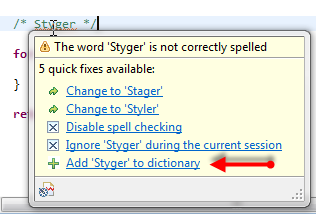
Add word to dictionary
But what if that ‘Add’ action is missing? How to re-enable it?
This is the third part of a tutorial series how to ‘do-it-yourself’ a tool chain for the Freescale Kinetis microcontroller, with the FRDM-KL25Z as example. The tool chain is using GNU ARM gcc plus Eclipse Kepler release. So far I have the following parts:
So far things are very generic. But with debugging it means different hardware, and different hardware connections. And for this connection we need a GDB Server.
Eclipse CDT features a GNU Debugger (GDB), and this is what I want to use here: debugging my microcontroller with GDB inside Eclipse. In order to debug the microcontroller, I need two other things: a GDB Server and a Debug Probe.

GDB with GDB Server
This is the second part of a multi-part tutorial about how to set up an open source tool chain with GNU ARM gcc + Eclipse to build and debug an application for Kinetis ARM devices.

Eclipse Kepler
The Freedom boards FRDM-KL25Z RevE and FRDM-K20D50M make it easier to use it as USB Host device, as they come with a special jumper to provide 5V to the USB device, so my earlier ‘hack’ is not needed any more :-). After I had USB MSD Host working for the FRDM-KL25Z, it was much harder to get the USB stack working for the FRDM-K20D50M board, because somehow the example Freescale provided with their USB stack refused to work properly on my board. After debugging it for several nightly hours, I decided to take my working Processor Expert project for KL25Z and added support for the K20. And the good news is: since tonight this is working :-).
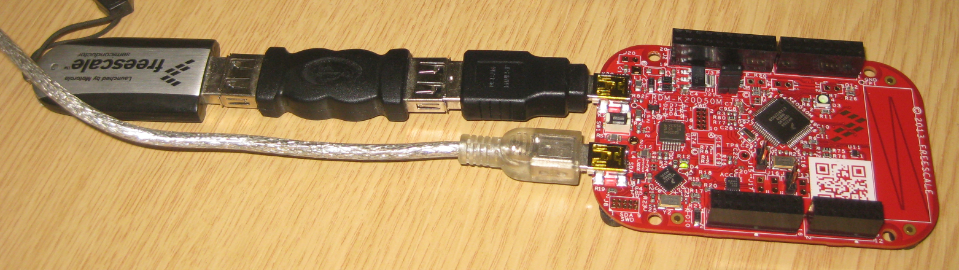
FRDM-K20D50M as USB MSD Host
I miss my old DELL laptop. Ok, the new one I received from IT services is not bad. It is faster and has a better screen. But I’m not really happy with the new keyboard. With the previous keyboard I was able to do a ‘PrtnScrn’ with a single key press. With the new one I need to press Fn + PrntScrn. And this is impossible to do with one hand:

Impossible to reach Fn+Prnt Scrn with one hand!
Yes, I have two hands ;-). But many times I need to do ‘print screen’ while having my other hand on the mouse :-(.What else can I do?
After my first post using a Bluetooth module, things have evolved a bit. The challenge with these Bluetooth modules is: they look the same, but having different firmware. I did not fully realize that until I have ordered another bluetooth module from dx.com:
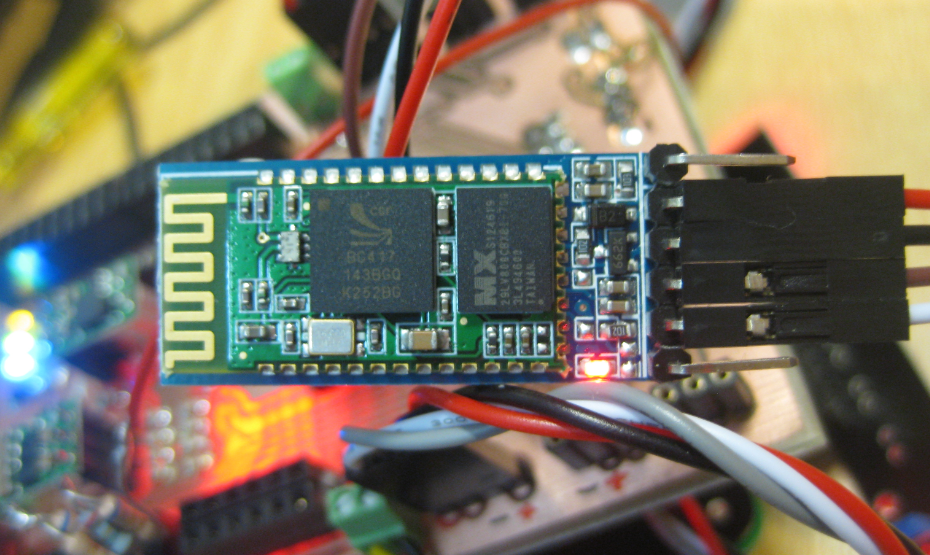
DX.com Bluetooth Module (HC-06)
That module comes already on a carrier, so I assumed I can use the same driver as for my other module. I was wrong :-(.
Having many projects open the same time, and working on them in parallel is a challenge. Ok, the human brain is not built for multitasking, but I still try ;-). What I typically I end up in my Eclipse Problems View to have entries from multiple projects mixed up:

Problems View with Entries for multiple Projects
How to show it that I can fix the problems for ony project only, and not showing all problems from all projects?
I stumbled now twice over a problem, and only after a lot of head scratching (you should see my head now 😉 ) I have found the cause (and solution) for it. In the hope that I can save the readers of this blog some time, here is what happened.
I described in earlier posts how to enable GNU build tools to generate hex/bin/S19 files, or to write the code size to the console view. That works fine for me. But then I received a project were obviously this does not work: even with the project settings configured properly, there is no S19 file, and no code size printed. What’s wrong?
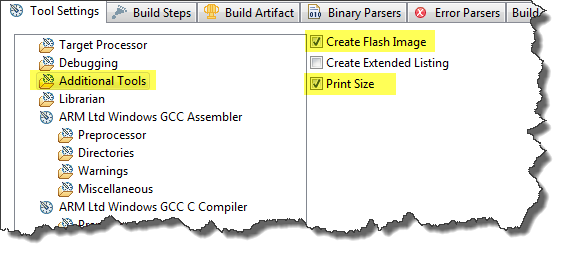
Additional Tools in ARM GNU Eclipse Panel
This post starts a small (or larger?) series of tutorials using the Arduino Motor/Stepper/Servo Shield with the FRDM-KL25Z board. That motor shield is probably one of the most versatile on the market, and features 2 servo and 4 motor connectors for DC or stepper motors. That makes it a great shield for any robotic project :-).

Arduino Motor Stepper Servo Shield with FRDM-KL25Z
 MCU on Eclipse