FreeRTOS has many memory allocation options (see Memory Management) with four ‘schemes’. One of it is the a simple wrapper over the library malloc() and free() routines. I admit, I have not used them, as usually I avoid to include such kind of libraries, as they have their own problems. Anyway, a discussion in the FreeRTOS forum raised my interest: obviously some malloc() implementation (as in the EWL library of CodeWarrior) are making a safety check against the current stack pointer.
Category Archives: Processor Expert
Generating Static FreeRTOS Source Code
Using Processor Expert is an awesome tool: it generates source code for me, and I can can ‘dynamically’ tune my projects to my needs. Still, sometimes it is better or desirable to have a ‘normal’ or ‘static’ project. This is very well possible with Processor Expert (see “Sneaking from Processor Expert” or “Disable my Code Generation“): I can generate the code one time, and then use it without Processor Expert.
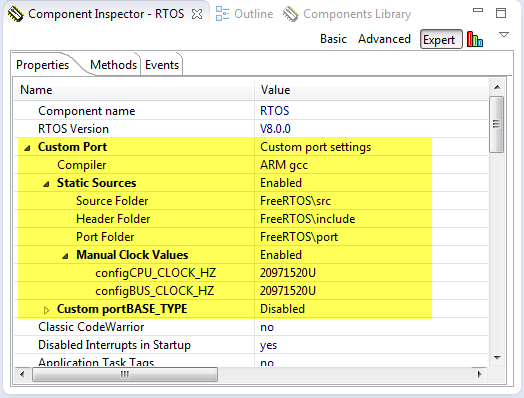
To make this even easier, I have added an option to the FreeRTOS Processor Expert component to generate ‘static’ code I can copy-paste to projects and tool chains which are either not supported by Processor Expert, or just for ‘static’ projects.
First Steps with the Freescale TWR-K64F120M
Naturally, I have several project ideas lingering around. No time to make them all (for now). One of it is interfacing the Raspberry Pi camera with a microcontroller. To store the images, I need plenty of RAM on the device, and so far the Kinetis microcontroller did not have that. Finally, Freescale announced the K64F120 a few months back, and my ordered TWR-K64F120M board arrived on my desk, waiting to be used: Finally I get an ARM Cortex-M4F with 1 MByte of FLASH and 256 KByte of RAM :-).
FreeRTOS V8.0.0 Final Release available as Processor Expert Component
The final FreeRTOS V8.0.0 has been released last week: time to update the Processor Expert component for it, and this time it is really a major release 🙂 : from V7.5.0 to V8.0.0:
FreeRTOS V8.0.0 comes with many small changes, especially it now includes many of the extra casts I have contributed to avoid compiler warnings. And additionally it has a brand new feature: Event Groups.
DIY Free Toolchain for Kinetis: Part 10 – Project Creation with GNU ARM Eclipse 2.1.1
As mentioned in Part 9: There is a new GNU ARM Eclipse plugin 2.1.1, and this one makes project creation for Freescale devices easier than ever 🙂
- Native Kinetis-L project templates for FRDM-KL25Z and FRDM-KL46Z boards
- Easier than ever project creation for Processor Expert projects
DIY Free Toolchain for Kinetis: Part 9 – Express Setup in 8 Steps
On Monday the new semester starts, and yet again: we will do a Sumo thing :-). They can choose which tool chain they would like to use to develop their application for the ARM Cortex-M0+ used from Freescale. One option is to create a ‘Do-It-Yourself’ toolchain. Since the start of the series, things have evolved: there is a new GNU ARM tool chain available, Segger has updated their drivers, and most important the GNU ARM Eclipse plugin has been greatly extended to support Freescale parts and Processor Expert. So instead to read through all the previous tutorials, this one is about putting together a free tool chain less than 10 minutes (not counting the time to download around 500 MByte).
IoT: FreeRTOS Down to the Micro Amps
University research projects can be a lot fun, and are very challenging the same time. The good thing is that there is always someting new to learn :-).
This week-end I was working on my Internet of Things (IoT) project, based on a Freescale KL15Z and a nRF24L01+ transceiver. In essence it is a wireless data logger. For this, I only can afford a few micro amps consumed by the whole board over an extended period of time. I mean 21 micro amps for running a whole board with sensor, EEPROM, wireless transceiver, operating system and an ARM Cortex-M0+ ready to crunch numbers at 20 MHz 🙂
CriticalSection Component
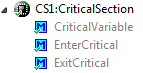
I have created and published on GitHub a new component ‘CriticalSection’:
This component is a wrapper between my components and the problematic current implementation in Processor Expert (see EnterCritical() and ExitCritical(): Why Things are Failing Badly). It uses a flexible approach and uses macros to either use my modified version of EnterCritical() and ExitCritical(), or simply defaults to the original implementation.
EnterCritical() and ExitCritical(): Why Things are Failing Badly
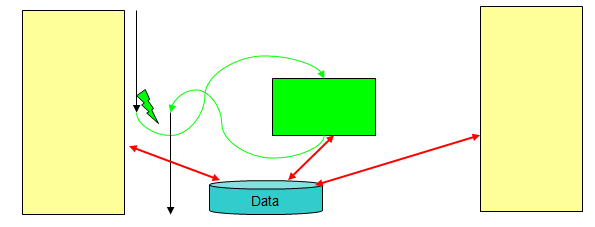
I have carefully implemented my firmware. It works perfectly for hours, days, months, maybe for years. If there would not be this problem: the firmware crashes sporadically :-(. Yes, I’m using watchdogs to recover, but hey: it is a serious problem. And because it happens only under rare and special conditions, it is hard to track it down or to debug it.
The thing is: these nightmares exist, and they are real and nasty. I’m pushing my students hard on this topic: It is about how to protect critical sections. And what could go wrong. And here is just yet another example: how it can go badly wrong if you are not careful. And it took me a while too to realize where the problem is. It was not a fun ride….
FRDM with Arduino Ethernet Shield R3, Part 3: Embedded Web Server
This is Part 3 of an ongoing tutorial to use the Arduino Ethernet Shield R3 with a Freescale FRDM-KL25Z board (or any other board you like).
In Part 1 I worked on the SD card, in Part 2 I have added basic network connection. Now time to run a web server with my FRDM-KL25Z :-). With this, I can get access to my board through the network, and the board will host a web page where I can do pretty much everything: showing status, or adding functions to turn on things like an LED 🙂