I want to make some noise with this post!!! This tutorial is about adding music and sound capabilities to the Freescale Freedom board, and to have a lot of fun with it :-). I need this ability for a larger project working on for a while. But I thought I share that sub-part how to play sound files. So with this tutorial I can turn my Freescale Freedom board into a music or sound player :-). And adding sounds is a cool way for any project, and as the music is stored on an SD card it fits easily hours of music or sounds.
Category Archives: Processor Expert
McuOnEclipse Component Sources in Dedicated GitHub Repository
From time to time it is good to do some cleanup work: what has grown organically sometimes needs some cuts and moves. The same applies to the McuOnEclipse GitHub repository (https://github.com/ErichStyger/mcuoneclipse) which has grown to 522 MByte, 8364 files and 1444 folders. I already moved out the Processor Expert component releases (see “McuOnEclipse Releases on SourceForge“). Time to cleanup and move something else: the Processor Expert component sources.
Updated McuOnEclipse Components: USB for KL24Z, FatFs v0.10c, Shell Backspace and FreeRTOS Trace Hook Configuration
I have received several requests to post a quick note when there is a new release (16-Nov-2014) of the McuOnEclipse components on SourceForge (see “McuOnEclipse Releases on SourceForge“). I have published today a new release, and with following major improvements:
- USB support for Kinetis KL24Z
- FatFs now features the latest Elm-Chan v0.10c release
- Backspace support in Shell
- Configuration item in FreeRTOS for Percepio Trace Hooks
Adding Processor Expert to Atollic TrueSTUDIO
For me as an Eclipse and Processor Expert lover, a press release that Atollic supports Processor Expert catched my eye :-). So there is yet another way to use Processor Expert: with a commercial Eclipse IDE provided by Atollic (atollic.com/).
Time to check it out…
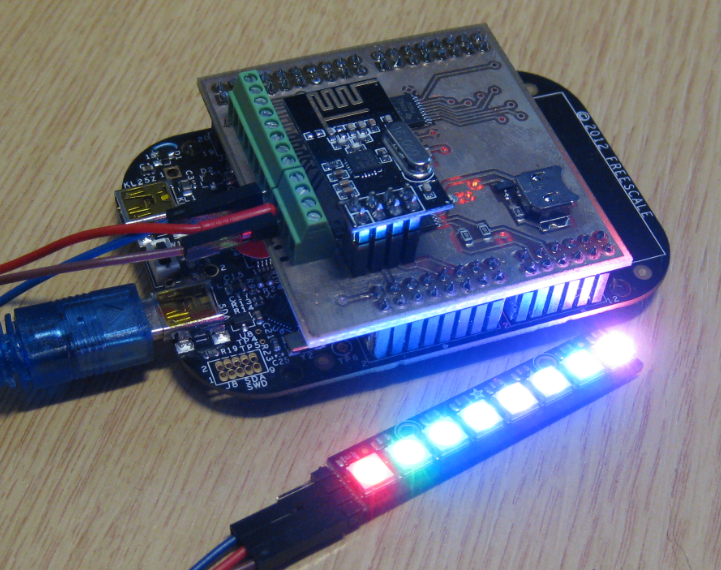
NeoShield: WS2812 RGB LED Shield with DMA and nRF24L01+
In my earlier post I used a hacked together shield for building a clock based on Adafruit’s NeoPixel/WS2812 (“LED Clock with Kitchen Hot Pan Protector“). The new design supports now 8 parallel data streams, integrated realtime clock and wireless connectivity with the nRF24L01+ module.
Using Keil μVision 5 with Processor Expert
I happily used the Keil v4.71.2.0 μVision tools for a few small projects (see “Using Keil µVision (ARM-MDK) with Processor Expert Driver Suite“) with the ‘lite’ edition (32kByte code size limitation). This weekend I wanted to move to the new v5.12.05 version.
And there were indeed several things which are different. So this is post is about getting this version getting up and running as the v4.7 one.
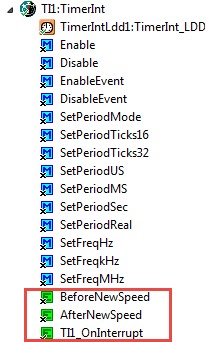
Processor Expert Events
Processor Expert components have an interesting concept: Events. Events are shown in green color with the ‘E’ (for Event):
Tutorial: FreeRTOS with the Kinetis SDK and Processor Expert
Freescale had announced at FTF back in April this year that they will use Kinetis Design Studio and the Kinetis SDK for all new Kinetis devices. The switch from CodeWarrior to Kinetis Design Studio (see “Comparing CodeWarrior with Kinetis Design Studio“) was not much of big deal for my projects (although CodeWarrior still has better features), and projects are rather easily portable. However, the move to the Kinetis SDK has been massively disruptive: Before it was easy to move projects from one device to another with Processor Expert, even from S08 to ColdFire to Kinetis. Now with the Kinetis SDK everything is very different. At least Freescale now officially supports FreeRTOS, and for myself as a big fan of that open source RTOS, that was some good news.
So in this tutorial I’m showing how FreeRTOS can be used with the Kinetis Design Studio. That makes at least using the Kinetis SDK bit more familiar to me :-).
RAM Target with Kinetis Design Studio and FRDM-K64F
Newer microcontroller have increase RAM areas, making it suitable to run the application from RAM instead of FLASH. For the FRDM-K64F board and the Kinetis Design Studio (V1.1.1), I have explored how to run the application out of RAM instead of FLASH memory, both for P&E and Segger connections.
Processor Expert Value Proposals
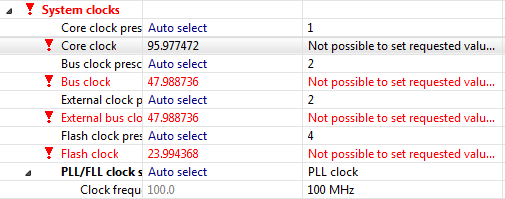
The cool thing with Processor Expert is that it gives me guidance through the settings. And there is a nice (rather hidden feature) which proposes me values I can enter:
💡 First, switch to the non-Tabs (classic) view, as the classic view is using the screen real estate better, and shows you *all* the information needed, and does not hide some.
So if you have some values to correct because other settings have changed: