MCUXpresso IDE 11.8.0

Don’t worry: despite all the things going on with VS Code, Eclipse is here to stay probably for many more years. The Eclipse foundation is pumping out releases, and so does NXP with their latest MCUXpresso IDE 11.8.0. Lets have a look…

MCUXpresso IDE 11.8.0
Continue reading

RS-485 with NXP LPC55S69

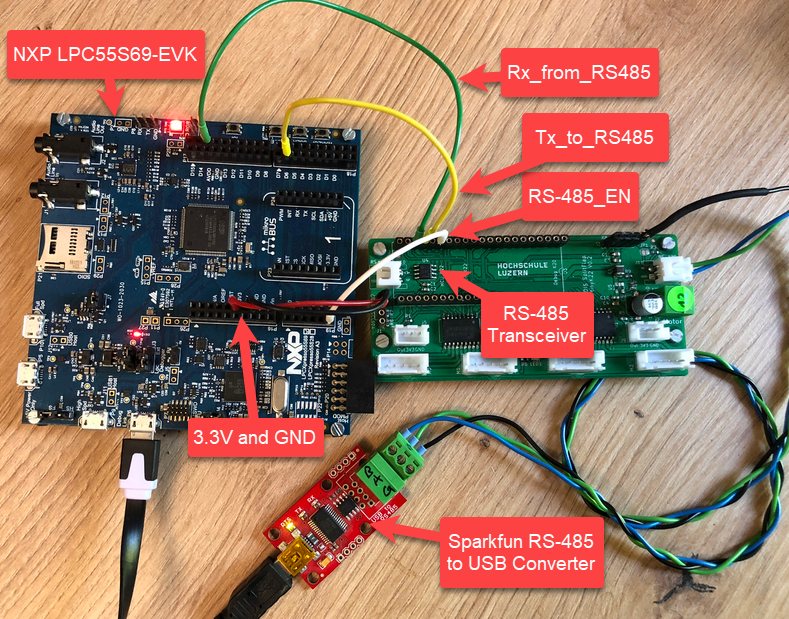
I’m using the RS-485 field bus in many of my projects: it is very reliable and robust, and easy to implement. And with ModBus there is standardized protocol used in building automation or industrial control applications. For example I’m using the protocol to communicate between battery systems and an EV Charger.

NXP LPC55S69-EVK with RS-485

In this article I show you with an example, how the NXP LPC55S69 can be used with RS-485.

Continue reading

Using Legacy Devices with LinkServer

The Freescale K20DX128 MCU was one of the first ARM Cortex-M devices of that company (now NXP) back in 2012, and the FRDM-K20D50M board was the first ‘FRDM‘ board of a long and successful series of boards, starting back in 2013. I still have the K20 present in many of my designs. The challenge with ‘early’ or ‘legacy’ devices is that after a while, they are ‘not recommended’ any more, and it is hard to get support for them. So for example in newer tooling and software from NXP, there is no support for the K20.

MCU-Link (NXP, left) debugging FRDM-K20 (Freescale, right) board

So if you still have the K20 around, and need some newer tooling, then I have good news for you: It is possible to add that good-old-Kinetis to the list of supported LinkServer devices, so you are not stuck and can use newer debugging solutions for the K20.

Continue reading

Data Converter for MCUXpresso Energy Measurement Data

The combination of the NXP MCUXpresso IDE with the NXP MCU-Link Pro debug probe implements a nifty power and energy measurement tool (see New “MCU-Link Pro”: Debug Probe with Energy Measurement). The eclipse based IDE provides a dedicated view to inspect the data collected. It can export and import data, but it is in a binary format. In this article I present a way to export and then convert the data into .csv or any other format for processing or visualizing it in different ways.

Exporting data to gnuplot and csvplot

Using an open source command line tool, the binary data gets converted into a csv format, which then can be consumed by many tools, e.g. gnuplot.

Continue reading

LittleFS File System with MCU Internal FLASH Memory

In many of my embedded projects I need persistent data or storage for settings. If using an SD card, then FatFS is usually my choice for the file system. But if using an external FLASH memory device, then my preferred choice is usually LittleFS: it is a little fail-safe filesystem, designed for micro-controllers, which I’m using with external flash memory devices.

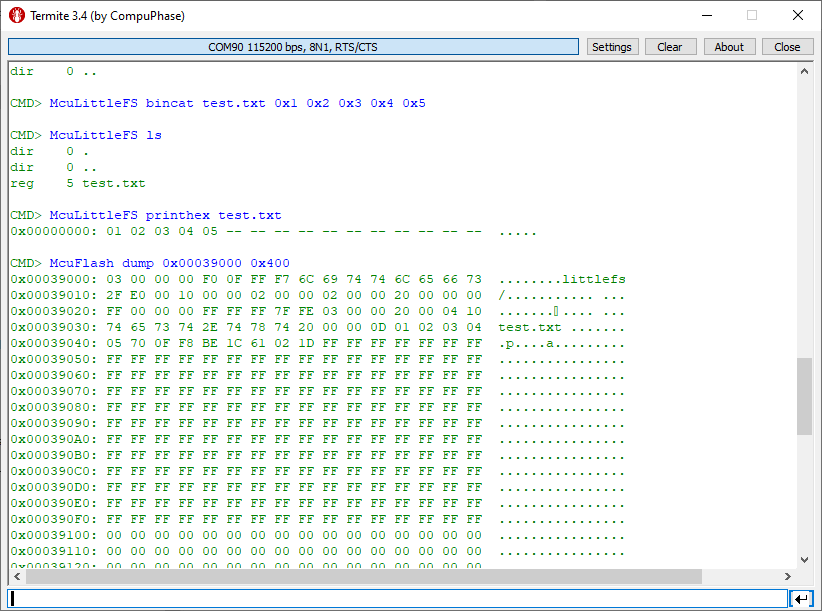
In the case where there is enough MCU flash, or if there is no external FLASH device available in a design, it can use the MCU internal FLASH as storage storage too. This is the topic of this article:

LittleFS File System Data
Continue reading

Booting J-Link as CMSIS-DAP Debug Probe

Mostly unnoticed (at least for myself), SEGGER has enabled some of the J-Link debug probes to support the CMSIS-DAP debug protocol.

SEGGER J-Link as CMSIS-DAP Debug Probe

This greatly enhances the use of J-Link debug probes for CMSIS-DAP based tools.

Continue reading

Building a Triumvirate: From Eclipse CDT to CMake, CMD and Visual Studio Code

A Triumvirate is or Triarchy is built by three individuals which lead or rule something. In this article I want to rule a project with Eclipse CDT, Visual Studio Code and with building it from the command line for automated builds.

So what if I have an Eclipse project (say MCUXpresso IDE and SDK), and want to build it on a build server, and and I want to use the same time the project with Eclipse IDE and Visual Studio code?

Key to this is CMake: I’m keeping the Eclipse CDT features, adding CMake with Make and Ninja to the fix, and have it ‘ruled’ by three different ’emperor’: Eclipse, Visual Studio Code and from a shell console:

MCUXpresso SDK CDT project with CMake for Eclipse, Visual Studio Code and Command Line Building
Continue reading

Which Embedded GCC Standard Library? newlib, newlib-nano, …

When developing with C or C++ an application, then you mostly focus on your own code. You don’t want to bother with the details how input/output functions like printf() or scanf(), and you might just use these functions and helpers and that’s it.

The implementation is part of the ‘C Standard Library’ (or C++ Standard Library). In the world of Linux, this is usually the ‘glibc’ or ‘GNU C Library, and one usually link with ‘libc’. That provides the implementation of printf(), or use ‘libm’ if using math functions like sin() or cos().

In the embedded world, things are much more complex, with plethora of choices, for example in the MCUXpresso IDE:

Library Selection in MCUXpresso IDE
Continue reading

NXP MCUXpresso IDE 11.7.0

It is the exam and grading time at the university, and the same time I’m preparing the lectures and labs for the new semester starting mid of February. I’m always heading for using the latest and greatest tools in my labs. A few days ago, NXP released the new version of the MCUXpresso IDE, version 11.7.0. Time to check it out…

NXP MCUXpresso IDE 11.7.0
Continue reading

How to make sure no Dynamic Memory is used

In many embedded applications, it is mandatory that memory allocation is static and not dynamic. Means that no calls to things like malloc() or free() shall be used in the application, because they might fail at runtime (out of memory, heap fragmentation).

But when linking with 3rd party libraries or even with the C/C++ standard libraries, how to ensure no dynamic memory is used? The problem can occur as well for C++ objects, or a simple call to printf() which internally requires some dynamic memory allocated.

Continue reading