For a space project we have to make sure that things are not failing while our hardware orbits around the Mother Earth. Therefore we are using different static and dynamic analysis tools, and one of it is using PC-lint from Gimpel to catch as many errors and bugs as possible. For that project, we are using Eclipse with the GNU ARM Embedded (launchpad) ARM compiler and Eclipse as IDE with the GNU ARM Eclipse plugins. There are commercial plugins available for linting with Eclipse (e.g. Linticator), but with a few tweaks it is possible to lint with Eclipse free-of-charge. So this article is about how to lint an Eclipse (Freescale/NXP Kinetis Design Studio) project with PC-Lint.
Tag Archives: tool chains
GNU gcc printf() and BuiltIn Optimizations
Readers of my blog know: I’m not a fan of printf(), and I think for many good reasons. Still printf() is widely used, and the GNU gcc tries to optimize things. This is observed with a simple example: If I’m writing
printf("a");
Then the code produced (ARM Cortex-M0+ with GNU ARM Embedded 4.9 2015q2 gives:
movs r0, #97 ; 0x61 bl 0xa98
Instead of calling printf(), it is calling putchar()! Why is that?
Atollic TrueSTUDIO Lite for ARM with Unlimited Code Size
Good news for all the Eclipse and ARM lovers: Atollic have announced this week at ARM TechCon 2015 in Santa Clara that their TrueSTUDIO ‘Lite’ is now free of charge with unlimited code size. 🙂
Aligning S19 Records to 64-bit Boundaries
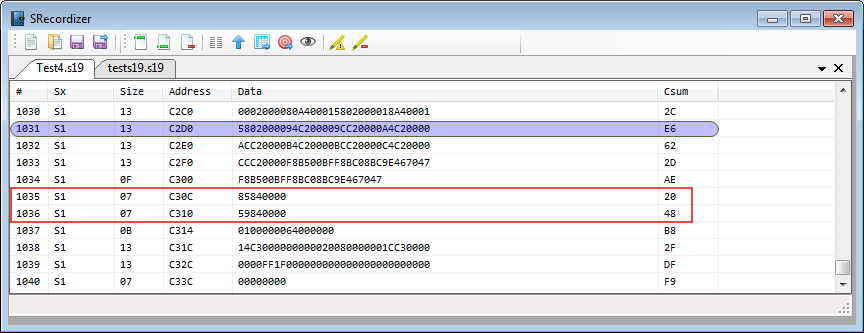
Many tool chains and linker are able to produce S19 files, such as with the GNU tools it is the ‘objcopy‘ which does this job (see “Binary (and S19) Files for the mbed Bootloader with Eclipse and GNU ARM Eclipse Plugins“). But these tools usually cannot handle the special cases. For example on the Freescale Kinetis K64F my serial bootloader (see “Serial Bootloader for the Freedom Board with Processor Expert“) had a problem with these lines in the S19 file:
Using Precompiled Headers with GNU gcc in Eclipse
Some of my robotics projects take a rather long time do a full build. When I developed applications with Visual C++ on the host, using precompiled headers gave me a big boost in compilation speed. I was looking for the same in similar with GNU and gcc, and as expected: gcc does support precompiled headers too. And indeed, I was able to cut down compilation time by 30% :-). So this post is about how to use gcc with precompiled headers in Eclipse/CDT to give my builds a boost.
Going to Mars: Building a DIY Eclipse IDE for ARM Embedded Microcontrollers
It has been a while since I published my ‘build my own DIY IDE’ (see “DIY Free Toolchain for Kinetis: Part 1 – GNU ARM Build Tools“). I have used that approaches in my classes successfully. Now a new semester is coming up, so time to update the instructions using the latest Eclipse IDE (Mars) and tools (GCC ARM Embedded (launchpad) with GNU ARM Eclipse).
Tutorial: Using GNU Profiling (gprof) with ARM Cortex-M
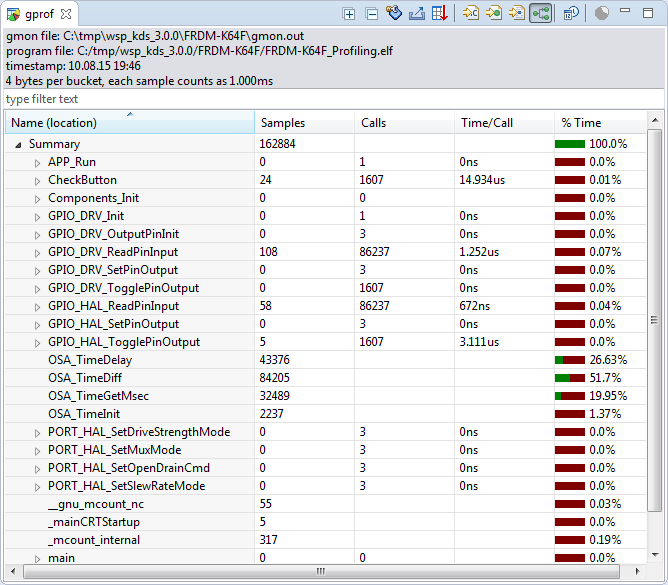
I have published a Sneak Preview how GNU gprof profiling looks for an embedded target ARM Cortex-M in an earlier post:

This tutorial explains how to profile an embedded application (no RTOS needed) on ARM Cortex-M devices with GNU gprof. Additionally I explain the inner workings to generate the data necessary for gprof.
Continue readingDebugging STM32F103RB NUCLEO Board with Segger J-Link
The STMicroelectronics STM32F103 (ARM Cortex-M3) Nucleo boards include the on-board ST-Link v2 circuit which allows to debug the board. This circuit is similar to the OpenSDA circuit found on Freescale boards. Unlike the Freescale OpenSDA, the ST-Link is only the ST-Link: it is not possible to load a P&E Multilink or Segger J-Link or firmware on it. Luckily, the ST-Link has a SWD connector, but this connector is a non-standard one. So how can I debug that board with an Eclipse based environment with GNU ARM Eclipse plugins and a Segger J-Link?
Board Take-Over: Using Segger J-Link to Debug NXP
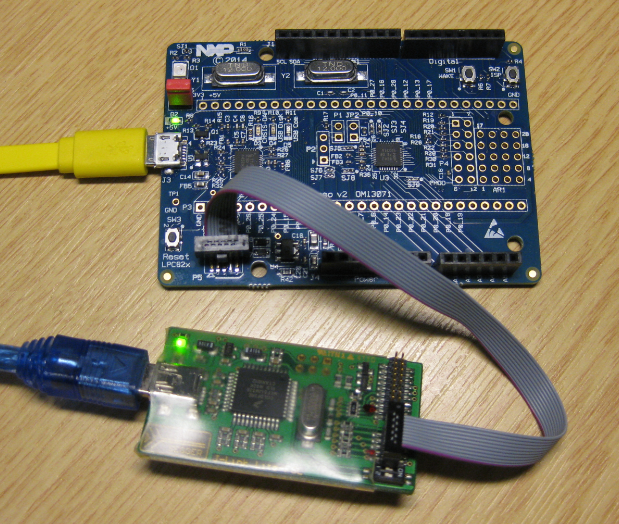
So NXP has announced that they want to take over Freescale (see this press release). In an earlier post I experimented how Freescale tools could be used in NXP tools, see “Merging NXP LPCXpresso IDE with Freescale Kinetis Design Studio, Processor Expert and Kinetis SDK“. Just for fun, I want to do the acquisition the other way round: Using Freescale (now NXP) software and tools to build and debug the LPC824 from NXP :-).
Improve Eclipse Performance with Increased Heap Size
I noticed that especially working with several projects in my workspace, Eclipse got sluggish and slowly responding. I have in Eclipse the Heap Monitor/Status enabled (see “Show Heap Status in Eclipse“):
So the used heap of the Java VM is hitting a limit of about 500 MByte, and seems to be trashing around? How to increase that heap size?