
Generating Static FreeRTOS Source Code

Using Processor Expert is an awesome tool: it generates source code for me, and I can can ‘dynamically’ tune my projects to my needs. Still, sometimes it is better or desirable to have a ‘normal’ or ‘static’ project. This is very well possible with Processor Expert (see “Sneaking from Processor Expert” or “Disable my Code Generation“): I can generate the code one time, and then use it without Processor Expert.

To make this even easier, I have added an option to the FreeRTOS Processor Expert component to generate ‘static’ code I can copy-paste to projects and tool chains which are either not supported by Processor Expert, or just for ‘static’ projects.
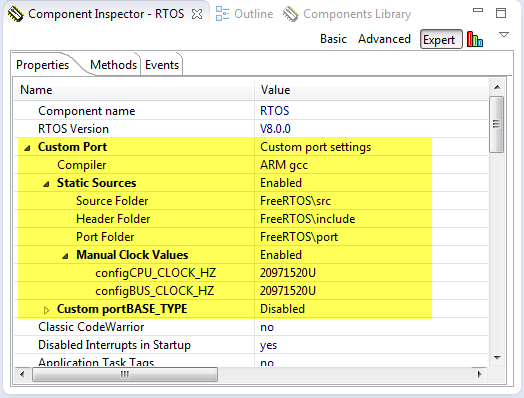
FreeRTOS Custom Port Settings
FreeRTOS Custom Port Settings

Continue reading

DIY Free Toolchain for Kinetis: Part 10 – Project Creation with GNU ARM Eclipse 2.1.1

As mentioned in Part 9: There is a new GNU ARM Eclipse plugin 2.1.1, and this one makes project creation for Freescale devices easier than ever 🙂

  • Native Kinetis-L project templates for FRDM-KL25Z and FRDM-KL46Z boards
  • Easier than ever project creation for Processor Expert projects
GNU ARM Eclipse 2.1.1

GNU ARM Eclipse 2.1.1

Continue reading

DIY Free Toolchain for Kinetis: Part 9 – Express Setup in 8 Steps

On Monday the new semester starts, and yet again: we will do a Sumo thing :-). They can choose which tool chain they would like to use to develop their application for the ARM Cortex-M0+ used from Freescale. One option is to create a ‘Do-It-Yourself’ toolchain. Since the start of the series, things have evolved: there is a new GNU ARM tool chain available, Segger has updated their drivers, and most important the GNU ARM Eclipse plugin has been greatly extended to support Freescale parts and Processor Expert. So instead to read through all the previous tutorials, this one is about putting together a free tool chain less than 10 minutes (not counting the time to download around 500 MByte).

DIY Eclipse Toolchain

DIY Eclipse Toolchain

Continue reading

DIY Free Toolchain for Kinetis: Part 8 – Processor Expert, Eclipse and GNU ARM Eclipse Plugins

There has been many new releases these days: Freescale released Processor Expert Driver Suite 10.3, and Liviu Ionescu released new GNU ARM Eclipse Plugins with new and updated documentation. So time for me to show how this all comes together 🙂

Processor Expert Driver Suite 10.3 Project with GNU ARM Eclipse Build Tools

Processor Expert Driver Suite 10.3 Project with GNU ARM Eclipse Build Tools

It is now easier than ever before to use the GNU ARM Eclipse plugins and Processor Expert. There are still some manual steps, and this post is about all the details to get it working as smooth as possible.

Continue reading

DIY Free Toolchain for Kinetis: Part 7 – GNU ARM Eclipse Plugins

Tired by the tool chains provided by your silicon vendor? Do you want to use a free and open tool chain? Then you probably followed by “DIY Free Toolchain” series already. In “DIY Free Toolchain for Kinetis: Part 2 – Eclipse IDE” I used the standard GNU Eclipse plugins. As mentioned in above post, there is an even better and more powerful plugin available: the GNU ARM Eclipse plug-ins. There is a dedicated blog site which provides excellent documentation and direct access to new and frequent releases. And these days there is a true a Christmas gift for every Eclipse lover: the version 1.1.7 with the addition of J-Link debugger plugin :-).

GNU ARM Eclipse (http://gnuarmeclipse.livius.net)

GNU ARM Eclipse

Continue reading

Eclipse Build Variables

This post is not about variables in my application code (which I debug). It is about using Variables in Eclipse for building projects. Eclipse variables allow me to make my projects ‘position independent’ whenever I cannot use a path relative to my projects or workspace.

Eclipse Variables

Which variables are used where in Eclipse might be sometimes not very clear. Depending in which context variables are used, not everything might be available. This link for example gives a list of variables which can be used to invoke an external tool.

Build Variables

Eclipse comes with many built-in variables, especially for the build system. If I want to see what variables are already defined, I can show them in the project properties, under C/C++ Build > Build Variables with enabled option ‘Show system variables’:

System Build Variables

System Build Variables

Continue reading

Tutorial: Replacing IAR EW with Eclipse IDE

Are you using IAR tools and you are jealous looking at what others can accomplish with Eclipse? You wish you could use your IAR build tools but taking advantage of Eclipse too?

I do not want to start a religious IDE war here ;-). At least for IAR, there is a way to bring both worlds together: having IAR build and debug tools integrated in Eclipse :mrgreen: :

Using IAR Tools In Eclipse

Using IAR Compiler and Debugger in Eclipse

Continue reading

Review: ThunderBench with the Freescale FRDM Board and Processor Expert

For the Eclipse and Processor Expert lovers of this world: there is another Eclipse based IDE you can use: ThunderBench made by Emprog:

ThunderBench for ARM Eclipse Startup Screen

ThunderBench for ARM Eclipse Startup Screen

They support a range of ARM based devices, including the Freescale ones I’m using. So I downloaded the v3.24 30 day trial from their download page last week. Finally I have found some time to try it out. Could this be an alternative to use my Freescale FRDM boards with Processor Expert?

Continue reading

IAR ARM v6.7 comes with improved Processor Expert Support

This week I saw on the IAR website that they have released the new IAR Embedded Workbench v6.7 for ARM. I was still on 6.5 using the free code size limited ‘Kickstart’ version), so I thought it would be a good time to upgrade to the v6.7. And there are good reasons as the connection to Processor Expert makes things much easier now.

Continue reading

S-Record Manipulation with GNU objcopy and Burner Utility

In my earlier post “S-Record Generation with gcc for ARM/Kinetis” I documented how to have the ARM GNU gcc toolchain to produce a S19 (Motorola (or now Freescale) S-Record) file. Here are a few more tips on that subject:

  1. Changing length of S-Records
  2. Only using 32bit addresses
  3. Combining S19 files

Continue reading