In this semester course, students (and myself too, of course :-)) are building a Mini Sumo Robot. That robot is using the Freescale FRDM-KL25Z board with an ARM Cortex-M0+ on it. Today I’ll give an introduction to the ARM core to the class, and timing is right: this morning I have found an excellent overview about ARM microcontroller and tools written by Jay Carlson.: Getting Started with ARM Microcontrollers.
Tag Archives: Building
Optimized BitIO_LDD Programming with Processor Expert
In my tutorial “Bits and Pins with Kinetis” I showed how to use the BitIO_LDD approach for Bit I/O access. I do not like this LDD (logical device driver) approach for several reasons:
- It requires an extra ‘device handle’ passed to the functions, even if such a device handle is not needed or desired.
- The code efficiency/size is negatively impacted by this.
Luckily, there is a way to hack around this 🙂
Optimized FreeRTOS: Stack Check and SysTick for ARM Cortex Cores
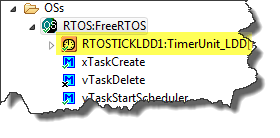
The ARM Cortex specification includes the ‘SysTick’ (System Tick Timer): a dedicated system timer which is intended to be used as time base for an RTOS. While technically it would be possible to use any periodic interrupt timer, I’m using as well the SysTick for my FreeRTOS ARM ports. And because Processor Expert includes a nice timer interface, I’m using the TimerUnit_LDD:
While this is great for flexibility, it has its price in efficiency. That TimerUnit_LDD adds overhead. So I want to get rid of the TimerUnit_LDD and use a more efficient way.
Continue reading
DIY Free Toolchain for Kinetis: Part 6 – Linux Host with OpenOCD and CMSIS-DAP
For everyone who wants to build a Do-It-Yourself toolchain for Kinetis on Linux, I recommend to read the following excellent post by Karibe:
Setting up Linux opensource build and debug tools for freescale freedom board FRDM-KL25Z
He describes how to get OpenOCD with CMSIS-DAP working with Eclipse on Ubuntu to debug the FRDM-KL25Z board.
List of Tutorials
- Part 1: Setting up ARM GNU tool chain
- Part 2: Setting up Eclipse IDE
- Part 3: Setting up the debugger (P&E and Segger)
- Part 4: Setting up Processor Expert
- Part 5: Setting up FreeRTOS Kernel Awareness
- Part 6: Linux Host Support with OpenOCD and CMSIS-DAP
- Part 7: GNU ARM Eclipse Plugins
- Part 8: Processor Expert with GNU ARM Eclipse Plugins
- Part 9: DIY Free Toolchain for Kinetis: Part 9 – Express Setup in 8 Steps
- Part 10 – Project Creation with GNU ARM Eclipse 2.1.1
Happy Linuxing 🙂
FreeRTOS V7.5.0 released
A week ago, the updated FreeRTOS V7.5.0 has been released on FreeRTOS.org. So time to have my Processor Expert FreeRTOS component updated as well :-).
DIY Free Toolchain for Kinetis: Part 2 – Eclipse IDE
This is the second part of a multi-part tutorial about how to set up an open source tool chain with GNU ARM gcc + Eclipse to build and debug an application for Kinetis ARM devices.
List of Tutorials
- Part 1: Setting up ARM GNU tool chain
- Part 2: Setting up Eclipse IDE
- Part 3: Setting up the debugger (P&E and Segger)
- Part 4: Setting up Processor Expert
- Part 5: Setting up FreeRTOS Kernel Awareness
- Part 6: Linux Host Support with OpenOCD and CMSIS-DAP
- Part 7: GNU ARM Eclipse Plugins
- Part 8: Processor Expert with GNU ARM Eclipse Plugins
- Part 9: DIY Free Toolchain for Kinetis: Part 9 – Express Setup in 8 Steps
- Part 10 – Project Creation with GNU ARM Eclipse 2.1.1
DIY Free Toolchain for Kinetis: Part 1 – GNU ARM Build Tools
This is the first part of a multi-part tutorial on setting up a free and functional GNU gcc + Eclipse + debugger environment for use with the Freescale FRDM-KL25Z board.
List of Tutorials
- Part 1: Setting up ARM GNU tool chain
- Part 2: Setting up Eclipse IDE
- Part 3: Setting up the debugger (P&E and Segger)
- Part 4: Setting up Processor Expert
- Part 5: Setting up FreeRTOS Kernel Awareness
- Part 6: Linux Host Support with OpenOCD and CMSIS-DAP
- Part 7: GNU ARM Eclipse Plugins
- Part 8: Processor Expert with GNU ARM Eclipse Plugins
- Part 9: DIY Free Toolchain for Kinetis: Part 9 – Express Setup in 8 Steps
- Part 10 – Project Creation with GNU ARM Eclipse 2.1.1
In this first part, I’m showing how to install the GNU ARM tool chain to build a ‘blinking LED’ application for the FRDM-KL25Z. With 100% free tools 😉
FreeRTOS Heap with Segmented Kinetis K SRAM
While working on a project for the FRDM-K20D50M, I faced a problem: I was running out of SRAM for my application. The GNU linker reports: “section `.bss’ will not fit in region `m_data'”: 😦
But my device has 16 KByte of SRAM, and I knew I use much less than 10 KByte. So what is the problem? Continue reading
Using Keil µVision 4 (ARM-MDK) with Processor Expert Driver Suite
❗ This article has been written for the version 4 of µVision. There is an update for version 5 of µVision here: “Using Keil μVision 5 with Processor Expert“
The good thing with using ARM microcontroller is: there are plenty of tool choices. Even myself, I’m using multiple different tool chains. And while I’m heavily using Eclipse, there are non-Eclipse tool chains which have their advantages too.
The cool thing with CodeWarrior is that beside of Eclipse based, it comes with Processor Expert integrated. And I’m using Processor Expert a lot in my projects. But using Processor Expert does not mean I’m limited to CodeWarrior or Eclipse. So I can use CodeRed or IAR as tool chain with it. And this post is about using Processor Expert with the µVision tool chain from Keil/ARM.
Eclipse Problems View: Only Show Problems for Project
Having many projects open the same time, and working on them in parallel is a challenge. Ok, the human brain is not built for multitasking, but I still try ;-). What I typically I end up in my Eclipse Problems View to have entries from multiple projects mixed up:
How to show it that I can fix the problems for ony project only, and not showing all problems from all projects?