Adding Processor Expert to Atollic TrueSTUDIO

For me as an Eclipse and Processor Expert lover, a press release that Atollic supports Processor Expert catched my eye :-). So there is yet another way to use Processor Expert: with a commercial Eclipse IDE provided by Atollic (atollic.com/).

Atollic Splash Screen

Atollic Splash Screen

Time to check it out…

Continue reading

Tutorial: FreeRTOS with the Kinetis SDK and Processor Expert

Freescale had announced at FTF back in April this year that they will use Kinetis Design Studio  and the Kinetis SDK for all new Kinetis devices. The switch from CodeWarrior to Kinetis Design Studio (see “Comparing CodeWarrior with Kinetis Design Studio“) was not much of big deal for my projects (although CodeWarrior still has better features), and projects are rather easily portable. However, the move to the Kinetis SDK has been massively disruptive: Before it was easy to move projects from one device to another with Processor Expert, even from S08 to ColdFire to Kinetis. Now with the Kinetis SDK everything is very different. At least Freescale now officially supports FreeRTOS, and for myself as a big fan of that open source RTOS, that was some good news.

Blinking Red LED with FreeRTOS Task using Kinetis SDK, FreeRTOS and Processor Expert

Blinking Red LED with FreeRTOS Task using Kinetis SDK, FreeRTOS and Processor Expert

So in this tutorial I’m showing how FreeRTOS can be used with the Kinetis Design Studio. That makes at least using the Kinetis SDK bit more familiar to me :-).

Continue reading

RAM Target with Kinetis Design Studio and FRDM-K64F

Newer microcontroller have increase RAM areas, making it suitable to run the application from RAM instead of FLASH. For the FRDM-K64F board and the Kinetis Design Studio (V1.1.1), I have explored how to run the application out of RAM instead of FLASH memory, both for P&E and Segger connections.

MK64FN1M0VLL12

MK64FN1M0VLL12

Continue reading

C++ with Kinetis Design Studio

Unlike CodeWarrior, the Kinetis Design Studio (at least in V1.1.1) does not offer a choice between C and C++ projects. That makes sense with the GNU ARM Eclipse plugins, other than the CodeWarrior gcc integration, there is no need for setting up a special tool chain for C++ (see “Compiling C Files with GNU ARM G++“). While this is great, things are not perfect yet, so I’m providing in this post the information needed to properly setup a C++ project with Kinetis Design Studio V1.1.1.

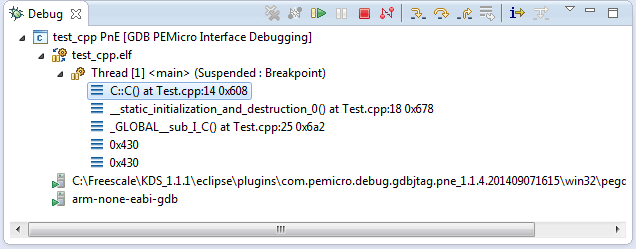
Debug View of Startup Code Calling C++ Constructors

Debug View of Startup Code Calling C++ Constructors

Continue reading

Failed to Debug with GDB: Breakpoints or Expressions on non-existing Locations

Sometimes, there are ugly bugs in tools, and without knowing about them, it is likely to spend hours and hours, and of course to be frustrated. Knowing about these issues does not remove the issue, but at least helps to cut time to deal with it. And here is one which was nagging on me for a while with the GNU GDB debugger in Eclipse…..

💡 I have used the Q4 2014 GNU ARM Embedded (launchpad) toolsuite/gdb (4.9-2014-q4-major), and I have found that with that gdb version the issue described is fixed. If you are using Kinetis Design Studio, see “Switching ARM GNU Tool Chain and Libraries in Kinetis Design Studio” how to upgrade the tool chain.

I was happily debugging my project, making some changes, and suddenly I cannot debug it any more. What happens is that I can download the binary with GDB, but it immediately terminates and disconnects:
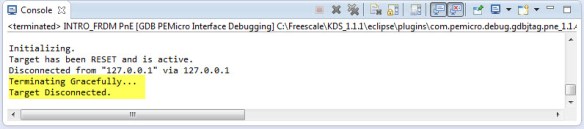
Terminating Gracefully Target Disconnected

Terminating Gracefully Target Disconnected

After digging and doing some trial and errors, I have found what is causing this.

Initializing.
Target has been RESET and is active.
Disconnected from "127.0.0.1" via 127.0.0.1
Terminating Gracefully...
Target Disconnected.

Continue reading

Putting Code of Files into Special Section with the GNU Linker

The GNU Linker (ld) is very, very powerful. This time I wanted to put all my Processor Expert generated code into its own dedicated section. This is useful for example to have a bootloader or a library inside a special area in FLASH. It was not obvious to me how to do this with the linker, with some search on the internet and some trial and errors, I finally managed that. And as always with exploring things, I have learnt something :-). So here is how I’m able to put the code of arbitrary files into its own dedicated section.

Code Section for Generated Code

Code Section for Generated Code

Continue reading

Comparing CodeWarrior with Kinetis Design Studio

At FTF 2014, Freescale made the announcement that CodeWarrior won’t support all the new ARM Kinetis devices coming out in the future: they will be supported with the free-of-charge Kinetis Design Studio (KDS) instead. As for myself, this is a big shift from a well established CodeWarrior toolchain to something new. A question which came up recently several times in the forums and in other posts is: how do CodeWarrior and KDS compare with each other?

CW vs KDS

CW vs KDS

Continue reading

Executing Multiple Commands as Post-Build Steps in Eclipse

The GNU ARM Eclipse plugins from Liviu already offer several built-in actions which can be performed at the end of a build: creating flash image, create listing file and printing the code and data size:

GNU ARM Eclipse Extra Post Build Steps

GNU ARM Eclipse Extra Post Build Steps

But what if I need different things, or even more things?

Continue reading

Building Projects with Eclipse from the Command Line

Eclipse has a great user interface (UI). But what if I want to do things from the command line, without the GUI? For example to build one or more projects in the workspace without using the Eclipse UI? With this, I can do automated check-outs and do automated builds.

Performed a command line project build with Eclipse

Performed a command line project build with Eclipse

Continue reading

Semihosting with GNU ARM Embedded (LaunchPad) and GNU ARM Eclipse Debug Plugins

In “Semihosting with Kinetis Design Studio” I used printf() to exchange text and data between the target board and the host using the debug connection. Kinetis Design Studio (KDS) has that semihosting baked into its libraries. What about if using the GNU ARM Embedded (launchpad) tools and libraries (see “Switching ARM GNU Tool Chain and Libraries in Kinetis Design Studio“)? Actually it requires two more steps, but is very easy too.

Semihosting Output

Semihosting Output

Continue reading