Using a version control system for software development is a standard procedure today. While things are pretty clear for ‘standard’ Eclipse projects, it is not that easy for Processor Expert projects. I’m using Processor Expert projects with Git and SVN (Subversion). I want to share here tips how to use Processor Expert projects with a version control system. Screenshots and vocabulary are for TortoiseGit and Git, but applicable to any other VCS (Version Control System).
Maze solving FRDM-KL25Z Robot goes backward for Dead-Ends
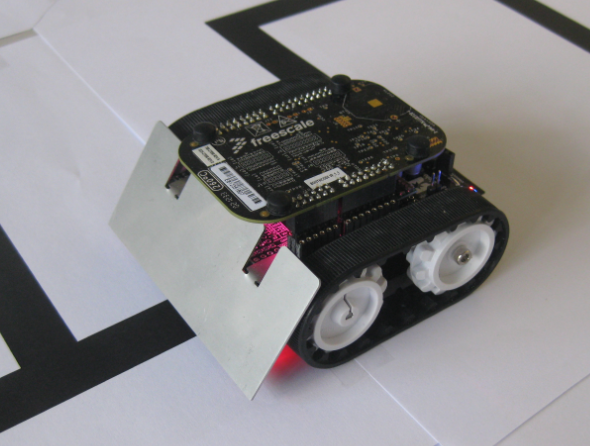
The maze solving robot based on the Freedom FRDM-KL25Z and Pololu Zumo shield has new features:
- For dead-end paths, instead turning around, the robot is driving backward
- Higher speed for going forward/backward/turns
- In the finish area, the robot turns around
- It reverts the solution path, so the robot can directly run from the finish area to the start
Freedom Logic Analyzer with DMA
The FRDM-KL25Z Open Source Logic Analyzer based on SUMP presented here was already very useful with the added trigger support. But it was not capable to do a sampling rate above a few hundred kHz. That’s ok for slower probing, but not for anything with a higher speed. Using DMA (Direct Memory Access) instead of timer based sampling can remove that limitation :-).
Compiling C Files with GNU ARM G++
If I want a C++ project for my KL25Z Freedom board, I select C++ during the project creation:
This creates a gcc C++ project with all the needed settings.
This worked fine until I added a *.c file to my project which had code in it which was not accepted by the C++ compiler. Wait! Should the *.c not be compiled in C mode, as I was used to with other compilers? It turned out that things are different with gcc (or g++) :-(: the *.c files in my project are compiled in C++ mode. So the question is: how to compile in C mode with the ARM g++ compiler?
Freedom Robot solves the Maze
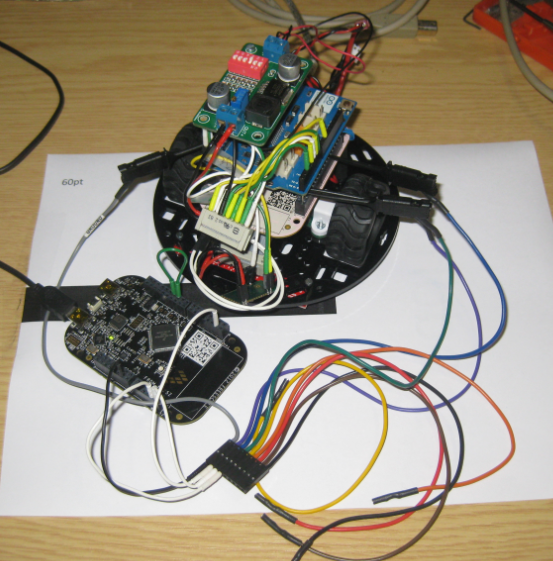
Finally I have found some time over the past week-end to enhance my Zumo robot. After I had my line following robot based on the Pololu Zumo chassis and the FRDM-KL25Z, I thought it should be easy and logical to solve a maze. Logical: yes. Easy: not that much. In fact it took me longer than expected. As always, there are a lot of tiny and important problems to solve (the maze alone was easy 🙂 ).
Tutorial: PWM with Processor Expert
For many of my applications I’m using a PWM (Pulse Width Modulated) signal. One example is the motor driver used in this project where I use one PWM signal for each motor. Another usage of PWM is to control the brightness of an LED. Processor Expert makes usage of the PWM hardware easier. Still, for some settings it is good to have the resulting signals in mind. So in this post I’m showing how the settings impact the PWM signal generated.
mbed for the Freedom Board
I knew about mbed already for some time: watching students using it for an NXP enabled board. Pretty cool stuff: mbed is an online IDE and compiler with tons of software libraries for the supported platform. So I was dreaming to have something like this for my own boards like the Freedom board. But because mbed only supported two dedicated NXP boards, that was a road block.
But then mbed announced recently that the mbed SDK is open source. Wow, that is interesting! And finally the announcement last week: mbed supports the KL25Z Freedom Board. Now they have my attention :-).
The Quotation Problem
Maybe this article gets the attention of a local optometrist or eye shop: I have a business opportunity for you! ;-).
I ran into a weird problem: I received an ARM GNU gcc project which failed during the generation of the S19 file in strange way:
'Executing target #80 Freedom_Zumo.siz' 'Invoking: ARM Ltd Windows GNU Create Flash Image' “C:/Freescale/CW MCU v10.3\eclipse\../Cross_Tools/arm-none-eabi-gcc-4_7_3/bin/arm-none-eabi-objcopy” -O srec Freedom_Zumo.elf "Freedom_Zumo.hex" ' ' Der Befehl "“C:" ist entweder falsch geschrieben oder konnte nicht gefunden werden. mingw32-make: *** [Freedom_Zumo.hex] Error 1
Quick Switch Editor in Eclipse
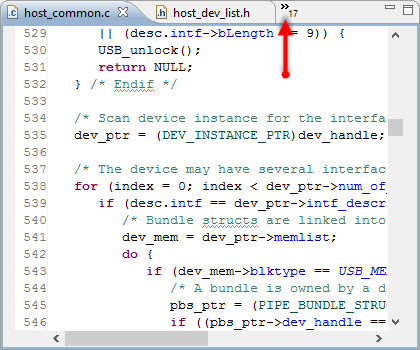
Probably I need to add 3rd monitor to my laptop system, or maybe I’m not organized enough. But as a matter of fact: I want to have as many source files as possible open in Eclipse. But there is simply not enough screen real estate to show them all:
With that many source files open, I need an effective way to switch between the files.
FreeRTOS on the FRDM-KL05Z Board
There is now an example project available on GitHub which runs FreeRTOS on the FRDM-KL05Z board: