My other robots based on the FRDM-KL25Z use Bluetooth as connectivity. This one is using a Freescale IEEE802.15.4/ZigBee/SMAC module:

Robot with SRB MC13213 Board as Remote Controller

My other robots based on the FRDM-KL25Z use Bluetooth as connectivity. This one is using a Freescale IEEE802.15.4/ZigBee/SMAC module:
Robot with SRB MC13213 Board as Remote Controller
With my Pololu line following robot I had strange problems with the sensor array: the sensor values were very unreliable. Until I have found the problem: Instead of the expected 3.3V, my FRDM-KL25Z RevD board provided 2.8V instead 3.3V on the P3V3 Arduino header pin:
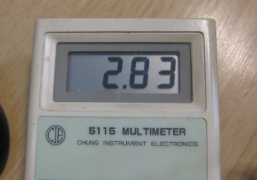
Measured 2.8V on P3V3
And that voltage even was lower the more current I needed :-(. Luckily there is an easy hardware fix for this.
As with any software drivers: they are never perfect. The same applies to the Processor Expert components delivered in CodeWarrior for MCU10 or the DriverSuite too. That’s why I have created many more components which are available on GitHub here. All these components are using other components to reach the hardware. But what if a functionality is not exposed through the low-level component? Or what if I want direct access to the hardware? Up to now I had to choose either the Processor Expert way, or to do it in the ‘traditional’ way using an SDK like CMSIS or vendor supplied header files.
With MCU10.4, I noticed that there is another way: PDD (Physical Device Driver).

PDD in the Components View
The MCUonEclipse GitHub repository is great for everyone which is familiar with Git or GitHub. Previously I was hosting my Processor Expert components on steinerberg.com. Exporting and maintaining the Processor Expert Update Files (*.PEupd) one by one is a lot of effort. GitHub makes things a lot easier, but again: you need to be familiar with it. And not everyone is ‘gitting’ yet. To help the rest of the world (the non-Gitter), I have now published Processor Expert update files for all the components in the repository, so it is easier to install them.
IMPORTANT NOTE: After October 17th 2014, the releases of the McuOnEclipse Processor Expert has been moved to SourceForge, see McuOnEclipse Releases on SourceForge
Usually I do *not* use floating point numbers in my projects. For this, I select ‘None’ during the project creation in CodeWarrior for MCU:

No Floating Point Selected
But what if I need to change my mind later? How to change such a ‘no-floating-point-needed’ project to one with floating point format support?
If you are following my recent posts, then you know I started using USBDM on OpenSDA as an alternative run control solution. Now with the advent of MCU10.4, the question is: how to use USBDM with it, because the USBDM installer obviously only knows the version up to MCU10.3?

USBDM 4.10.4a Installer
Ok, this one might not work for everyone. And maybe I’m seeing a ghost. But a nice and real one, at least for me :-). It seems that with the new CodeWarrior for MCU10.4 installation I was able to recover a bricked OpenSDA FRDM-KL25Z board 😯

Recovered OpenSDA Board
I continue to uncover new things in CodeWarrior in MCU10.4 :-). Remember my post “Switching Processor Package in Processor Expert” about the steps needed to switch from one microcontroller package to another? Although that’s not something I need to do on a daily base, this process is simplified in the new version 10.4 🙂

Select Package
What was missing in the FatFsMemSDHC component presented here is support for a ‘write protection’ pin. Well, that write protection is not present on micro-SD cards, and on normal SD cards it is a simple plastic thing with no real hardware meaning: it is all up to the software to respect it. While my other SD card components have support for such a write protection detection, it was lacking for the FatFsMemSDHC (for Kinetis) component. Time to fix this!

SD Card Lock: an SD-Card, a micro-SD Card and a micro-SD card adapter, both with write-enabled

 MCU on Eclipse