This article is part of a ‘mini series’ about hidden gems, tips and tricks around Eclipse.
The topic of this one is how access more hints and tips in the manual.

User Manual

This article is part of a ‘mini series’ about hidden gems, tips and tricks around Eclipse.
The topic of this one is how access more hints and tips in the manual.
User Manual
This article is part of a ‘mini series’ about hidden gems, tips and tricks around Eclipse.
The topic of this one is how to accelerate the start of the debugger.

Nothing to be done
I have continued to explore my two hobbies (embedded systems, and Talking About The Weather) during these weeks of lock-down. I have finally got to the point that my Weather Station project can sit on the window shelf of my office, and show me the temperature, humidity and atmospheric pressure on the attached eInk display.

In this blog I’m going to focus on driving that display.
Continue readingThis article is part of a ‘mini series’ about hidden gems, tips and tricks around Eclipse.
The topic of this one is how to import existing projects into a workspace.

Drag&Drop Import
Creating a new project with Eclipse for a microcontroller these days is fairly easy, and I have the choice if I want to start the project with C or C++:

Choice of C and C++ for a new project
Still the embedded microcontroller world is dominated by C and not C++. So while it is easy to start with a C++ project, most vendor provided example or tutorial project are C projects. So how can I transform such project to C++?
In an earlier tutorial I introduced using I2C with the NXP LPC55S69 on OKdo E1 board to read a Bosch BME280 environmental sensor on a Mikroe Weather Click board. The MCUXpresso Clocks, Pins and Peripheral Config tools were used to get it running. It’s all for my Weather Station project that I’ve been working on during these months of lockdown. It is starting to take shape – as you can see from the photograph:
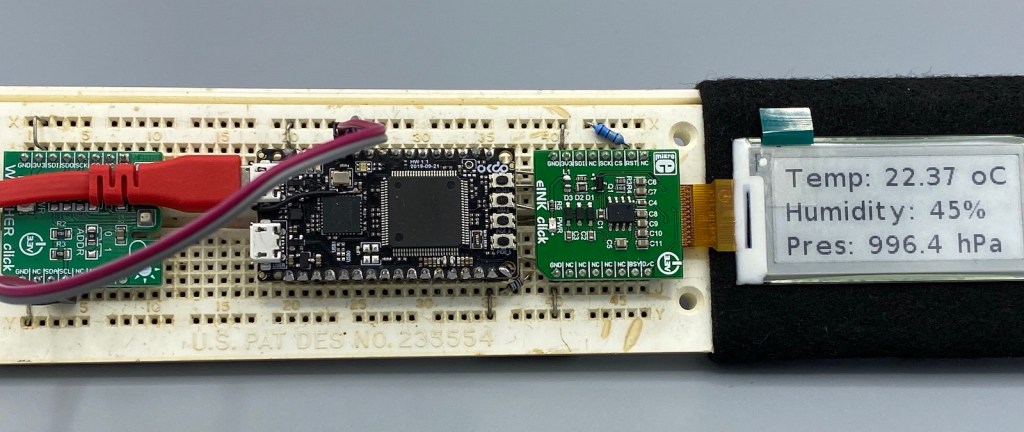
Now I really need to start reading and writing to the BME280 sensor, and that means using the I2C driver in the lpcxpresso55s69 SDK. And so this week I’ll provide a forensic examination of the most commonly-used I2C function call.
Continue readingWhen using a logging framework it is useful to use the current file name or line number. The ANSI C/C++ standard defines the __LINE__ and __FILE_ preprocessor macros for this.
But what about the project name, if it is a release or debug build, the microcontroller used or other things like the operating system which was used to build the binary?

Target Chip Name
This (and even more) can be easily provided by Eclipse to the C/C++ application being built with CDT.
I want to share with you a little embedded trick that I use to improve the reliability of my code. And in addition to improving reliability, the technique can be used to schedule any event to occur ‘sometime in the future’. It uses the MicroTick (UTICK) timer found on the NXP LPC55S69 microcontroller, and could be applied to any device with a simple timer.
The MicroTick timer is an elegant, thing of beauty. But there is not a driver example built into the lpcxpresso55s69 SDK, and I believe that the timer is not widely used. That means we need a tutorial!
Continue readingThis is a follow-up article of my earlier project presented in “FatFS, MinIni, Shell and FreeRTOS for the NXP K22FN512“. I wanted to extend it with a USB MSD (memory stick) device: The USB storage device gets automatically mounted, and depending on a configuration (.ini) file on the memory device I can perform various actions, for example automatically copy data from the SD card to the USB device. For example the system logs data, and to get the data I insert the memory stick, it copies the data on it and automatically unmounts it, and I can remove the memory stick.

FRDM-K22F USB Host Mode with Memory Sticks
The NMI is a special interrupt on ARM Cortex-M architecture: as the name indicates, it cannot be ‘masked’ by the usual ‘disable interrupts’ flags (PRIMASK, BASEPRI), similar to the Reset signal.

cortex-m-vector-table (Source: adapted from arm.com)
Dealing with the reset signal is kind of obvious, and most designs and boards have it routed to a reset button or similar. The NMI is less obvious if you don’t pay attention to it: most ARM-Cortex implementations and boards have the NMI signal routed to a pin and are ‘hiding’ it in the schematics behind a normal GPIO pin or port: if you don’t pay attention to the NMI functionality, the board might not work as intended.
 MCU on Eclipse