So NXP announced here a $40 Billion Merger with Freescale. Frequent readers of my blog will know that I’m using in my own and university projects many Freescale devices with Eclipse based tools (Eclipse Kepler/Luna, Emprog ThunderBench, Atollic TrueSTUDIO, Freescale CodeWarrior and of Freescale Kinetis Design Studio) in combination with Processor Expert. In a few projects I have used NXP devices with the CodeRed Eclipse base tools too. So I was curious how that merger of the two silicon companies could look like, if you merge the Freescale and NXP Eclipse based tools, and mix it with Processor Expert and the Freescale Kinetis SDK? The result looks like this:
Category Archives: SDK
Reduce Eclipse ‘Install New Software’ Installation Time
In Eclipse, the usual way to add new plugins or extend the IDE is using the menu Help > Install New Software. Same thing for the newly released Freescale Kinetis Design Studio V3.0.0: I add the support for new devices in the Freescale Kinetis SDK from the SDK Eclipse update:
One thing I noticed with this (and all others updates I do) is that they take much time to install. That’s expected if the update needs to be downloaded from the web. But I was wondering why it takes so long even if the files are local?
Thanks to a tip (thank you, Marek!), there is a setting to cut the installation time :-). Continue reading
Freescale Processor Expert Survey
Frequent readers of this blog know: I’m using Processor Expert in most of my projects with CodeWarrior, Driver Suite or Kinetis Design Studio. With the move of Freescale to Kinetis Design Studio and the Kinetis SDK with Processor Expert, there is an opportunity for our voice to be heard in a survey Freescale now runs about configuration tools and Processor Expert.
Happy Surveying 🙂
Tutorial: FreeRTOS with the Kinetis SDK and Processor Expert
Freescale had announced at FTF back in April this year that they will use Kinetis Design Studio and the Kinetis SDK for all new Kinetis devices. The switch from CodeWarrior to Kinetis Design Studio (see “Comparing CodeWarrior with Kinetis Design Studio“) was not much of big deal for my projects (although CodeWarrior still has better features), and projects are rather easily portable. However, the move to the Kinetis SDK has been massively disruptive: Before it was easy to move projects from one device to another with Processor Expert, even from S08 to ColdFire to Kinetis. Now with the Kinetis SDK everything is very different. At least Freescale now officially supports FreeRTOS, and for myself as a big fan of that open source RTOS, that was some good news.
So in this tutorial I’m showing how FreeRTOS can be used with the Kinetis Design Studio. That makes at least using the Kinetis SDK bit more familiar to me :-).
C++ with Kinetis Design Studio
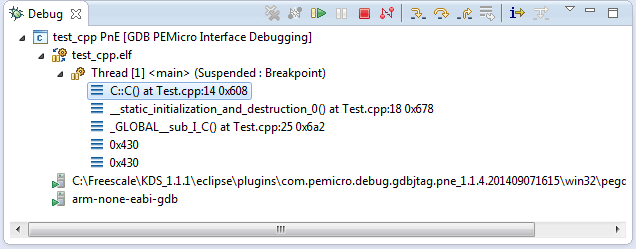
Unlike CodeWarrior, the Kinetis Design Studio (at least in V1.1.1) does not offer a choice between C and C++ projects. That makes sense with the GNU ARM Eclipse plugins, other than the CodeWarrior gcc integration, there is no need for setting up a special tool chain for C++ (see “Compiling C Files with GNU ARM G++“). While this is great, things are not perfect yet, so I’m providing in this post the information needed to properly setup a C++ project with Kinetis Design Studio V1.1.1.
Switching ARM GNU Tool Chain and Libraries in Kinetis Design Studio
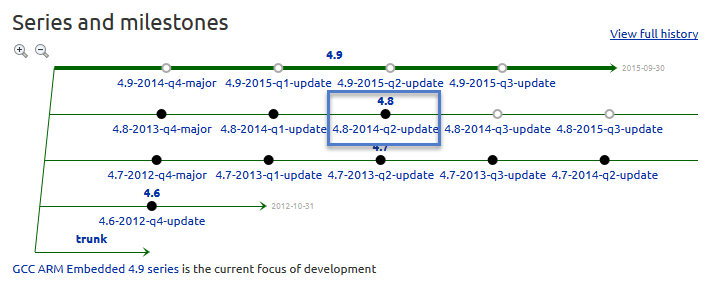
The Freescale Kinetis Design Studio (KDS) V1.0.1 beta is using a different GNU ARM toolchain than the ARM Inc. supported one on launchpad (GCC ARM Embedded). Additionally, KDS is using newlib 1.19 and newlib-nano 1.0, while there just has been a new release of the GCC ARM Embedded a month ago with the 4.8.4 update 2 release in June this year. So how to upgrade KDS to the latest and greatest GCC ARM Embedded?
Tutorial: DIY Kinetis SDK Project with Eclipse – Board Configuration
In “Tutorial: DIY Kinetis SDK Project with Eclipse – Startup” I showed how to create a Kinetis SDK project from scratch. In this post it is about adding the board initialization files. With the board initialization the peripheral clocks and pin muxing is configured.
Tutorial: DIY Kinetis SDK Project with Eclipse – Startup
This is the start of a multi-post tutorial about the Freescale Kinetis SDK, released back in April as beta version. The SDK a set of peripheral drivers, and will become the standard software foundation and drivers provided by Freescale for their ARM Cortex based devices. Similar what other vendors already do. While this is a good step, it is the same time very disruptive for my university projects with new Freescale Cortex-M devices. And with everything new (and beta), it needs time to learn. So this post is about creating a Do-It-Yourself Kinetis SDK project from scratch for Eclipse. This part is about the startup code: about everything to get the application started.