I’m using Eclipse based IDE’s to develop and debug my embedded applications. This works great, as Eclipse has all the necessary tools to edit, build and debug it. But when it comes just to download/flash a binary to the board, then things are pretty much specific to the tools used. With the advent of the new MCUXpresso IDE, here is how that Eclipse IDE can be used for this.
Category Archives: LPC
Using the LPCXpresso V2/V3 Boards to Debug an external Board
The MCUXpresso IDE (see “MCUXpresso IDE: Unified Eclipse IDE for NXPs ARM Cortex-M Microcontrollers“) has one great feature: it includes debug support for the popular LPC-Link2 debug probes. That way I have yet another powerful debug probe with extra features for ARM based boards. That LPC-Link2 circuit is present on many LPCXpresso boards from NXP. So why not using it to debug it my custom hardware?
MCUXpresso IDE: Importing Kinetis Design Studio Projects
Many of my currently active projects are using Kinetis Design Studio (KDS) V3.2.0 from NXP (I have published many of my projects on GitHub). Now with the advent of the MCUXpresso IDE (see “MCUXpresso IDE: Unified Eclipse IDE for NXPs ARM Cortex-M Microcontrollers“), I have migrated several projects from KDS to MCUXpresso. This post is about how to easily get KDS projects ported and running in MCUXpresso IDE.
The Influence of Software and Tools on ARM Cortex-M Microcontroller Vendor Selection
For me, the available software and tools are the primary key decision factor why I select a particular silicon vendor. Without good software and tools, a microcontroller only ‘sand in plastic case’, even if it is the best microcontroller in the world. I do have several probably excellent microcontroller boards, and they are only getting touched by more durst over the months and years.
MCUXpresso IDE: Adding the Eclipse Marketplace Client
One great thing with Eclipse compared to proprietary IDEs are the thousands of available plugins. Yes, not every plugin is probably on the ‘must have’ list (I have listed some in a series starting with “5 Best Eclipse Plugins: #1 (Eclox with Doxygen, Graphviz and Mscgen)“).
The ‘traditional’ approach to install Eclipse plugins is using the menu Help > Install New Software. Using that approach, I have to use or enter an Eclipse update site. An easier way is to use the Eclipse Marketplace plugin which allows me to search and browse for plugins and simplifies installation of it. But as this one does not come installed by default with MCUXpresso. But it is my preferred way to browse and install plugins into Eclipse:
MCUXpresso IDE: S-Record, Intel Hex and Binary Files
This is another article about the NXP MCUXpresso IDE (see “MCUXPresso IDE: Unified Eclipse IDE for NXPs ARM Cortex-M Microcontrollers“), this time it is about Post-build steps. Post-build steps are custom actions which can be executed after the build (or link phase), and are typically used to generate S-Record, Binary or Intel Hex files (see “S-Record, Intel Hex and Binary Files“).
MCUXpresso IDE: Unified Eclipse IDE for NXPs ARM Cortex-M Microcontrollers
There are many mergers going on in the industry, and one of the largest one was in 2016 the integration of Freescale Semiconductor with NXP Semiconductors, with both providing Eclipse based IDE’s to their customer base. Consequently, the company merger triggered a merger of the IDE’s, and last week NXP has released the result: the MCUXpresso IDE.
Embedded World Nürnberg 2017 Impressions: MCUXpresso, Hexiwear, NTAG, LPC800-DIP and Alan Hawse
This year I managed to attend the Embedded World in Nürnberg/Germany after missing the 2016 show. And 2017 has been a blast! With more than 1000 exhibitors and >30’000 visitors it was huge! There were too many exciting things, so I just pick a few: NXP demonstrated the new MCUXpresso Software and Tools with a new Eclipse Neon based IDE, lots of IoT and Hexiwear, the tiny LPC800-DIP board, and I have met Alan Hawse in person!
Better FreeRTOS Debugging in Eclipse
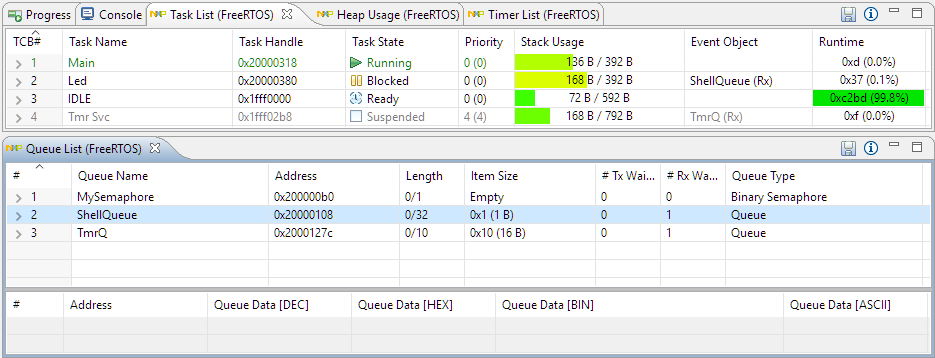
With debugging FreeRTOS applications in Eclipse, it is a big to have views available showing all the threads, queues, timers and heap memory allocation. One of the best Eclipse plugins are the one NXP provides for FreeRTOS: they are free of charge and give me pretty much everything I need. However, if you are not that familiar with FreeRTOS itself, here are a few tips to get more out of the plugins.
Cycle Counting on ARM Cortex-M with DWT
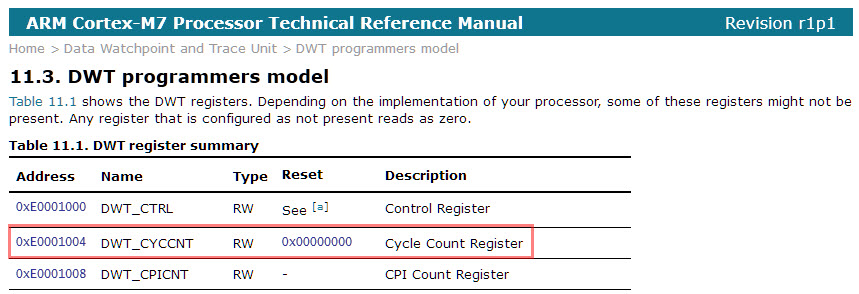
Some ARM Cortex-M have a DWT (Data Watchpoint and Trace) unit implemented, and it has a nice feature in that unit which counts the execution cycles. The DWT is usually implemented on most Cortex-M3, M4 and M7 devices, including e.g. the NXP Kinetis or LPC devices.

DWT Cycle Count Register (Source: http://infocenter.arm.com/help/index.jsp?topic=/com.arm.doc.ddi0489d/BABJFFGJ.html)