Using Keil µVision 4 (ARM-MDK) with Processor Expert Driver Suite

❗ This article has been written for the version 4 of µVision. There is an update for version 5 of µVision here: “Using Keil μVision 5 with Processor Expert

The good thing with using ARM microcontroller is: there are plenty of tool choices. Even myself, I’m using multiple different tool chains. And while I’m heavily using Eclipse, there are non-Eclipse tool chains which have their advantages too.

The cool thing with CodeWarrior is that beside of Eclipse based, it comes with Processor Expert integrated. And I’m using Processor Expert a lot in my projects. But using Processor Expert does not mean I’m limited to CodeWarrior or Eclipse. So I can use CodeRed or IAR as tool chain with it. And this post is about using Processor Expert with the µVision tool chain from Keil/ARM.

Keil uVision Splash Screen
Keil uVision Splash Screen

Continue reading

5V Generation from V_IN on the Freedom Board RevE

The Freescale Freedom boards like the FRDM-KL25Z feature an Arduino header so I can stack shields on it. Unfortunately, the Freedom board does not generate 5V if not connected to the USB cable. This makes it not possible to be used with many shields like the Adafruit Motor Shield: such shields expect that the Arduino board is providing 5V through the Arduino header (Pin 10 on J9 on the FRDM-KL25Z). So I had to do hardware changes to generate that 5V if I used my board disconnected from USB, e.g. running from batteries through V_IN (pin16 (P5-9V_IN) on the FRDM-KL25Z.

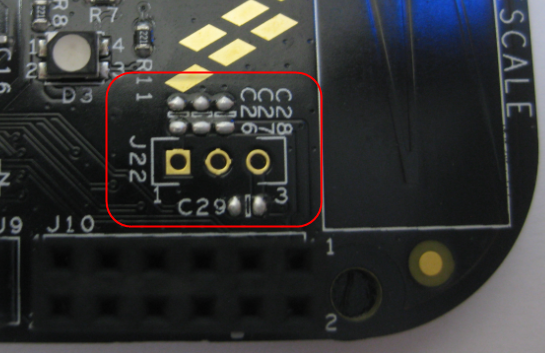
J22 with Capacitors on FRDM-KL25Z RevE

J22 with Capacitors on FRDM-KL25Z RevE

The good news is that the Rev.E of the Freedom FRDM-KL25Z board has now a header J22 to make things easier:

Continue reading

Tutorial: Arduino Motor/Stepper/Servo Shield – Part 3: 74HCT595 Shift Register

For many projects, I have one common problem: I run out of I/O pins on my microcontroller :-(. Luckily, I’m not alone, and the industry has created solutions for this kind of problems. One is to use a shift register as the 74HCT595/SN74HC595 which gives me 8 extra output pins. All what I need to spend are are 3 GPIO pins. Not a bad deal: I spend 3 pins and I get 8 (or multiple of it) on return :-).

So why do I say this for this Arduino Motor/Stepper/Servo Shield tutorial? I have asked in this earlier post with a poll for the next topic (relais, motor or command line interface). Right now votes are mostly for relay. But before I can do relay (or DC motor), I need to first cover the 74HCT559. So here we go to have you ready for the next tutorial 🙂

Arduino Motor Shield

Arduino Motor Shield with 74HC595

Continue reading

Bricking and Recovering FRDM-KL25Z Boards: Reset, SWD Clock and Low Power

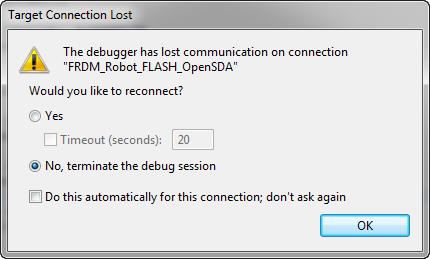
I’m working with a student on building a small autonomous robot platform, based on the FRDM-KL25Z board. We integrated new software modules, compiled and linked, and then downloaded the application to the board. While debugging and stepping through the application startup, I had this:

The Debugger has lost communication on connection

The Debugger has lost communication on connection

Outsch! That’s not good. Even worse, trying to connect again to the board failed :-(. What happened?

Continue reading

Tutorial: Arduino Motor/Stepper/Servo Shield – Part 1: Servos

This post starts a small (or larger?) series of tutorials using the Arduino Motor/Stepper/Servo Shield with the FRDM-KL25Z board. That motor shield is probably one of the most versatile on the market, and features 2 servo and 4 motor connectors for DC or stepper motors. That makes it a great shield for any robotic project :-).

Arduino Motor Stepper Servo Shield with FRDM-KL25Z

Arduino Motor Stepper Servo Shield with FRDM-KL25Z

Continue reading

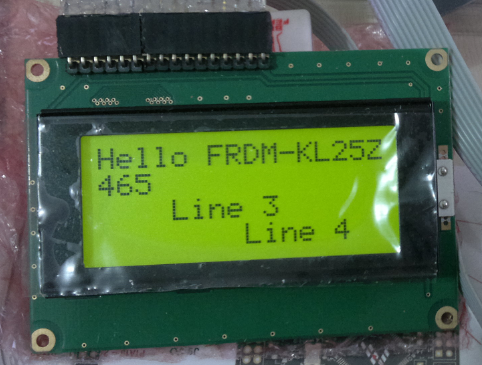
Character LCD with 4 Lines

Character LCD’s (like 2 lines with 16 characters each) as in this post are easy to use. Much easier to use compared to full graphical LCDs.

The ones I’m using have either 1 or 2 lines, but I saw that there are 4 line displays too. So far my LCD component only supports one or two lines.

4 Line LCD

4 Line LCD (Source: Ezequiel Bazotti)

Continue reading

CMSIS-DAP with IAR and the KL25Z Freedom Board

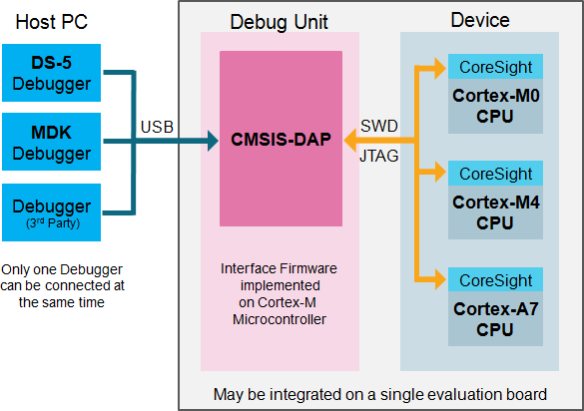
Beside of USBDM, there is another Open Source implementation of a debug interface for the Freedom Board OpenSDA: CMSIS-DAP.

CMSIS-DAP stands for ‘Cortex Microcontroller Software Interface Standard – Debug Access Port’) has been published by ARM Inc. With this, there is an open source alternative to proprietary implementation (e.g. P&E OpenSDA or Segger OpenSDA).
Beside of the ARM MDK IDE, CMSIS-DAP is supported by Coocox and IAR. And IAR is what I’m using in this post.

Continue reading

Freedom Board with Segger OpenSDA Debug Firmware

Looks like there is some movement on the ‘OpenSDA Front’: After CodeRed has released their RedProbe OpenSDA firmware, now Segger has released an OpenSDA firmware.

With this, I get a low-cost debugging solution similar to the well-known J-Link run control devices. The OpenSDA Segger Firmware is something like a J-Link-lite.

FRDM-KL25Z with Segger OpenSDA Debug Firmware

FRDM-KL25Z with Segger OpenSDA Debug Firmware

Continue reading

Freedom Track Robot with IEEE802.15.4/SMAC

My other robots based on the FRDM-KL25Z use Bluetooth as connectivity. This one is using a Freescale IEEE802.15.4/ZigBee/SMAC module:

Robot with SRB MC13213 Board

Robot with SRB MC13213 Board as Remote Controller

Continue reading