To build an application for a modern microcontroller today is not a simple thing. Well, it depends what ‘simple’ means. But compared to the ‘old days of 8bit micro controllers’ (which are still in use!) developing for a complex 32bit device is definitely a different thing. Not only the complexity has changed, but as well the breath of tools and helpers. In my view, the only constant is ‘change’, and I have changed the way how to develop several times in my career. In this post I present several different techniques I’m using in my development.
Category Archives: CodeWarrior
Improve Eclipse Performance with Increased Heap Size
I noticed that especially working with several projects in my workspace, Eclipse got sluggish and slowly responding. I have in Eclipse the Heap Monitor/Status enabled (see “Show Heap Status in Eclipse“):
So the used heap of the Java VM is hitting a limit of about 500 MByte, and seems to be trashing around? How to increase that heap size?
McuOnEclipse Components: 05-July-2015 Release
I know: A new McuOnEclipse Processor Expert components release was long overdue. But I have been extremely busy in the last months, but now the university semester is over, and I have finally some spare time to catch up on a lot of things. So here we go: there is a new component release available on SourceForge (https://sourceforge.net/projects/mcuoneclipse/files/PEx%20Components/): Components 2015-07-05.zip
Reduce Eclipse ‘Install New Software’ Installation Time
In Eclipse, the usual way to add new plugins or extend the IDE is using the menu Help > Install New Software. Same thing for the newly released Freescale Kinetis Design Studio V3.0.0: I add the support for new devices in the Freescale Kinetis SDK from the SDK Eclipse update:
One thing I noticed with this (and all others updates I do) is that they take much time to install. That’s expected if the update needs to be downloaded from the web. But I was wondering why it takes so long even if the files are local?
Thanks to a tip (thank you, Marek!), there is a setting to cut the installation time :-). Continue reading
Editing Compiler Include (or other) Settings in Eclipse
So now I have carefully set up my compiler include paths in Eclipse to tell the GNU compiler where to find my header files:
The question is: how can I apply these settings to another project?
CRC Checksum Generation with ‘SRecord’ Tools for GNU and Eclipse
One of the things missing for Embedded in the GNU linker is that it cannot generate a CRC checksum. Luckily, there is the solution of using SRecord:

Solving the 8192 Character Command Line Limit on Windows
There is a really annoying issue with using command line tools on Windows: the maximum length of the command line passed to cmd.exe is 8192 characters (see http://blogs.msdn.com/b/oldnewthing/archive/2003/12/10/56028.aspx). So you think this is not a problem for you, as you would not pass such a long command line to cmd.exe (the DOS shell under Windows)? Well, if you are using Eclipse (as I do) which generates make files (which is the normal way), then the cmd.exe very likely is involved to call the compiler/linker/etc, indirectly with the usage of make.exe. Compiling files is usually not a problem as it does not hit that 8192 limit. However, it is likely that link phase will end up with an error:
If you have such a problem, there is a solution ….
Adding Multiple Include Paths to Build Settings in Eclipse
In Eclipse and CDT, I need to tell the compiler where it has to search for the header files. The normal way is to go to the compiler settings (menu Project > Properties > C/C++ Build > Settings) and then add the include paths, one by one, using the ‘+’ icon:
But for many include paths, this is a time-consuming process. But there is another way.
Adding ‘Show in Windows Explorer’ to Eclipse
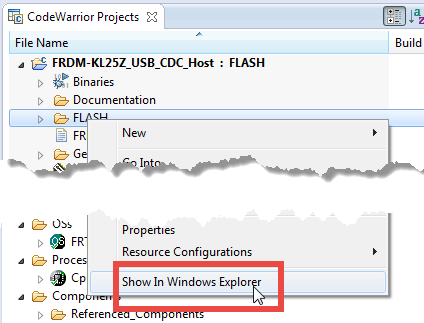
In CodeWarrior there was a very useful feature in the CodeWarrior Projects view: with a context menu I can open that folder/file in Windows Explorer:
However, this feature is missing in Eclipse, so how to add this functionality?
Tutorial: How to Erase the FLASH with the GNU GDB debugger
I have several applications where I store application specific information in the microcontroller FLASH memory (see “Configuration Data: Using the Internal FLASH instead of an external EEPROM“). I have run into issues recently with the Segger J-Link GDB server as by default it does *not* erase all the FLASH memory. So the question is: How can I erase all (or part) of the FLASH memory with GDB (e.g. in Kinetis Design Studio or in Eclipse)?