One little nasty assertion in the GNU standard library appeared a few days ago, kind out of nowhere, reporting “REENT malloc succeeded”:
Obviously it was caused by the call to srand() which sets the ‘seed’ for the standard library (pseudo) random number generator. The assertion happens as well later for calling the rand() function.
The RP2040 Pico board comes with 2 MByte onboard FLASH memory. While this is plenty of space for many embedded applications, sometimes it needed to have more storage space. Having the ability to adding an extra SPI FLASH memory with a useful file system comes in handy in such situations. This makes the RP2040 ideal for data logger applications or otherwise store a large amount of data. In this article I’ll show you how to add an extra 16 MByte of memory to the Raspberry Pi Pico board, running FreeRTOS, a command line shell and using LittleFS as the file system.
It is already December 1st, and time for a new Advent Calendar. This year the design includes birch plywood with PMMA, SK6812 RGBW LEDs running with a Raspberry Pi Pico board, building a small village.
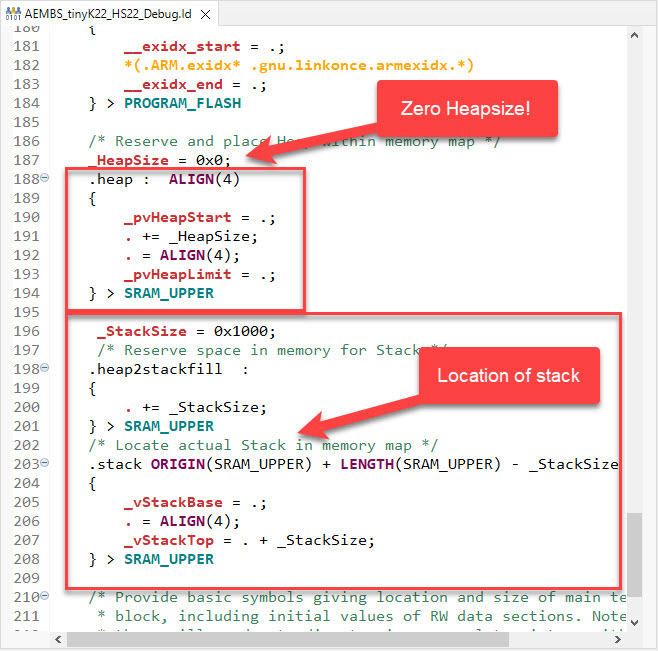
In many embedded applications, it is mandatory that memory allocation is static and not dynamic. Means that no calls to things like malloc() or free() shall be used in the application, because they might fail at runtime (out of memory, heap fragmentation).
But when linking with 3rd party libraries or even with the C/C++ standard libraries, how to ensure no dynamic memory is used? The problem can occur as well for C++ objects, or a simple call to printf() which internally requires some dynamic memory allocated.
If using C++ on an embedded target, you depend on the constructors for global objects being called by the startup code. While in many cases an embedded system won’t stop, so you don’t need to call the global C++ destructors, this is still something to consider for a proper shutdown.
MCU vendors offer SDKs and configuration tools: that’s a good thing, because that way I can get started quickly and get something up and running ideally in a few minutes. But this gets you into a dependency on tools, SDK and configuration tools too: changing later from one MCU to another can be difficult and time consuming. So why not get started with a ‘bare’ project, using general available tools, just with a basic initialization (clocking, startup code, CMSIS), even with the silicon vendor provided IDE and basic support files?
In this case, I show how you easily can do this with CMake, make and Eclipse, without the (direct) need of an SDK.
In this time where many micro-controllers have 100+ weeks estimated delivery time, it makes sense to look at alternatives. So it is not a surprise that the Raspberry Pi RP2040 gets used more and more in projects. It is not only inexpensive, it is (at least for now) available which makes all the difference. The RP2040 is the first microcontroller from Raspberry Pi: a dual-core ARM Cortex-M0+ running up to 133 MHz, 264 KByte on-Chip RAM and up to 16 MByte external FLASH.
Raspberry Pi Pico with J-Link, with a NXP sensor board
It is a very versatile microcontroller, with a rich eco-system and set of tools. It can be easily used with C/C++ or MicroPython, and the Raspberry Pi Pico board only costs around $5. There are plenty of tutorials out there, for example how to use the Pico board as debug probe to debug another Pico board. While this is great, there is an easy way to use any existing J-Link and Eclipse IDE too, so this is what this article is about.
The Eclipse Editor has a very cool feature named ‘Code Templates’: With such templates files are created with specific pre-filled content. For the templates, variables like ${user} for the user name can be used, see Custom C/C++ Headers with Eclipse:
Tool chains like the GNU compiler collection (gcc) have a plethora of options. The probably most important ones are the ones which tell the compiler how to optimize the code. Running out of code space, or the application is not performing well? Then have a look at the compiler optimization levels!
However, which one to select can be a difficult choice. And the result might very well depend on the application and coding style too. So I’ll give you some hints and guidance with an autonomous robot application we use at the Lucerne University for research and education.





 MCU on Eclipse