Implementing File I/O Semihosting for the RP2040 and VS Code

I’m working recently on a new lecture module using the Raspberry Pi Pico (RP2040) board, which highlights several aspects of modern software engineering, including DevOps and CI/CD. An important part of any CI/CD pipeline is testing. For a host application, one could pass arguments to the application, e.g. ‘myapp --test=module1‘, or let it read such information from a configuration file which describes the tests. Or write GNU gcov data to a file to collect coverage information.

Unfortunately, a normal embedded application has no argv[], and many system have no file system. A solution to this problem would be using semihosting with file I/O. Unfortunately for the Raspberry Pi Pico SDK 1.5.1 for the RP2040, there is no semihosting file I/O implemented :-(.

I have now implemented and added file I/O to the SDK, making it possible for the RP2040 to access and use files on the host, among other things. This greatly extends the capabilities of the device, and is very useful for testing, including gathering test coverage information.
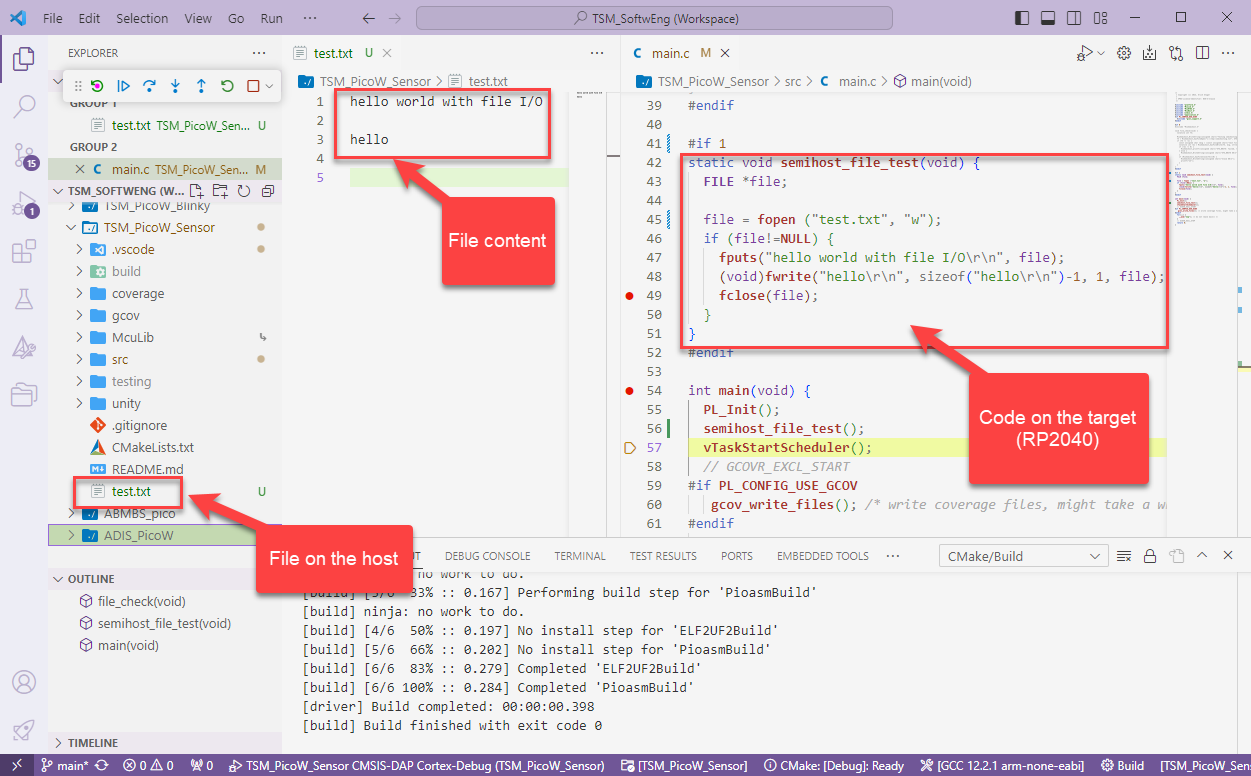
RP2040 writing files on the host with semihosting
Continue reading

Global Constructors and Destructors with C (not C++)

In the OOP world, global objects get initialized with a constructor and destroyed at the end with a destructor. Interestingly, the GNU gcc has attributes to mark functions as constructor and destructors, which can greatly simply system startup and shutdown, even if not using C++.

C Function marked as Constructor and called before main()

With the GNU gcc compiler, I can mark functions with an attribute, so they get called before entering main() or after exit of main(). The attribute works both in C and C++, but it especially useful in C to initialize modules in an automated way.

Continue reading

CI/CD for Embedded with VS Code, Docker and GitHub Actions

“Our highest priority is to satisfy the customer
through early and continuous delivery
of valuable software.”

Agile Manifesto, https://agilemanifesto.org/principles.html

It is interesting to see that modern tools and agile development workflows are getting more and more into the embedded world. CI/CD is a strategy where code changes to an application get automatically integrated, tested and released automatically into a production environment.

VS Code with CI/CD
Continue reading

VS Code: Importing pre-v2.13.0 MCUXpresso SDK Projects

In my previous article I showed how to import, build and debug MCUXpresso SDK projects in VS Code. In my lectures and labs we are using a robot based on the NXP Kinetis K22FX512 ARM Cortex-M4F microcontroller, and there is only the v2.13.0 SDK available.

INTRO Sumo Robot
Sumo Robot with K22FX512

The software on the robot uses the latest NXP MCUXpresso SDK v2.3.1. The he Eclipse based MCUXpresso IDE 11.8.0 works fine with all the 2.x SDKs, up to the latest 2.13.0 one.

Continue reading

Solving Linker Error: “cannot move location counter backwards”

Upgrading to a newer GNU toolchain always has its risks. That’s why I always recommend to stay on a given toolchain for production code.

But sometimes one needs to upgrade, or gets a code or project that works in one environment, but not in another. Today I have run into a problem with code read-out projection:

Disabled Automatic Placement of Code Read Protection

Well, the code read-out protection is not the root of the problem, but a good example why problems could occur.

Continue reading

VS Code: MCUXpresso Installer

VS Code is managing its extensions (see VS Code: MCUXpresso Extension). But to make it usable for embedded development, you need more tools: compiler, linker, debugger, libraries, build system, debug probe support, …

For the experts, this is not a big deal: you know where to get them, and you install them, as shown with another tutorial. But for a class full of students or newcomers to VS Code, this can be a a time consuming and daunting task.

To make the installation easier, NXP has released a ‘dependency checker and installer’ along with their VS Code extension, which makes the setup much easier and simpler.

MCUXpresso Installer
Continue reading

MCUXpresso IDE 11.8.0

Don’t worry: despite all the things going on with VS Code, Eclipse is here to stay probably for many more years. The Eclipse foundation is pumping out releases, and so does NXP with their latest MCUXpresso IDE 11.8.0. Lets have a look…

MCUXpresso IDE 11.8.0
Continue reading

Data Converter for MCUXpresso Energy Measurement Data

The combination of the NXP MCUXpresso IDE with the NXP MCU-Link Pro debug probe implements a nifty power and energy measurement tool (see New “MCU-Link Pro”: Debug Probe with Energy Measurement). The eclipse based IDE provides a dedicated view to inspect the data collected. It can export and import data, but it is in a binary format. In this article I present a way to export and then convert the data into .csv or any other format for processing or visualizing it in different ways.

Exporting data to gnuplot and csvplot

Using an open source command line tool, the binary data gets converted into a csv format, which then can be consumed by many tools, e.g. gnuplot.

Continue reading

GNU Linker Wizardry: Wrapping printf() with Timestamps

If one is using a dedicated logger module like the McuLog, then you don’t have to worry or care about timestamp support. But if your application is using normal printf() calls for for logging purpose, you will face issues to adding timestamps to it. You might consider to change all prinft() calls. This might be a lot of work, or not possible in all cases if you cannot change the source code.

But there is a really cool feature of the GNU linker to solve that problem. It allows to ‘wrap’ around any symbol or function, including the ones in the standard library. That way I can add my mode to the printf() code as a wrapper, for example adding a timestamp for every call.

In the example below you can see this in action:

printf() calls with added timestamps

In this article I’ll show how you can wrap any function with custom code.

Continue reading

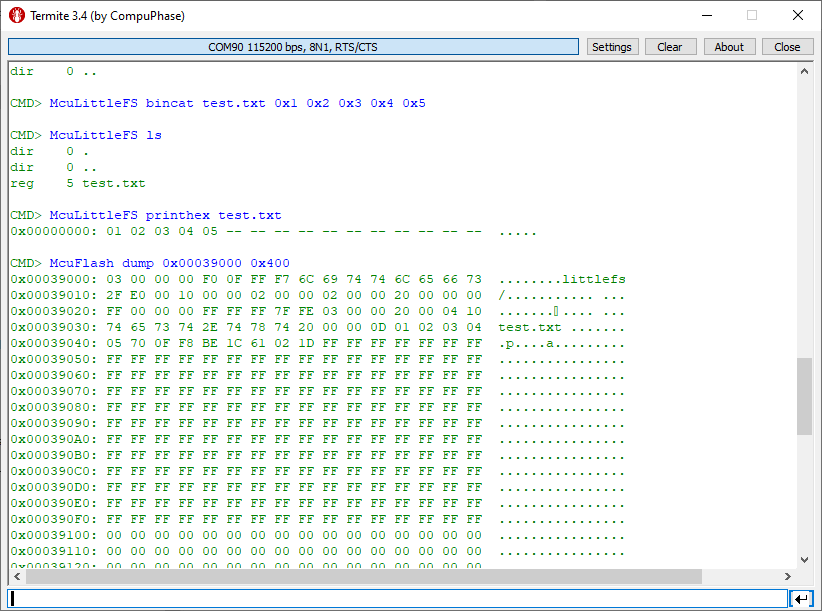
LittleFS File System with MCU Internal FLASH Memory

In many of my embedded projects I need persistent data or storage for settings. If using an SD card, then FatFS is usually my choice for the file system. But if using an external FLASH memory device, then my preferred choice is usually LittleFS: it is a little fail-safe filesystem, designed for micro-controllers, which I’m using with external flash memory devices.

In the case where there is enough MCU flash, or if there is no external FLASH device available in a design, it can use the MCU internal FLASH as storage storage too. This is the topic of this article:

LittleFS File System Data
Continue reading