I won’t be able to attend the Maker Faire in Rome (16. – 18. Oct. 2015). But five of the Sumo bots students from the previous semesters have built and programmed will be there.

Sumo Robots

I won’t be able to attend the Maker Faire in Rome (16. – 18. Oct. 2015). But five of the Sumo bots students from the previous semesters have built and programmed will be there.
Sumo Robots
Given all the posts I already have published on a similar topic, this one will be a short one: how to use the Freescale FRDM-K64F board with OpenSDAv2 to debug another board:
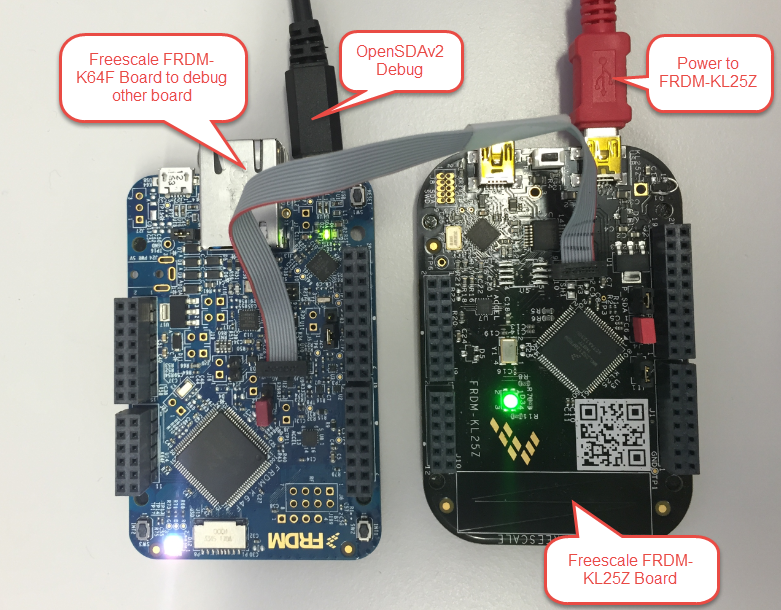
FRDM-K64F Board to Debug FRDM-KL25Z Board
In “CodeWarrior Flash Programming from a DOS Shell” I showed how to program a device from the DOS shell. Because that example was for ColdFire and CodeWarrior for MCU10.2, here is the same for a Kinetis (FRDM-KL25Z) and CodeWarrior for MCU10.6. In my workspace (c:\tmp\wsp_10.6) I have a project folder (FRDM-KL25Z).
I’m using the ‘Flash Programmer’ to sneak the needed commands:

Sneaking Commands from Flasher
English is not my first language, but I use it in this blog because that way I can reach a broader audience. If I would use Swiss German, only a few would be able to understand what I write about: “Wänn I würd schwiizerdütsch bruuche, dänn chönt wohl chuum öpper das hie läse” ;-).
Google Translate is not prefect, but still it does a fair job of translating web pages. I have added now a Google translate button to this blog side bar. Click on it and have the web page translated to the language of your choice. Try it out:

💡 If you are speaking Portuguese and want to learn about the Freescale FRDM-KL25Z board, then check out https://hardwarizando.wordpress.com/2015/08/11/introducao-a-kl25z-codewarrior-processor-expert-e-interrupcoes-periodicas/
Happy Translating 🙂
PS: some of the translations by Google are sooooo funny 🙂
This is Part 1 of a Mini Series. Manya has challenged herself to use the Adafruit NeoPixels (WS2812B RBG LEDs) with the Freescale FRDM-K64F board and the Kinetis SDK (see “Let’s play with Freescale FRDM-K64F“). I did a while back that with the FRDM-KL25Z board (see “NeoShield: WS2812 RGB LED Shield with DMA and nRF24L01+“). I used Processor Expert in my project (without the Kinetis SDK), and with this setup it is very easy. However, Manya wanted to do this with the Kinetis SDK and without Processor Expert. No surprise to me, she has found out that this setup with the Kinetis SDK and without the usage of Processor Expert is much more challenging (see “Not done yet!!“). I promised to Manya to give her a helping hand, so here we go! 🙂

Adafruit 8×8 NeoPixel Shield with Freescale FRDM-K64F Board
I’m preparing for the next semester at the university starting in September this year. As part of that, I’m currently evaluating the Freescale Kinetis FRDM-KL43Z board:

FRDM-KL43Z Board Unpacked
Key to successfully implementing embedded applications these days is to have detailed visibility into what is going on with the application on the board. For this, I’m using the FreeRTOS+Trace from Percepio to inspect the runtime behaviour. Stop-Mode debugging is very useful, but visibility into the runtime is even more important. FreeRTOS+Trace is a tool to accomplish this, but it requires to dump the data off the target to the host (see “Updated Percepio Tracealyzer and Trace Library to Version V2.7.0“). Usually, I’m using the GDB debugger for this, and that works for shorter trace sequences like a few seconds. Yes, I can combine them, but it painful to stop, dump and continue. So what if I could collect trace for several minutes or hours without the need to stop the application? Why not stream the data to the host directly?
So here is it: I’m now able to get almost unlimited trace streaming off the target, witout user intervention. I can trace my application for hours 🙂

Trace Recording for almost one hour
There are cases where my application runs find for days, weeks or even months, but then from time to time there is an application crash. Yes, the watchdog will recover it, but still it would be good to know what happened? One solution would be to hook up a trace probe (like the one I have described in this post: “First Steps with the P&E Tracelink“). But having such a trace probe attached all the time is first not cheap and second not always possible. So what if the application would leave ‘breadcrumbs’ behind which would tell me the flow of the program leading to the problem? I have found a functionality in the GNU tools which seems not be widely known or use, but is incredibly helpful in such cases.
So what if I could get a log like this telling me which functions get called by whom?
{ 00000E88->00000DA0 ???->DEMO_Init
} 00000E88<-00000DA0 ???<-DEMO_Init
{ 00000E8C->00000D40 ???->DEMO_Run
 { 00000D62->00000CE8  DEMO_Run:0x0022->decide
  { 00000D0E->00000C60  decide:0x0026->calcValue
  } 00000D0E<-00000C60  decide:0x0026<-calcValue
  { 00000D16->00000CA0  decide:0x002E->getValue
   { 00000CC6->00000C60  getValue:0x0026->calcValue
   } 00000CC6<-00000C60  getValue:0x0026<-calcValue
  } 00000D16<-00000CA0  decide:0x002E<-getValue
 } 00000D62<-00000CE8  DEMO_Run:0x0022<-decide
 { 00000D62->00000CE8  DEMO_Run:0x0022->decide
For a home automation project I need to know the room temperature and humidity percentage of the room air. Adafruit has an inexpensive DHT11 sensor from http://www.aosong.com which I decided to use for that project.

Test Setup for DHT11 Sensor
If you are designing your own board for the Freescale FRDM boards, then having the matching PCB design files is a good thing to have. I have posted this week an Altium contribution on GitHub for the FRDM headers (see “FRDM-KL25Z Arduino Headers with Altium“). And here there is yet another contribution I received from [Darren]: the FRDM-KL25Z board in Altium :-):
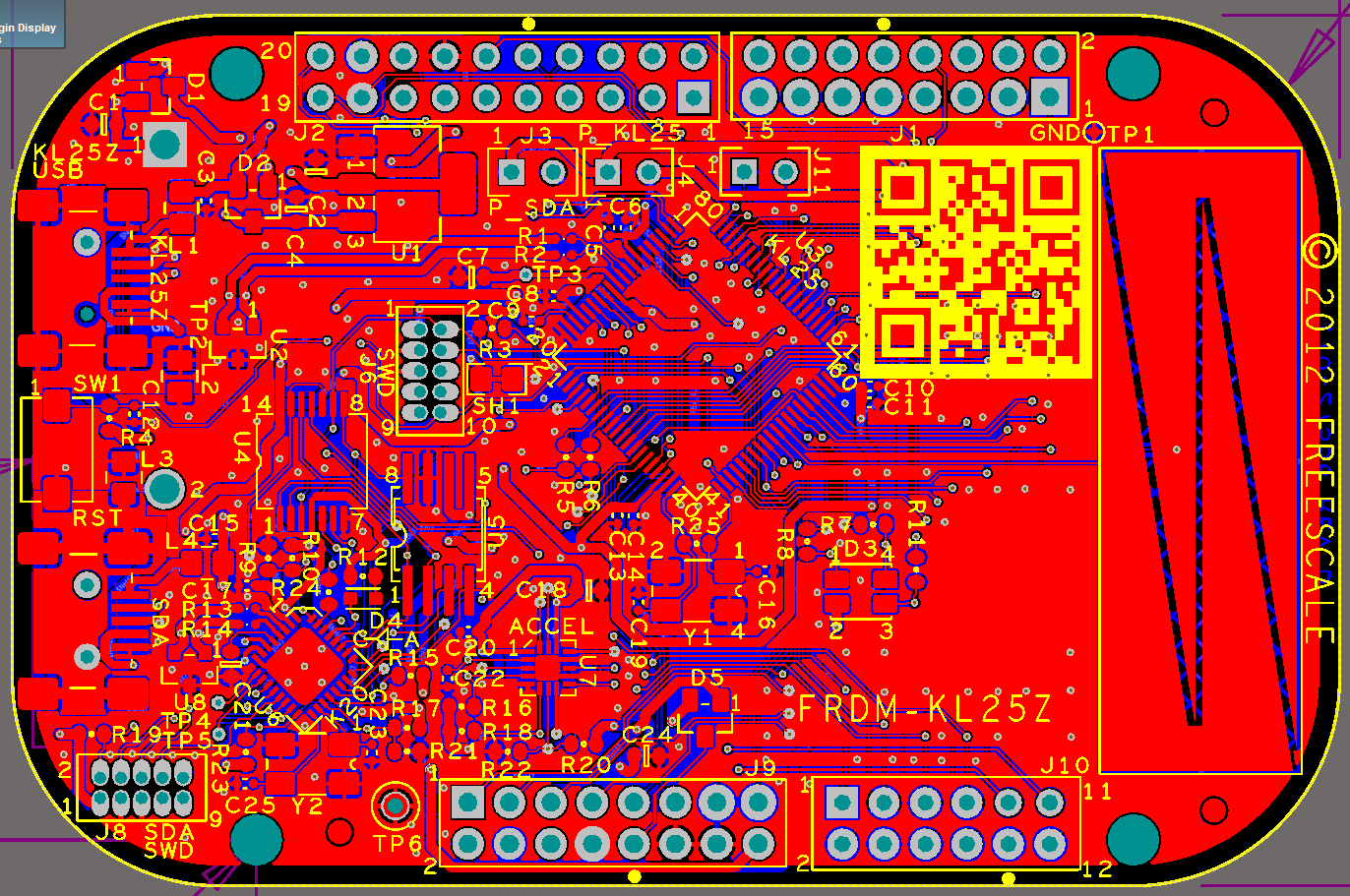
FRDM-KL25Z in Altium
 MCU on Eclipse