Getting started with Kinetis FRDM- K64F: New and Better!! :)

Hello all!

Here is my second blog about the Kinetis MCU development boards, introducing you to the new and more informative Getting Started process for Kinetis FRDM-K64F from Freescale. As a part of my internship I got the amazing opportunity to play with the ‘New Getting Started’ process and the most recent box of the FRDM-K64F development board from Freescale.

Freescale have been working all along to make the life of its customers easier. So, at the FTF 2015 we launched the new website:

http://www.freescale.com/webapp/sps/site/prod_summary.jsp?code=FRDM-K64F&tab=In-Depth_Tab

This website is for the new Getting started process for FRDM K-64F. This website will tell you all that you will need to start the FRDM K-64F development board. Continue reading
Using Segger Real Time Terminal (RTT) with Eclipse

I have used semihosting more and more in my projects. However, there are several disadvantage of using it:

  • Without special handlers, it only works with an active debug connection going on. Without a debugger attached, the application blocks otherwise.
  • Because it needs debugger interactions, it is rather slow (only several hundreds of bytes per second)

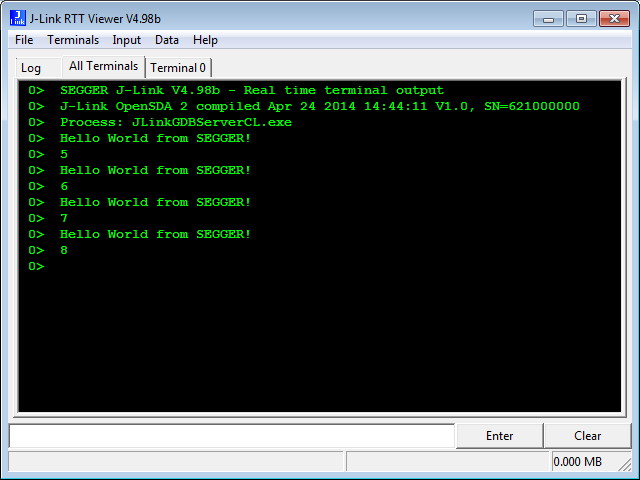
The good news is that Segger supports with their debug probes a faster approach with what they name Real Time Terminal (RTT). And it even runs without a debugger attached to the board: all what I need is a Segger J-Link probe (or Segger J-Link OpenSDA) plus a telnet client.

Segger RTT Viewer

Segger RTT Viewer

Continue reading

Code Coverage with gcov, launchpad tools and Eclipse Kinetis Design Studio V3.0.0

What makes Eclipse great: using open source tools there are a lot of tools and techniques available which usually are only provided for desktop development.

A while back I described how to do code coverage with Eclipse Kepler and the GNU ARM Embedded (launchpad) tools (see “Code Coverage for Embedded Target with Eclipse, gcc and gcov“). With Kinetis Design Studio out, time to do the same with that Eclipse distribution, especially as Freescale is now using the stock GNU ARM Embedded tools too.

Coverage with multiple Files

Coverage with multiple Files

Continue reading

Sensirion SHT11 Temperature and Humidity Sensor on a MikroElektronika Click Board

In one of my earlier posts (“Using the DHT11/DHT22 Temperature/Humidity Sensor with a FRDM Board“) I’m using the DHT11/DHT22 temperature/humidity sensors with the FRDM-KL25Z board. These sensors are very inexpensive, but have limited measurement range and accuracy. As pointed out by a reader of that article, Sensirion (a Swiss company :-)) has good sensors too, and I decided I would like to try the SHT11 sensor:

  • 0-100% Relative Humidity
  • +/- 3% Relative Humidity accuracy
  • -40 – +125°C
  • 2.4 – 5.5V supply voltage
SHT11 Sensor

SHT11 Sensor

Continue reading

Code Coverage for Embedded Target with Eclipse, gcc and gcov

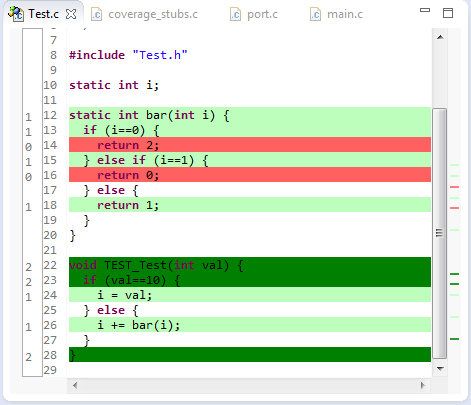
The great thing with open source tools like Eclipse and GNU (gcc, gdb) is that there is a wealth of excellent tools: one thing I had in mind to explore for a while is how to generate code coverage of my embedded application. Yes, GNU and Eclipse comes with code profiling and code coverage tools, all for free! The only downside seems to be that these tools seems to be rarely used for embedded targets. Maybe that knowledge is not widely available? So here is my attempt to change this :-).

Or: How cool is it to see in Eclipse how many times a line in my sources has been executed?

Line Coverage in Eclipse

Line Coverage in Eclipse

And best of all, it does not stop here….

Continue reading

Recovering the FRDM-K64F Bootloader, or: Cloning the Program of a Microcontroller

The Freescale FRDM-K64F and FRDM-K22F have a different OpenSDA (v2) firmware on it: unlike the earlier (v1), that firmware is open and not protected which is a great thing. However, it has the disadvantage if you use the wrong SWD/JTAG header on your board, the bootloader on the K20 OpenSDA microcontroller is gone 😦

Two SWD Headers on FRDM-K64F Board

Two SWD Headers on FRDM-K64F Board

Continue reading

Tutorial: FreeRTOS with the Kinetis SDK and Processor Expert

Freescale had announced at FTF back in April this year that they will use Kinetis Design Studio  and the Kinetis SDK for all new Kinetis devices. The switch from CodeWarrior to Kinetis Design Studio (see “Comparing CodeWarrior with Kinetis Design Studio“) was not much of big deal for my projects (although CodeWarrior still has better features), and projects are rather easily portable. However, the move to the Kinetis SDK has been massively disruptive: Before it was easy to move projects from one device to another with Processor Expert, even from S08 to ColdFire to Kinetis. Now with the Kinetis SDK everything is very different. At least Freescale now officially supports FreeRTOS, and for myself as a big fan of that open source RTOS, that was some good news.

Blinking Red LED with FreeRTOS Task using Kinetis SDK, FreeRTOS and Processor Expert

Blinking Red LED with FreeRTOS Task using Kinetis SDK, FreeRTOS and Processor Expert

So in this tutorial I’m showing how FreeRTOS can be used with the Kinetis Design Studio. That makes at least using the Kinetis SDK bit more familiar to me :-).

Continue reading

RAM Target with Kinetis Design Studio and FRDM-K64F

Newer microcontroller have increase RAM areas, making it suitable to run the application from RAM instead of FLASH. For the FRDM-K64F board and the Kinetis Design Studio (V1.1.1), I have explored how to run the application out of RAM instead of FLASH memory, both for P&E and Segger connections.

MK64FN1M0VLL12

MK64FN1M0VLL12

Continue reading

USB CDC with the FRDM-K64F, finally!

Sometimes I think that a problem should be solvable in a few minutes, and then it turns out that it lingers around for months. Very, very frustrating! Such a thing is getting the USB 4.1.1 stack running on the FRDM-K64F board. I have that board since April 2014, and it took me 7 months to get the FSL USB stack running on it :-(.

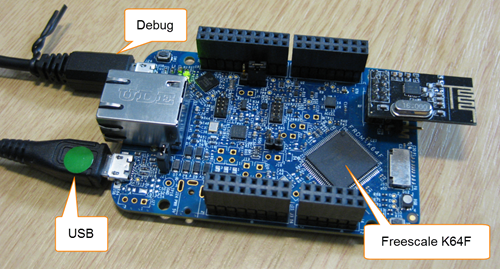
FRDM-K64F Board

FRDM-K64F Board

Continue reading

Enabling/Disabling FXOS8700CQ Device Needs a Delay

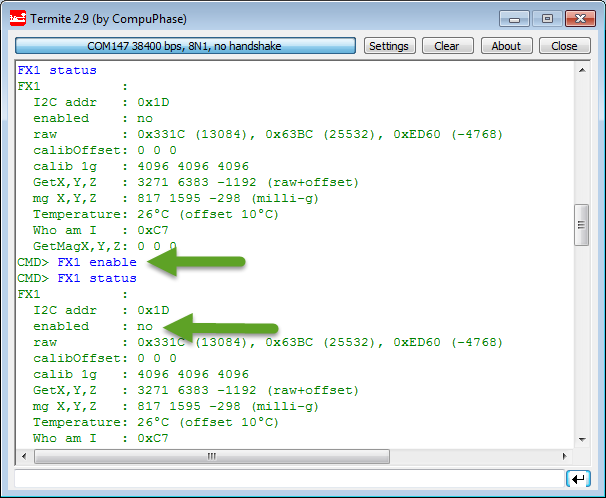
Found an interesting behaviour with the Freescale FXOS8700CQ on the new Sumo Robots (see “Sensor and Communication Shield for Sumo Robot“): when enabling the accelerometer/magnetometer, it actually did not work:

Failed to Enable FXOS8700 Accelerometer

Failed to Enable FXOS8700 Accelerometer

Continue reading