I was running into that dialog while opening my S08 project:

Target Task Error: “Error importing task.”
Hmm, that’s weird: the target task framework complains about a target task, but in my project I’m not using any target tasks?

I was running into that dialog while opening my S08 project:
Target Task Error: “Error importing task.”
Hmm, that’s weird: the target task framework complains about a target task, but in my project I’m not using any target tasks?
Processor Expert in MCU10 generates a lot of files for me. But sometimes I need to tweak things a bit. I change the generated sources to fit my needs, and then I want to prevent that my changes get overwritten by the next code generation.
First, I need to know which files are generated: the information in “Dissection of MCU10 Projects” helps me to identify them. But how can I prevent code generation for each component? Or for other generated files? Or how to completely disable code generation?
Inheriting Processor Expert components with CDE and the Component Wizard is easy. But sometimes it is tricky and requires some tweaking. Components should be easily accessible (see CDE: Show Inherited Methods), and names should make sense. And here is a challenge: changing the name for inherited components:
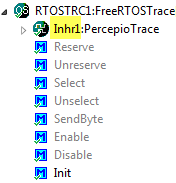
Inherited Component with ‘Inhr’ Base Name
Using Processor Expert components makes my development faster and easier. And when I have a useful piece of software I want to distribute or use in another project, I transform it into a Processor Expert component. But recently I noticed a strange thing with my components: the inherited components did not show the methods and events?
One of the greatest features in Eclipse is the Indexer: it parses automatically my code in the background. It creates all the needed information so I can browse around my sources. I can use the Open Declaration context menu in the source code:
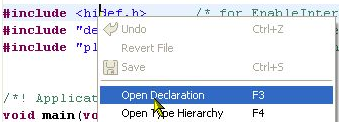
Open Declaration Context Menu
I’m using Subversion to keep track of changes in my eclipse MCU10 projects. That allows me to get back in time without the need to make copies of my project. But sometimes I do need to make a copy of my project: because I want to use a project as a base and then do something different with it. To make a copy of a project is simple, but requires some more steps if I’m using Target Tasks. Here is how I do this… Continue reading
Creating an eclipse managed make project with MCU10 is easy: Starting the wizard with File > New > Bareboard Project and after a few clicks I have a project. I don’t need to worry about all the files in the project structure, until……..well, until I need to put the files into a VCS.
This error message is something I see nearly every day in the Problems View:
mingw32-make: *** No rule to make target ….

No rule to make target
As outlined in Quickstart for Processor Expert in Eclipse, it is easy to create a new Processor Expert project. There are three shared files which are maintained by Processor Expert. At the same time I need to change them with my code. So how does this work, and how can I configure it to my needs?
Ok, you are probably new to Eclipse, and want to do the fun part: Creating an Eclipse Processor Expert project in CodeWarrior for MCU10.2. Cool! Here are some steps and tips to make it smooth from the beginning…

