Not everyone is familiar with Git, and not everyone wants to use it. Although I think using Git or SVN is something every software engineer today needs to master 😉 To make it easier for the ‘non-Gitter’ to use the Processor Expert components, they are available now as *.PEupd files as described here. However, the *.PEupd files are just a snapshot, and not the latest and greatest. So how to use the latest component sources and example projects without Git?
Tag Archives: technology
Rollout of ‘julier’ Formula Student Race Car
Last Thursday the new Formula Student race car named ‘julier’ had its rollout to the public at Sauber Motorsports in Hinwil, Switzerland. Again a fully electrical racing car, but this time with 4-wheel drive, improved aero-pack and electronics, and able to get from 0 to 100 km/h in 2.6 seconds!
CMSIS-DAP with IAR and the KL25Z Freedom Board
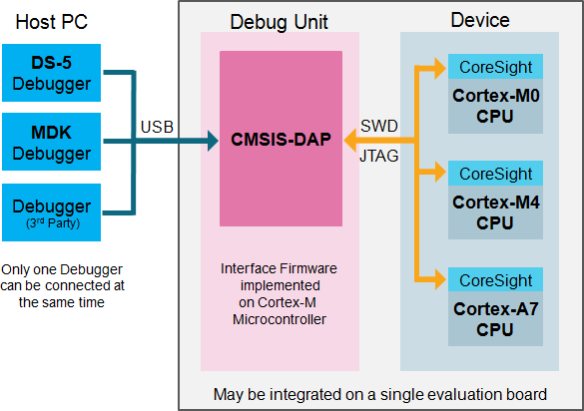
Beside of USBDM, there is another Open Source implementation of a debug interface for the Freedom Board OpenSDA: CMSIS-DAP.

CMSIS-DAP (Source: http://nimblemachines.com/cmsis-dap/)
CMSIS-DAP stands for ‘Cortex Microcontroller Software Interface Standard – Debug Access Port’) has been published by ARM Inc. With this, there is an open source alternative to proprietary implementation (e.g. P&E OpenSDA or Segger OpenSDA).
Beside of the ARM MDK IDE, CMSIS-DAP is supported by Coocox and IAR. And IAR is what I’m using in this post.
Freedom Board with Segger OpenSDA Debug Firmware
Looks like there is some movement on the ‘OpenSDA Front’: After CodeRed has released their RedProbe OpenSDA firmware, now Segger has released an OpenSDA firmware.
With this, I get a low-cost debugging solution similar to the well-known J-Link run control devices. The OpenSDA Segger Firmware is something like a J-Link-lite.
Software Engineering for Embedded Systems
Yesterday was a great day: The book “Software Engineering for Embedded Systems” finally arrived 🙂 :
Why I’m excited about this? Because I had the honor to contribute a chapter to that book 🙂
Freedom Track Robot with IEEE802.15.4/SMAC
My other robots based on the FRDM-KL25Z use Bluetooth as connectivity. This one is using a Freescale IEEE802.15.4/ZigBee/SMAC module:
Low-Level Coding with PDD (Physical Device Driver)
As with any software drivers: they are never perfect. The same applies to the Processor Expert components delivered in CodeWarrior for MCU10 or the DriverSuite too. That’s why I have created many more components which are available on GitHub here. All these components are using other components to reach the hardware. But what if a functionality is not exposed through the low-level component? Or what if I want direct access to the hardware? Up to now I had to choose either the Processor Expert way, or to do it in the ‘traditional’ way using an SDK like CMSIS or vendor supplied header files.
With MCU10.4, I noticed that there is another way: PDD (Physical Device Driver).
USBDM 4.10.5 supports now MCU10.4
Processor Expert Component *.PEupd Files on GitHub
The MCUonEclipse GitHub repository is great for everyone which is familiar with Git or GitHub. Previously I was hosting my Processor Expert components on steinerberg.com. Exporting and maintaining the Processor Expert Update Files (*.PEupd) one by one is a lot of effort. GitHub makes things a lot easier, but again: you need to be familiar with it. And not everyone is ‘gitting’ yet. To help the rest of the world (the non-Gitter), I have now published Processor Expert update files for all the components in the repository, so it is easier to install them.
IMPORTANT NOTE: After October 17th 2014, the releases of the McuOnEclipse Processor Expert has been moved to SourceForge, see McuOnEclipse Releases on SourceForge
Adding/Removing Floating Point Format for S08 Projects
Usually I do *not* use floating point numbers in my projects. For this, I select ‘None’ during the project creation in CodeWarrior for MCU:
But what if I need to change my mind later? How to change such a ‘no-floating-point-needed’ project to one with floating point format support?