Tutorial: Replacing IAR EW with Eclipse IDE

Are you using IAR tools and you are jealous looking at what others can accomplish with Eclipse? You wish you could use your IAR build tools but taking advantage of Eclipse too?

I do not want to start a religious IDE war here ;-). At least for IAR, there is a way to bring both worlds together: having IAR build and debug tools integrated in Eclipse :mrgreen: :

Using IAR Tools In Eclipse

Using IAR Compiler and Debugger in Eclipse

Continue reading

Review: ThunderBench with the Freescale FRDM Board and Processor Expert

For the Eclipse and Processor Expert lovers of this world: there is another Eclipse based IDE you can use: ThunderBench made by Emprog:

ThunderBench for ARM Eclipse Startup Screen

ThunderBench for ARM Eclipse Startup Screen

They support a range of ARM based devices, including the Freescale ones I’m using. So I downloaded the v3.24 30 day trial from their download page last week. Finally I have found some time to try it out. Could this be an alternative to use my Freescale FRDM boards with Processor Expert?

Continue reading

IAR ARM v6.7 comes with improved Processor Expert Support

This week I saw on the IAR website that they have released the new IAR Embedded Workbench v6.7 for ARM. I was still on 6.5 using the free code size limited ‘Kickstart’ version), so I thought it would be a good time to upgrade to the v6.7. And there are good reasons as the connection to Processor Expert makes things much easier now.

Continue reading

S-Record Manipulation with GNU objcopy and Burner Utility

In my earlier post “S-Record Generation with gcc for ARM/Kinetis” I documented how to have the ARM GNU gcc toolchain to produce a S19 (Motorola (or now Freescale) S-Record) file. Here are a few more tips on that subject:

  1. Changing length of S-Records
  2. Only using 32bit addresses
  3. Combining S19 files

Continue reading

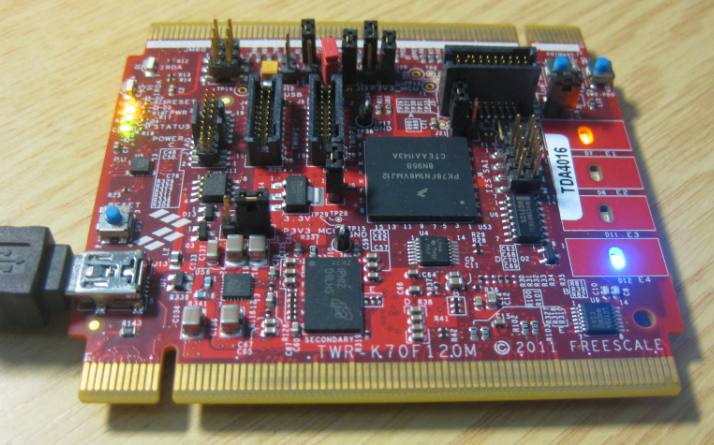
USB with the TWR-K60F120M and TWR-K70F120M

If you read my posts, then you probably know: I *love* the FRDM boards! But: Freescale has only the lower-end processors available with a FRDM board (yet?). As I need something more powerful for my Raspberry Pi Camera project, I’m using Tower boards instead. This gives me an ARM Cortex-M4 with 120 MHz, Floating Point unit plus 128 KByte SRAM :-).

For that project I need USB. So this post is about using the TWR-K60F120M and TWR-K70F120M with USB connectivity, using the USB CDC device class as example. Initially I thought I can do as easily with the FRDM boards. It turned out, that things are not that easy.

Freescale TWR-K70F120M Tower Board

Freescale TWR-K70F120M Tower Board

Continue reading

Eclipse Command Line Code Generation with Processor Expert

Eclipse based IDE’s have typically one limitation: the IDE has not much scripting capabilities. Yes, I can use things like JUnit for testing, but if it comes to build and debug C/C++ applications, then support gets really rare. An exception to this is CodeWarrior for MCU which features a command line version of the IDE which can be used for test automation as I used it in one of my tutorials. What I missed so far is to have a command line interface for Processor Expert to generate code. This is now possible with CodeWarrior for MCU10.5 :-).

Continue reading

Using the FRDM-KL25Z with CMSIS-DAP to program non-Freescale ARM Microcontrollers

Freescale might not have thought about this: how to use Freescale boards and silicon to develop for non-Freescale silicon? 😉

I tinkered around using the FRDM (e.g. FRDM-KL25Z) board as a general purpose programming or debugging device. See the links to the posts at the end of this article. I have used it to program and debug other Freescale ARM processors. It requires board changes and the usage of a different OpenSDA firmware which has its own limitations (no USB CDC serial bridge). But for about $15-20 I have a device to program my own external boards :-).

If you are using Keil tools, then the good news is: With CMSIS-DAP you can debug any other (even non-Freescale) ARM device as long it is supported by the IDE :mgreen:

FRDM-KL25Z debugging the nRF51422-DK (Source: Keith Wakeham)

FRDM-KL25Z debugging the nRF51422-DK (Source: Keith Wakeham)

Continue reading

Tutorial: Using the FRDM-KL25Z as Low Power Board

The FRDM-KL25Z is a great board: inexpensive (around US$15), small form factor, has easily accessible pins, and has a low power (capable, at least) microcontroller, and comes with an embedded debugging interface. So why not using this board right away ‘as is’ for a low power battery operated device? Great idea, you think? Yes, I thought too. Only to find out that the board needs 20 mA out of the box.

The good news is: It is possible on a week-end to get this 150 times better down to 132 μA, with an RTOS running all the time :-). I invite you to join a journey with board modifications, jumpers, schematics and many multi-meter pictures ;-)….

132 micro amps

132 micro amps!

Continue reading

How to Avoid Slow Processor Expert Projects

The Eclipse IDE is in my view the best IDE in the world :-). But it is not the fastest one: All the functionality and comfort has a price, and such a Java and highly flexible IDE requires its resources. The Eclipse community is continuously addressing that concern, and for example the Eclipse Juno 4.2 IDE in CodeWarrior for MCU10.5 shows this nicely: things are much smoother compared to the Eclipse Indigo 3.7 in MCU10.4. But if you feel that you do not want to use Processor Expert because it is too slow, then I have a trick how to improve performance by a factor of 10 :-).

Continue reading

Link Order: Using Multiple Definitions with ARM GNU Linker and Eclipse

Sometimes I have ‘multiple definitions’ in my projects: this means that I have functions defined in one source files, and I need to ‘overwrite’ one or more with a version in another source file.  For example I have a source file with utility functions (Utility.c), and I want to overwrite some of these functions with a different implementation in a different file (MyUtility.c). How can I do this?

Continue reading