Programming Kinetis with CodeWarrior from the DOS Shell

In “CodeWarrior Flash Programming from a DOS Shell” I showed how to program a device from the DOS shell. Because that example was for ColdFire and CodeWarrior for MCU10.2, here is the same for a Kinetis (FRDM-KL25Z) and CodeWarrior for MCU10.6. In my workspace (c:\tmp\wsp_10.6) I have a project folder (FRDM-KL25Z).

I’m using the ‘Flash Programmer’ to sneak the needed commands:

Sneaking Commands from Flasher

Sneaking Commands from Flasher

Continue reading

Updating Segger Tools in Eclipse Kinetis Design Studio

Segger releases often new application and firmware updates. If I install an IDE like the Freescale Kinetis Design Studio, it comes with that firmware version available at that time. How to take advantage of a new Segger release?

Segger Download Page

Segger Download Page

Continue reading

Batch Programming with GDB: Segger J-Link and P&E Multilink

I need to program several boards with a firmware: a number too small for serious batch/factory programming, but a number too high doing this with the debugger. I want this:

  1. Connect the board with the debug probe and power it
  2. Run a script to flash the program and run it
  3. Disconnect and restart step 1.
First set of sensor nodes with two programming adapters

Need to program a few boards…

Continue reading

Debugging STM32F103RB NUCLEO Board with Segger J-Link

The STMicroelectronics STM32F103 (ARM Cortex-M3) Nucleo boards include the on-board ST-Link v2 circuit which allows to debug the board. This circuit is similar to the OpenSDA circuit found on Freescale boards. Unlike the Freescale OpenSDA, the ST-Link is only the ST-Link: it is not possible to load a P&E Multilink or Segger J-Link or firmware on it. Luckily, the ST-Link has a SWD connector, but this connector is a non-standard one. So how can I debug that board with an Eclipse based environment with GNU ARM Eclipse plugins and a Segger J-Link?

Connected J-Link with Nucleo Board

Connected J-Link with Nucleo Board

Continue reading

Debugging the FRDM-K64F with P&E Multilink

The FRDM-K64F board as other Freescale Freedom board have an onboard debugging device. For everyone who wants to debug the FRDM-K64F board with say a P&E Universal Multilink, here is my setup in case you do not get it working out of the box:

FRDM-K64F with P&E Multilink

FRDM-K64F with P&E Multilink (click to enlarge)

Continue reading

Command Line Programming and Debugging with GDB

Eclipse with GDB is great: it comes with a graphical front end for debugging. But sometimes it is all about to download a program. Is it really necessary to launch an IDE like Eclipse to program or quickly debug a board? With the GNU Debugger (GDB), the answer is ‘no’: GDB comes with a command line debugger which is designed exactly for this: providing a command line interface for programming/downloading and debugging, bypassing any GUI (Graphical User Interface).

Combination of GDB Debugging Probes and Boards

Combination of GDB Debugging Probes and Boards (P&E, Segger and FRDM-KL25Z)

Continue reading

OpenOCD/CMSIS-DAP Debugging with Eclipse and without an IDE

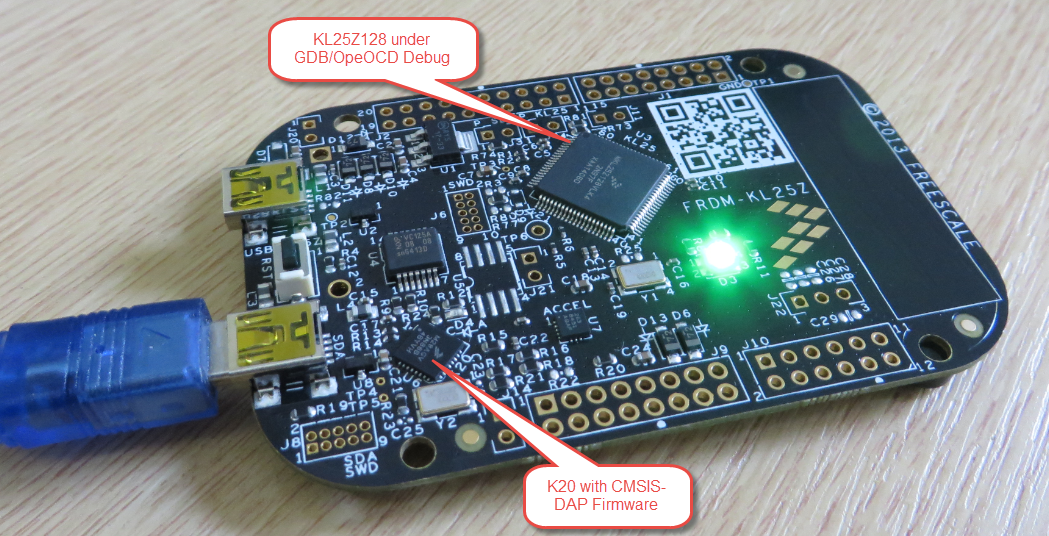
OpenOCD is an open source and free-of-charge debugging solution, which is a great option here at the University of Lucerne, as students do not need to buy an expensive debugging probe. Still, I recommend to buy professional probes like the P&E or Segger ones, as they are worth every (Euro) cent. But for a ‘zero’ budget, OpenOCD with CMSIS-DAP is something to consider. And with Kinetis Design Studio using the GNU ARM Eclipse Plugins, OpenOCD is not that hard to be used. And because both Freescale and GNU ARM Eclipse offer OpenOCD Windows binaries, that connection method is in the reach of Windows users too.

FRDM-KL25Z with OpenOCD Debug

FRDM-KL25Z with OpenOCD Debug

Continue reading

Tutorial: How to Erase the FLASH with the GNU GDB debugger

I have several applications where I store application specific information in the microcontroller FLASH memory (see “Configuration Data: Using the Internal FLASH instead of an external EEPROM“). I have run into issues recently with the Segger J-Link GDB server as by default it does *not* erase all the FLASH memory. So the question is: How can I erase all (or part) of the FLASH memory with GDB (e.g. in Kinetis Design Studio or in Eclipse)?

Memory Monitor with Erased Flash

Memory Monitor with Erased Flash

Continue reading

Recovering the FRDM-K64F Bootloader, or: Cloning the Program of a Microcontroller

The Freescale FRDM-K64F and FRDM-K22F have a different OpenSDA (v2) firmware on it: unlike the earlier (v1), that firmware is open and not protected which is a great thing. However, it has the disadvantage if you use the wrong SWD/JTAG header on your board, the bootloader on the K20 OpenSDA microcontroller is gone 😦

Two SWD Headers on FRDM-K64F Board

Two SWD Headers on FRDM-K64F Board

Continue reading