DIY Free Toolchain for Kinetis: Part 3 – Debugger (GDB Server with P&E and Segger)

This is the third part of a tutorial series how to ‘do-it-yourself’ a tool chain for the Freescale Kinetis microcontroller, with the FRDM-KL25Z as example. The tool chain is using GNU ARM gcc plus Eclipse Kepler release. So far I have the following parts:

List of Tutorials

So far things are very generic. But with debugging it means different hardware, and different hardware connections. And for this connection we need a GDB Server.

GDB Server

Eclipse CDT features a GNU Debugger (GDB), and this is what I want to use here: debugging my microcontroller with GDB inside Eclipse. In order to debug the microcontroller, I need two other things: a GDB Server and a Debug Probe.

GDB with GDB Server

GDB with GDB Server

Continue reading

DIY Free Toolchain for Kinetis: Part 1 – GNU ARM Build Tools

This is the first part of a multi-part tutorial on setting up a free and functional GNU gcc + Eclipse + debugger environment for use with the Freescale FRDM-KL25Z board.

List of Tutorials

In this first part, I’m showing how to install the GNU ARM tool chain to build a ‘blinking LED’ application for the FRDM-KL25Z. With 100% free tools 😉

Blinking Red RGB LED made with free tools

Blinking Red RGB LED made with free tools

Continue reading

Bricking and Recovering FRDM-KL25Z Boards: Reset, SWD Clock and Low Power

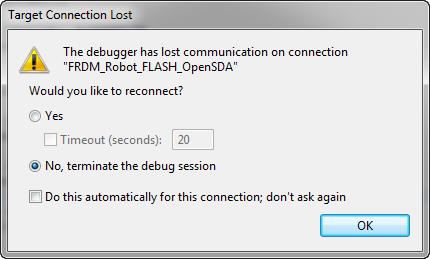
I’m working with a student on building a small autonomous robot platform, based on the FRDM-KL25Z board. We integrated new software modules, compiled and linked, and then downloaded the application to the board. While debugging and stepping through the application startup, I had this:

The Debugger has lost communication on connection

The Debugger has lost communication on connection

Outsch! That’s not good. Even worse, trying to connect again to the board failed :-(. What happened?

Continue reading

Freedom Board with Segger OpenSDA Debug Firmware

Looks like there is some movement on the ‘OpenSDA Front’: After CodeRed has released their RedProbe OpenSDA firmware, now Segger has released an OpenSDA firmware.

With this, I get a low-cost debugging solution similar to the well-known J-Link run control devices. The OpenSDA Segger Firmware is something like a J-Link-lite.

FRDM-KL25Z with Segger OpenSDA Debug Firmware

FRDM-KL25Z with Segger OpenSDA Debug Firmware

Continue reading

Debugging FRDM-KL05Z with USBDM

I mentioned in “Debug External Processors with USBDM and Freedom Board” post that I had a problem to debug the FRDM-KL05Z with USBDM. Well, after a long night with some sleep, with more thinking and searching, finally I have it resolved: I can debug my FRDM-KL05Z with USBDM 🙂

FRDM-KL05Z Debugging with USBDM

FRDM-KL05Z Debugging with USBDM

Continue reading

Debug External Processors with USBDM and Freedom Board

Teaching at a university means to work in a very special environment. What students love is ‘Open Source’: because it allows them to ‘see’ things and learn from the technology. The other thing is: students have a low budgets, so they appreciate if they can use inexpensive or low-cost hardware and software. The FRDM-KL25Z Freedom board for sure meets that low price, and no extra programming device needed.

Now they are building their own boards, and they wish to program and debug it. They can borrow the Segger J-Links and P&E Multilinks we have available at the university. But why not use the Freedom board as ‘hobby’ debug and programming solution? As explored in “Using the Freedom Board as SWD Programmer“, they can use the default factory installed OpenSDA to program another microcontroller of same type. But not to debug it.

While writing the “Using the Freedom Board as SWD Programmer” article, I was looking into USBDM. USBDM has added in January 2013 support for OpenSDA. But at that time, it was somehow not working for me, and I had not enough time to find out what the problem was. Time to get that fixed. Good news: With help and tips from the USBDM community, I have it finally working 🙂

USBDM Debugging another FRDM-KL25Z

USBDM Debugging another FRDM-KL25Z

Continue reading

text, data and bss: Code and Data Size Explained

In “Code Size Information with gcc for ARM/Kinetis” I use an option in the ARM gcc tool chain for Eclipse to show me the code size:

   text       data        bss        dec        hex    filename
 0x1408       0x18      0x81c       7228       1c3c    size.elf

I have been asked by a reader of this blog what these item numbers really mean. Especially: what the heck is ‘bss’???? 🙂

Continue reading

SWD Debugging with the FRDM-KL25Z Board

The OpenSDA on the FRDM-KL25Z board is a cool feature: I do not need any external debugging device to program and debug my board :-). But my KL25Z custom board will not have that OpenSDA on it: first because it would add additional costs, and I do not see a way how I could use it for my board. I better start using a SWD/JTAG debugger for my Freedom board to have everything in place.

What I need to add to the black Freedom board is the SWD header:

SWD J6 (populated) and J11 (unpopulated)

SWD J6 (populated) and J11 (unpopulated)

Continue reading

How (not) to Secure my Microcontroller

There are several reports in the Freescale forums around having ‘secured’ the Freedom board. But what does ‘securing’ a board mean? And what does it mean if I get that ‘Device is Secure’ dialog?

Device is Secure. Erase to unsecure?

Device is Secure. Erase to unsecure?

There are different levels of protection you can find in many embedded microprocessors, and the terms might vary from vendor to vendor:

  1. Protect
  2. Secure
  3. Disable Mass Erase

Continue reading

Unsecuring the KL25Z Freedom Board

In ‘Device is Secure‘ I had a case where this was a false alarm. But recently there has been a report in the Freescale Forum that this can be a real problem with the Freedom KL25Z board I’m using too. I was not able to reproduce this on my end, so a reader of this blog who sent me a binary file to reproduce it.

Well, I was really scared to try that ‘killer’ file on my board, but well, that board is not that expensive, and I have 5 pieces of silicon at hand from a sample order :-). So I took some risk, and programmed that binary using the simple flash programmer. And indeed, when I wanted to debug it again, I got that dialog with my black Freedom board:

Device is Secure. Erase to unsecure?

Device is Secure. Erase to unsecure?

Continue reading