When using a bootloader (see “Serial Bootloader for the Freedom Board with Processor Expert“), then I usually protect the bootloader FLASH areas, so it does not get accidentally erased by the application ;-). When programming my boards with the P&E Multilink, then the P&E firmware will automatically unlock and erase the chip. That’s not the same if working with the Segger J-Link, as it but requires extra steps.
Tag Archives: Eclipse
Emulating Eclipse ‘Run’ with ‘Debug’ Configuration
Student: “Professor, my application does not work!”
Professor: “What is the problem?”
Student: “I don’t know, but the LED on my board is not blinking.”
Professor: “Can you step through the port initialization sequence and check if the clocks are initialized correctly?”
Student: “I have pressed the ‘Run’ button, I’m not debugging”.
Professor: “Why are you not debugging?”
Student: “I always do a ‘Run’, and I do ‘Debug’ only if needed.”
Professor: “Ahhhhhhrrrrgggg!”
Clearly, I’m not immune to the ‘déformation professionelle‘. I very rarely use ‘Run’, because it simply does not offer much value compared to ‘Debug’ during development. If using ‘Run’ and then there is a problem, I have to ‘Debug’ anyway, why not ‘Debug’ from the beginning? It is simply not an efficient way to work for me. Or I’m missing something?
Comparing CodeWarrior with Kinetis Design Studio
At FTF 2014, Freescale made the announcement that CodeWarrior won’t support all the new ARM Kinetis devices coming out in the future: they will be supported with the free-of-charge Kinetis Design Studio (KDS) instead. As for myself, this is a big shift from a well established CodeWarrior toolchain to something new. A question which came up recently several times in the forums and in other posts is: how do CodeWarrior and KDS compare with each other?
RingBuffer Component with Put/Get/Clear Events
Sometimes I have a good idea how to extend one of my Processor Expert components with an extra feature, but then I step back because why implementing more than I need at the moment? Until another user of the component simply asks for the same thing, and here we go: if one or more can take advantage of a feature, that’s definitely a strong argument to add it :-). This happened with the RingBuffer Processor Expert component I’m using in many projects. And a reader of this blog asked to add some extra event methods: when an item is added or removed to the buffer.
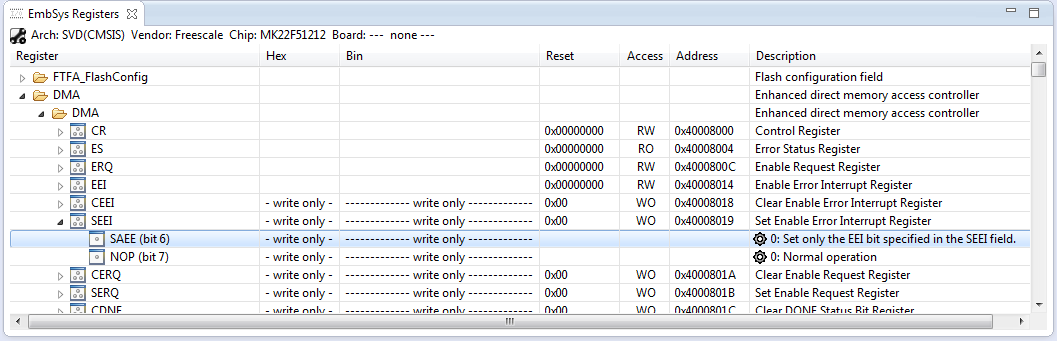
Updated Eclipse EmbSysReg Viewer with extra Freescale SVD Files
The EmbSysReg Viewer (http://embsysregview.sourceforge.net/) has been updated with even more Freescale SVD (System View Description) files, with a current count of 96 devices.
Executing Multiple Commands as Post-Build Steps in Eclipse
The GNU ARM Eclipse plugins from Liviu already offer several built-in actions which can be performed at the end of a build: creating flash image, create listing file and printing the code and data size:
But what if I need different things, or even more things?
How to Add Existing Files to Eclipse Projects
This Tip sounds very basic, but still: I get asked about this about once a week. So it must be something non-obvious in Eclipse then ;-): how to add existing files to an Eclipse project. As with many things in Eclipse, there is not a single way to do something. There are two basic ways to do this:
- Import
- Drag & Drop
- Copy & Paste
The first is the ‘official’ way in Eclipse, the other two are much faster and easier :-).
1. Import
To import one or multiple files, select the folder/project where I want to add the files, then use the menu File > Import:
Building Projects with Eclipse from the Command Line
Eclipse has a great user interface (UI). But what if I want to do things from the command line, without the GUI? For example to build one or more projects in the workspace without using the Eclipse UI? With this, I can do automated check-outs and do automated builds.
Semihosting with GNU ARM Embedded (LaunchPad) and GNU ARM Eclipse Debug Plugins
In “Semihosting with Kinetis Design Studio” I used printf() to exchange text and data between the target board and the host using the debug connection. Kinetis Design Studio (KDS) has that semihosting baked into its libraries. What about if using the GNU ARM Embedded (launchpad) tools and libraries (see “Switching ARM GNU Tool Chain and Libraries in Kinetis Design Studio“)? Actually it requires two more steps, but is very easy too.
P&E Eclipse Update Site for GNU ARM Eclipse Plugins
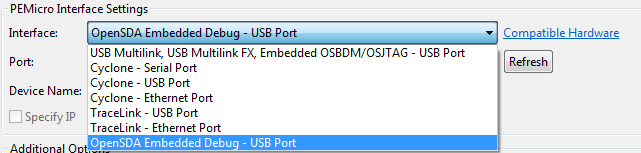
P&E has just released a new version of their Eclipse plugins for the set of GNU ARM Eclipse debug plugins. The GNU ARM Eclipse plugins from Liviu support OpenOCD and Segger J-link, so with this update or extension it adds P&E support to it. With this, I can use the P&E debug devices (P&E Multilink, Tracelink) or as well the Freescale OpenSDA with it.