Controlling NXP Freedom Board RGB LED with openHAB and Raspberry Pi

In “Blinky LED with openHAB on Raspberry Pi” I have used openHAB on a Raspberry Pi to control an LED attached to the Pi, and in “Controlling NXP Freedom Board RGB LED with openHAB and Raspberry Pi” I have explored how to connect a NXP Freedom Board over USB CDC to the Raspberry Pi. In this article I’m going to combine both: to control the LED on a NXP Freedom board remotely with openHAB on the Raspberry Pi.

ColorPicker with openHAB and FRDM-KL25Z
ColorPicker with openHAB and FRDM-KL25Z

Continue reading

Show Floating Point Variable Bytes in Eclipse CDT

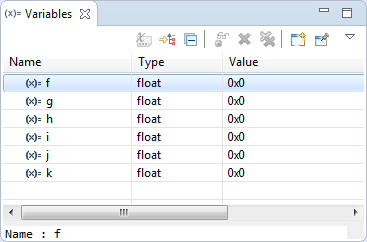
My preferred variable format in Eclipse is hexadecimal (see “Debugging Variables in Hexadecimal with Eclipse“). However, this does not work well with floating point variables:

Floating Point Variables in Eclipse Variables View

Floating Point Variables in Eclipse Variables View

The above view shows all variables having the value 0x0 (zero), but that’s actually not really true.

Continue reading

Debug Multiple Boards with GDB at the Same Time

Many times it is very useful to debug multiple boards at the same time. For example if I’m debugging a communication stack between two boards: that way I can debug the protocol on both sides. Eclipse is a great framework which allows that. This post shows how to debug multiple boards (e.g. the NXP Freedom boards) in parallel from the same Eclipse IDE using GDB and the Segger J-Link:

Two NXP Freedom Boards debugged at the same time

Two NXP Freedom Boards debugged at the same time

Continue reading

McuOnEclipse Release 10-Jan-2016

With the start of the new year 2016 I have published a new McuOnEclipse component release with the following major updates:

  1. Updated Segger SystemView and Real Time Transfer (RTT): added terminal functions and extra interfaces
  2. Improved USB CDC with serial number handing
  3. FreeRTOS TaskList shell command
  4. USB Stack: added MSD Host support for MCF52259, added support for K24FN120 and for the 100 MHz K20 devices
  5. New NEOMatrix component for Adafruit NeoPixel Matrix displays

    256 NeoPixel Matrix with FRDM-KL25Z

    256 NeoPixel Matrix with FRDM-KL25Z

Continue reading

Blaze: Miniature, Powerful, Hackable Display with Touch

I’m not much monitoring what is happening on Kickstarter or Indiegogo, only for time reasons, but maybe I should? For a while I’m looking for the next level for the tinyK20 project: better and more powerful microcontroller with touch display/graphic LCD. And when I see a Freescale/NXP Kinetis microcontroller on a crowd funding platform like this one, I hardly can resist 😉 :

Blaze Board (Source: http://kck.st/1S0HyUp)

Blaze Board (Source: http://kck.st/1S0HyUp)

Continue reading

Renaming Eclipse CDT Projects

When I create a project in Eclipse (e.g. in Kinetis Design Studio with the GNU ARM Eclipse plugins), I have to specify the name of the project during creation time:

Project Name in Eclipse

Project Name in Eclipse

But what if I change my mind later on and want to use a different name? How to rename the project?

Continue reading

Linting with Eclipse and the GNU ARM Embedded Launchpad Compiler

For a space project we have to make sure that things are not failing while our hardware orbits around the Mother Earth. Therefore we are using different static and dynamic analysis tools, and one of it is using PC-lint from Gimpel to catch as many errors and bugs as possible. For that project, we are using Eclipse with the GNU ARM Embedded (launchpad) ARM compiler and Eclipse as IDE with the GNU ARM Eclipse plugins. There are commercial plugins available for linting with Eclipse (e.g. Linticator), but with a few tweaks it is possible to lint with Eclipse free-of-charge. So this article is about how to lint an Eclipse (Freescale/NXP Kinetis Design Studio) project with PC-Lint.

Lint messages in Eclipse

Lint messages in Eclipse

Continue reading

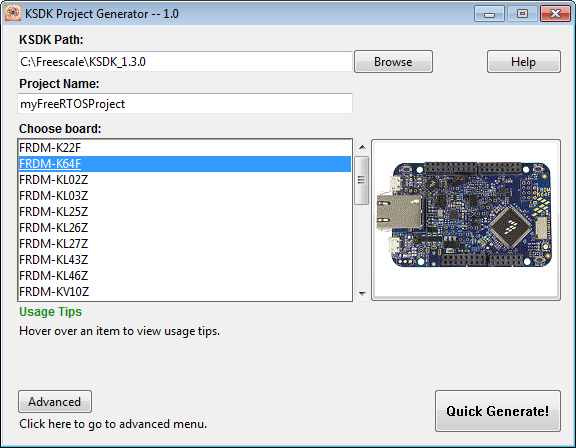
Tutorial: FreeRTOS Projects with Kinetis SDK V1.3 and the SDK Project Generator

This tutorial describes how to create a Kinetis SDK V1.3 project using the Freescale project generator in Kinetis Design Studio.

project generator

project generator

Continue reading

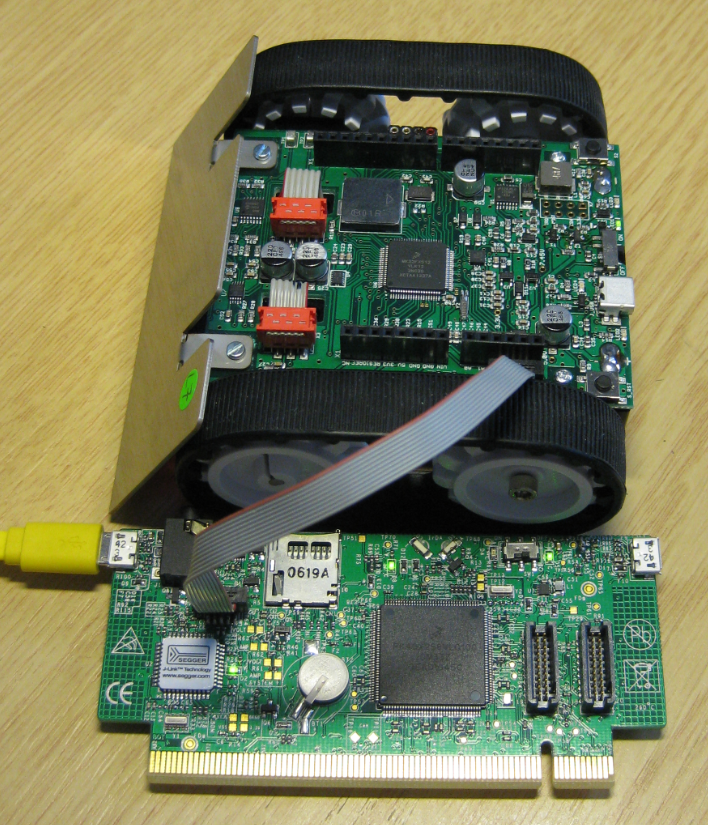
Using the KwikStik K40 Board to Debug an external Board

When I left for the week-end, I missed to take with me my Segger J-Link debug box. I have one P&E Universal Multilink at home, but I needed a Segger J-Link to use the SystemViewer with my robot. I need that for a FreeRTOS trainig I will deliver in Poing/Germany on Monday at Avnet/Silica.

But I had a Freescale KwikStk board at home, and I did remember that I can use that board as a Segger J-Link to debug my custom hardware (see “Freescale Kinetis KwikStik (part 1)“).

Debugging Custom Board with KwikStik

Debugging Custom Board with KwikStik

Continue reading