DIY Free Toolchain for Kinetis: Part 8 – Processor Expert, Eclipse and GNU ARM Eclipse Plugins

There has been many new releases these days: Freescale released Processor Expert Driver Suite 10.3, and Liviu Ionescu released new GNU ARM Eclipse Plugins with new and updated documentation. So time for me to show how this all comes together 🙂

Processor Expert Driver Suite 10.3 Project with GNU ARM Eclipse Build Tools

Processor Expert Driver Suite 10.3 Project with GNU ARM Eclipse Build Tools

It is now easier than ever before to use the GNU ARM Eclipse plugins and Processor Expert. There are still some manual steps, and this post is about all the details to get it working as smooth as possible.
Continue reading

Zumo Robot assembled

This week we were busy with building and documenting the first robots based on the Zumo Robot Chassis PCB.

Chassis Base PCB

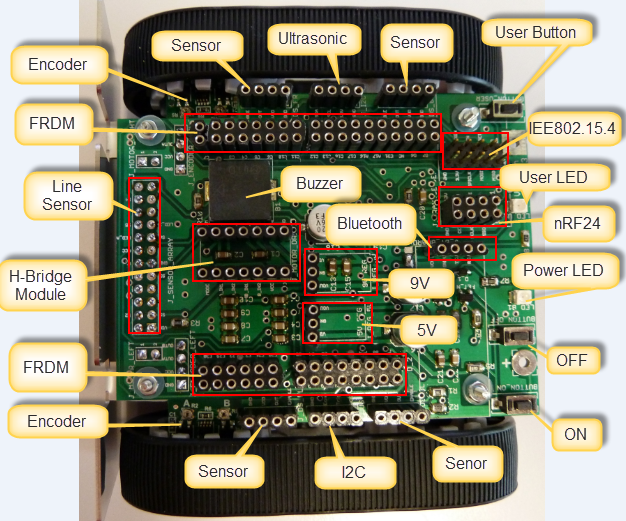
The chassis is designed to hook up the FRDM-KL25Z board from Freescale. It is using parts from Pololu (chassis, motors, DC-DC converter, line sensor, H-Bridge, encoders):

ZumoBaseBoardOverview

Zumo Base Board Overview

Continue reading

DIY Free Toolchain for Kinetis: Part 2 – Eclipse IDE

This is the second part of a multi-part tutorial about how to set up an open source tool chain with GNU ARM gcc + Eclipse to build and debug an application for Kinetis ARM devices.

List of Tutorials

Eclipse Kepler

Eclipse Kepler

Continue reading

A Processor Expert Component to Help with Hard Faults

Ahrg! Again my ARM application crashed somewhere and I ended up in a HardFault exception :-(. In my earlier post I used a handler to get information from the processor what happened. But it is painful to add this handler again and again. So I decided to make things easier for me: with a special HardFault Processor Expert component :-).

After adding this HardFault component to my project, it automatically adds an entry to the vector table. So no manual steps are needed: having the component in the project and enabled will do the needed steps.

Continue reading

Debugging Hard Faults on ARM Cortex-M

It is as bad as this: my application stopped in an unhandled interrupt service routine:

Cpu_Interrupt
Cpu_Interrupt

That does not tell much. I’m using Processor Expert generated code, and with this all my ‘unhandled’ vectors are pointing the same handler:

Continue reading

MCU10.2 Update 1.0.0 released

The update 1.0.0 for the MCU10.2 release has been published on the Freescale CW MCU V10.2 Updates & Patches web site. Downloading the 500 MByte zip file and installing the update will take a while. After downloading I select Help > Install New Software … and specify the archive file.

Note: In general uninstalling an eclipse update is not possible. If you want to keep our original MCU10.2 on the side, then follow this trick: Copy your existing MCU10.2 installation folder and rename it (say to ‘MCU10.2_without_update’). Then apply the update to the normal MCU10.2. If you want to revert to the version without the update, simple delete the updated installation and rename the one without the update again. No need to reinstall things again. And you can use both the updated version and the normal version in parallel too: simply launch the eclipse\cwide you want 🙂

Time to read the release notes and dig into what has been changed and improved.

Continue reading

Go, assembly, go!

As mentioned in my post about the memory view:  I want to go down to the bits and bytes. Same applies to programming: I want to get down to the assembly instruction level, the heavy metal world :-).

Although it sounds a little bit weird in the age of object-oriented programming and C++, but sometimes I need to do ‘assembly level only’ programming on a 32bit controller too. CodeWarrior for MCU offers assembly only project creation for all the 8bit microprocessors, but for the 32bit including the ColdFire it assumes that the usual way is to use C and C++? Yes, it offers C and C++ and you can add assembly files. But how to do assembly only?
Continue reading