Poor Man’s Trace: Free-of-Charge Function Entry/Exit Trace with GNU Tools

There are cases where my application runs find for days, weeks or even months, but then from time to time there is an application crash. Yes, the watchdog will recover it, but still it would be good to know what happened? One solution would be to hook up a trace probe (like the one I have described in this post: “First Steps with the P&E Tracelink“). But having such a trace probe attached all the time is first not cheap and second not always possible. So what if the application would leave ‘breadcrumbs’ behind which would tell me the flow of the program leading to the problem? I have found a functionality in the GNU tools which seems not be widely known or use, but is incredibly helpful in such cases.

So what if I could get a log like this telling me which functions get called by whom?

{ 00000E88->00000DA0 ???->DEMO_Init
} 00000E88<-00000DA0 ???<-DEMO_Init
{ 00000E8C->00000D40 ???->DEMO_Run
 { 00000D62->00000CE8  DEMO_Run:0x0022->decide
  { 00000D0E->00000C60  decide:0x0026->calcValue
  } 00000D0E<-00000C60  decide:0x0026<-calcValue
  { 00000D16->00000CA0  decide:0x002E->getValue
   { 00000CC6->00000C60  getValue:0x0026->calcValue
   } 00000CC6<-00000C60  getValue:0x0026<-calcValue
  } 00000D16<-00000CA0  decide:0x002E<-getValue
 } 00000D62<-00000CE8  DEMO_Run:0x0022<-decide
 { 00000D62->00000CE8  DEMO_Run:0x0022->decide

Continue reading

Solving the 8192 Character Command Line Limit on Windows

There is a really annoying issue with using command line tools on Windows: the maximum length of the command line passed to cmd.exe is 8192 characters (see http://blogs.msdn.com/b/oldnewthing/archive/2003/12/10/56028.aspx). So you think this is not a problem for you, as you would not pass such a long command line to cmd.exe (the DOS shell under Windows)? Well, if you are using Eclipse (as I do) which generates make files (which is the normal way), then the cmd.exe very likely is involved to call the compiler/linker/etc, indirectly with the usage of make.exe. Compiling files is usually not a problem as it does not hit that 8192 limit. However, it is likely that link phase will end up with an error:

Error in the Problems View

Error in the Problems View

If you have such a problem, there is a solution ….

Continue reading

Using the DHT11/DHT22 Temperature/Humidity Sensor with a FRDM Board

For a home automation project I need to know the room temperature and humidity percentage of the room air. Adafruit has an inexpensive DHT11 sensor from http://www.aosong.com which I decided to use for that project.

Test Setup for DHT11 Sensor

Test Setup for DHT11 Sensor

Continue reading

Command Line Programming and Debugging with GDB

Eclipse with GDB is great: it comes with a graphical front end for debugging. But sometimes it is all about to download a program. Is it really necessary to launch an IDE like Eclipse to program or quickly debug a board? With the GNU Debugger (GDB), the answer is ‘no’: GDB comes with a command line debugger which is designed exactly for this: providing a command line interface for programming/downloading and debugging, bypassing any GUI (Graphical User Interface).

Combination of GDB Debugging Probes and Boards

Combination of GDB Debugging Probes and Boards (P&E, Segger and FRDM-KL25Z)

Continue reading

Updated Percepio Tracealyzer and Trace Library to Version V2.7.0

Percepio has recently released the v2.7 version of Tracealyzer. This is a major upgrade from the v2.6 version which I have used so far: time to upgrade my Trace component for FreeRTOS to the latest and greatest v2.7!

FreeRTOS Plus Trace View

FreeRTOS+Trace View (V2.7)

Continue reading

Code Coverage for Embedded Target with Eclipse, gcc and gcov

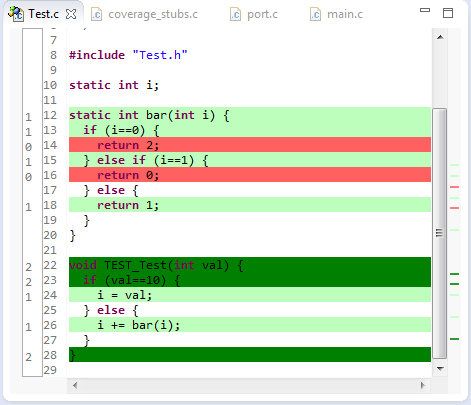
The great thing with open source tools like Eclipse and GNU (gcc, gdb) is that there is a wealth of excellent tools: one thing I had in mind to explore for a while is how to generate code coverage of my embedded application. Yes, GNU and Eclipse comes with code profiling and code coverage tools, all for free! The only downside seems to be that these tools seems to be rarely used for embedded targets. Maybe that knowledge is not widely available? So here is my attempt to change this :-).

Or: How cool is it to see in Eclipse how many times a line in my sources has been executed?

Line Coverage in Eclipse

Line Coverage in Eclipse

And best of all, it does not stop here….

Continue reading

Adding Multiple Include Paths to Build Settings in Eclipse

In Eclipse and CDT, I need to tell the compiler where it has to search for the header files. The normal way is to go to the compiler settings (menu Project > Properties > C/C++ Build > Settings) and then add the include paths, one by one, using the ‘+’ icon:

Adding Include Path

Adding Include Path (shown using the GNU ARM Eclipse plugin)

But for many include paths, this is a time-consuming process. But there is another way.

Continue reading

Tutorial: Playing MP3 Files with VS1053B and FRDM Board

I want to make some noise with this post!!! This tutorial is about adding music and sound capabilities to the Freescale Freedom board, and to have a lot of fun with it :-). I need this ability for a larger project working on for a while. But I thought I share that sub-part how to play sound files. So with this tutorial I can turn my Freescale Freedom board into a music or sound player :-). And adding sounds is a cool way for any project, and as the music is stored on an SD card it fits easily hours of music or sounds.

MP3 Player with FRDM-KL25Z

MP3 Player with FRDM-KL25Z and Adafruit Music Maker MP3 Shield

Continue reading

Tutorial: How to Erase the FLASH with the GNU GDB debugger

I have several applications where I store application specific information in the microcontroller FLASH memory (see “Configuration Data: Using the Internal FLASH instead of an external EEPROM“). I have run into issues recently with the Segger J-Link GDB server as by default it does *not* erase all the FLASH memory. So the question is: How can I erase all (or part) of the FLASH memory with GDB (e.g. in Kinetis Design Studio or in Eclipse)?

Memory Monitor with Erased Flash

Memory Monitor with Erased Flash

Continue reading