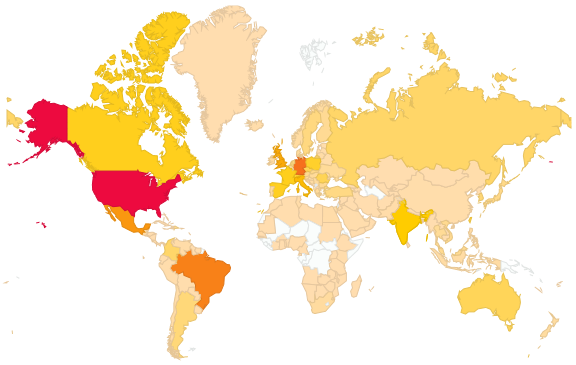
I admit: It would be somewhat disappointing to write articles, only to realize that nobody reads it. WordPress is my favorite blogging platform as I get detailed statistical data who in the world is reading MCUonEclipse:
The semester is approaching its end, and students are making great progress: with added infrared and ultrasonic sensors, the robots are able to detect the other robot (more or less 😉 ). Additionally the RNet stack adds extra remote control capabilities.
Zumo Sumo Battle
Things are very much in the testing phase, and some robot (or operator?) failures are really funny 🙂 For sure much more advanced moves compared to previous week. Including extra benefits like a robot bringing a bottle of water! The following video hopefully gives an impression:
For my RNet stack I need a way to identify nodes in the network using a unique address. What I need is Media-Access (MAC) address. Base on such a unique address I can assign short addresses (e.g. with a DHCP or similar protocol to automatically assign shorter network addresses). So how to uniquely identify my network nodes?
The Freescale Kinetis microcontroller have nice feature: they have a Unique Identification Register (UID) which would be a perfect fit for a MAC address :-).
Eclipse is very workspace centric: it only knows and deals with files in the workspace. So it is easy to compare and merge files present in the workspace: I select both files/folders and compare them with each other:
Compare with Each Other
But what if the files and folders are NOT in the workspace?
Usually, there are two flavors of Sumo robot competition:
Autonomous: no communication to the robot permitted after the start.
Remote-controlled: there is a wireless remote controller driving the robot.
Just for fun, I have implemented a wireless remote controller application for my Zumo Robot using the Freescale SRB (MC13123) board. I’m using the Freescale MMA7260Q accelerometer on the SRB board to control the robot.
The INTRO course is progressing fast, with a lot of information passed on how to build a successful mini Sumo robot based on the Freescale FRDM-KL25Z and a modified Pololu Zumo chassis. The PID control loop implementation for speed and position finally starts to work properly with the help of FreeMaster. Things are not perfect yet, but the robots get better from day-to-day.
I was searching the internet for an open source network stack for my nRF24L01+ transceivers. But these stacks were either too heavy or had a restrictive or not really non-open source license behind it. I was very reluctant to start with something I think already should exist. Two weeks ago I decided that I just do it from scratch, and here I am: I have the basics working 🙂
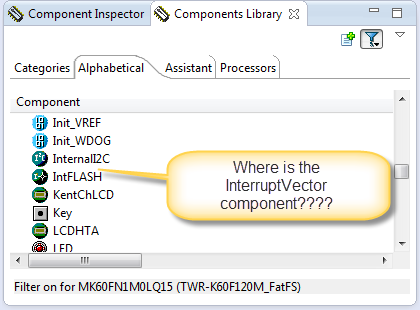
In case you are desperately looking a component in the components library view, but somehow it does not show up? For example I know there is component ‘InterruptVector’, but it is not present in the Components library view?




 MCU on Eclipse