How to put the Kinetis K20 on the tinyK20 Board into Bootloader Mode

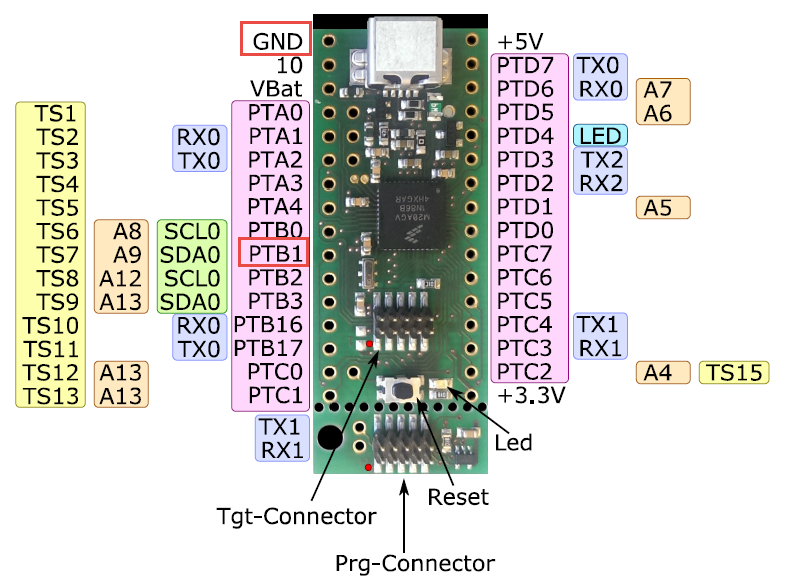
To put the tinyK20 board with the NXP Kinetis K20 into bootloader mode, well someone could check the schematics, or follow this quick guide :-). In short, the pin PTB1 has to be pulled to Ground (GND) while powering the Kinetis K20. The pin PTB1 is on the outside row as below:

tinyK20 Bootloader Pins

tinyK20 Bootloader Pins

Continue reading

Tutorial: Bare-Metal Shell for Kinetis

I have been asked to provide a command line shell example for a bare-metal (no RTOS) application, so here we go!

Having a way to communicate to the firmware on a board is essential for most of my projects: it is simply, incredibly helpful and easy to do (see “A Shell for the Freedom KL25Z Board“). This tutorial shows how to add a simple command line shell to the NXP Freedom board which then can be extended as necessary.

Console Application

Console Application

Continue reading

Show Floating Point Variable Bytes in Eclipse CDT

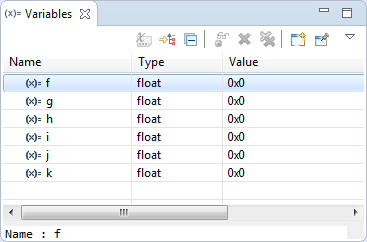
My preferred variable format in Eclipse is hexadecimal (see “Debugging Variables in Hexadecimal with Eclipse“). However, this does not work well with floating point variables:

Floating Point Variables in Eclipse Variables View

Floating Point Variables in Eclipse Variables View

The above view shows all variables having the value 0x0 (zero), but that’s actually not really true.

Continue reading

Debug Multiple Boards with GDB at the Same Time

Many times it is very useful to debug multiple boards at the same time. For example if I’m debugging a communication stack between two boards: that way I can debug the protocol on both sides. Eclipse is a great framework which allows that. This post shows how to debug multiple boards (e.g. the NXP Freedom boards) in parallel from the same Eclipse IDE using GDB and the Segger J-Link:

Two NXP Freedom Boards debugged at the same time

Two NXP Freedom Boards debugged at the same time

Continue reading

Hardware Reset for ARM Cortex-M with Segger J-Link and Kinetis Design Studio

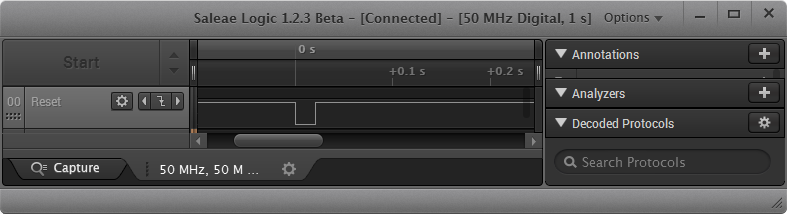
The reset and signal line of a microcontroller is probably the most important signal to a microcontroller. And if things go wrong, then a first thing to check is the reset line. So having control over reset is an important aspect for embedded development. You would think that if you download a program to a microcontroller, the debug probe would put the device into reset at the start with a short pulse like this:

Reset Signal in Logic Analyzer

Reset Signal in Logic Analyzer

Continue reading

3D Printed Classic Mac Apple Watch Charging Station

One of the first machine I used for development many years ago was a Apple Classic Macintosh computer. My days of development with Pascal and Modula-2 are long gone. But with the availability of 3D printers I can print a Classic Mac :-). But now it is not used for development: I use it to charge an Apple Watch:

3D Printed Apple Watch Charging Station

3D Printed Apple Watch Charging Station

Continue reading

Renaming Eclipse CDT Projects

When I create a project in Eclipse (e.g. in Kinetis Design Studio with the GNU ARM Eclipse plugins), I have to specify the name of the project during creation time:

Project Name in Eclipse

Project Name in Eclipse

But what if I change my mind later on and want to use a different name? How to rename the project?

Continue reading

USB CDC with the Raspberry Pi

For my home automation project with openHAB I want to attach Freescale (now NXP) FRDM (Freedom) boards so they can take care about the realtime aspects and to act as gateways to my other systems. One way is to use USB CDC (Serial over USB) as communication channel. USB has the advantage that it powers the board, plus I can attach multiple devices: up to four on the Raspberry Pi 2 and even more with using a USB hub. In a standard configuration with a USB WiFi and a USB HID (mouse plus keyboard) dongle I still can attach two Freescale (ahem, NXP) Freedom boards to the Raspberry Pi:

FRDM-K22F and FRDM-K64F attached to Raspberry Pi 2

FRDM-K22F and FRDM-K64F attached to Raspberry Pi 2

Continue reading