FRDM K64F Data Logger using FatFs with KSDK 1.2.0

Check out the article by Wesley Hunter about how to use the FRDM-K64F as a data logger. He describes all the steps how to use the Kinetis SDK v1.2.0 with FatFS.

Happy Logging 🙂

Centaurian's avatarCentaurian

This blog is a guide on how to setup using the FatFs library included with the Kinetis SDK 1.2.0 using mostly the Processor expert within Eclipse Luna. FatFs is a generic FAT file system module for small embedded systems written by Chan. I prefer to use Processor Expert when possible as this will often generate code that is smaller in size than using the KSDK library files direct. I experienced many gotcha’s and complication setting this up and wanted to share how I finally managed to get it to work.

  1. Prerequisites
  2. Create New Project
  3. Open Processor Expert
  4. Add SD card component
  5. Add Init_Port component
  6. Add GPIO component
  7. Configure the clock
  8. Import FatFs
  9. Add Card detection code
  10. FAT file appender function
  11. Disable the MPU

Prerequisites

Before you begin please make sure your development environment is setup and you can already compile and debug code using KSDK 1.2.0 on Eclipse Luna…

View original post 2,197 more words

Unboxing the Freescale FRDM-KL43Z Board

I’m preparing for the next semester at the university starting in September this year. As part of that, I’m currently evaluating the Freescale Kinetis FRDM-KL43Z board:

FRDM-KL43Z Board Unpacked

FRDM-KL43Z Board Unpacked

Continue reading

Freescale Freedom Board Tutorials on Element14

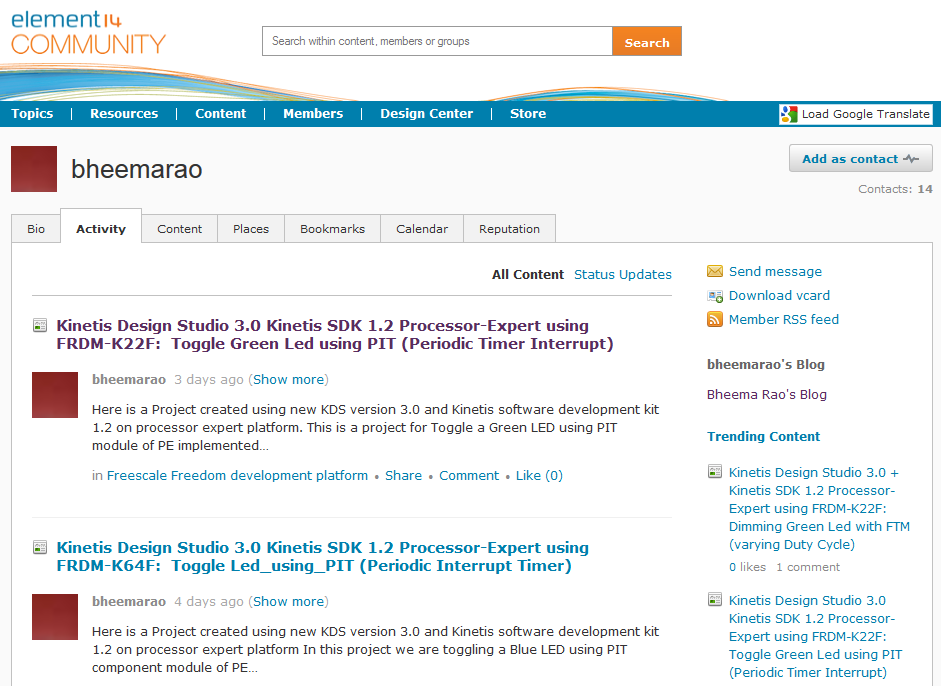
I have found several excellent tutorials created by Bheema Rao on element14: He uses many of the McuOnEclipse components, features Kinetis Design Studio/Eclipse and shows how to use the Kinetis SDK, toggling/dimming LED’s on Freescale Freedom Boards.

element14

element14

Continue reading

FreeRTOS Continuous Trace Streaming

Key to successfully implementing embedded applications these days is to have detailed visibility into what is going on with the application on the board. For this, I’m using the FreeRTOS+Trace from Percepio to inspect the runtime behaviour. Stop-Mode debugging is very useful, but visibility into the runtime is even more important. FreeRTOS+Trace is a tool to accomplish this, but it requires to dump the data off the target to the host (see “Updated Percepio Tracealyzer and Trace Library to Version V2.7.0“). Usually, I’m using the GDB debugger for this, and that works for shorter trace sequences like a few seconds. Yes, I can combine them, but it painful to stop, dump and continue. So what if I could collect trace for several minutes or hours without the need to stop the application? Why not stream the data to the host directly?

So here is it: I’m now able to get almost unlimited trace streaming off the target, witout user intervention. I can trace my application for hours 🙂

Trace Recording

Trace Recording for almost one hour

Continue reading

Tutorial: Using Processor Expert and FreeRTOS with Kinetis SDK V1.2

Freescale has released the new Kinetis SDK v1.2 back in May. Because of the changes in v1.2, previous applications (or my tutorials) do not work any more :-(. So time to write a new tutorial: how I can use Processor Expert with FreeRTOS for the Kinetis SDK v1.2.

Blinky Task with FreeRTOS and Kinetis SDK in KDS v3.0.0

Blinky Task with FreeRTOS and Kinetis SDK in KDS v3.0.0

Continue reading

Processor Expert Component Repositories

Processor Expert for Kinetis v3.0.0 (which is part of Freescale Kinetis Design Studio v3.0.0, KDS) has now the concept of ‘repositories’ for the components.

Previously, Processor Expert was able to use two paths for its components (e.g. in KDS v2.0.0):

  1. The ‘System‘ directory inside the Eclipse installation
  2. The ‘User‘ directory: a fixed path, global for all installations

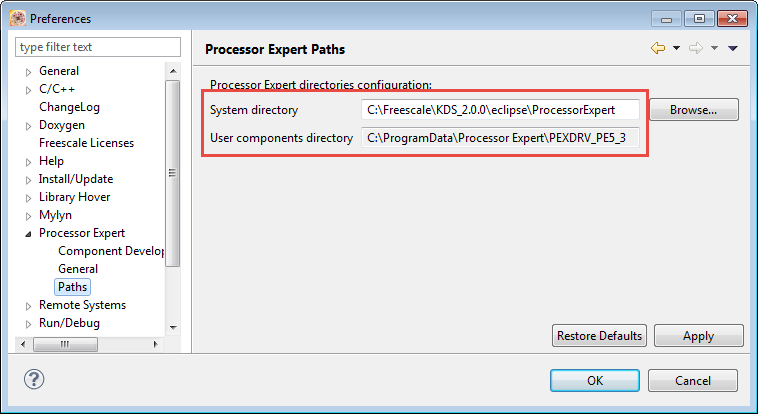
These directories are listed in the workspace settings (menu Window > Preferences > Processor Expert > Paths):

Processor Expert Paths in v2.0.0

Processor Expert Paths in v2.0.0

Continue reading

McuOnEclipse Components: 05-July-2015 Release

I know: A new McuOnEclipse Processor Expert components release was long overdue. But I have been extremely busy in the last months, but now the university semester is over, and I have finally some spare time to catch up on a lot of things. So here we go: there is a new component release available on SourceForge (https://sourceforge.net/projects/mcuoneclipse/files/PEx%20Components/): Components 2015-07-05.zip

McuOneEclipse Components on SourceForge

McuOneEclipse Components on SourceForge

Continue reading

How to Reset an ARM Cortex-M with Software

There are cases when I need to do a reset of the device by software. For example I have loaded the application image with the bootloader, and then I need to perform a reset of the microcontroller to do a restart. As a human user I can press the reset button on the board. But how to do this from the software and application running on the board, without user manual intervention? Or if I simply want to reset the system for whatever reason?

Performing a Software System Reset with Kinetis Design Studio
Continue reading

Tutorial: Using Kinetis Design Studio V3.0.0 with IAR and Keil IDE’s

Freescale Kinetis Design Studio V3.0.0 came out early May this year. One of the new cool features is that it includes the Processor Expert V3.0.0 with an extended New Project Wizard. With this wizard I’m able to create and use Processor Expert projects with IAR Embedded Workbench and Keil MDK :-).

Kinetis Design Studio, Keil MDK and IAR Embedded Workbench

Kinetis Design Studio, Keil MDK and IAR Embedded Workbench

Continue reading

UART with the FRDM-KL02Z Board

In my classes I’m mainly using the Freescale FRDM-KL25Z board, as it provides the best value for the money, and 128 kByte FLASH with 16 kByte of RAM is enough for many smaller projects. I do have as well the FRDM-KL02Z Board (32 KByte FLASH, 4 KByte of RAM) which is an inexpensive board to evaluate the smaller KL02Z microcontroller. Because someone reported a problem not being able to use the UART over OpenSDA/USB-to-CDC bridge, I have created a demo project which communicates with a console on the host.

FRDM-KL02Z Board

FRDM-KL02Z Board

Continue reading