Segger just has released their OpenSDAv2 firmware. The OpenSDAv2 firmware is different from the OpenSDAv1 as it is using a different memory map and bootloader. The OpenSDAv2 e.g. is present on the new FRDM-K64F board. The availability of the Segger firmware is definitely good news for any owner of the FRDM-K64F board: so far only the CMSIS-DAP firmware was available (on top of the mbed bootloader). With this, it was not possible to use the board with CodeWarrior, except with using an external P&E Multilink or Segger J-Link. With that new Segger J-Link OpenSDAv2 firmware, I can now use the FRDM-K64F with any IDE which supports the Segger J-Link :-).
Category Archives: Debugging
Binary (and S19) Files for the mbed Bootloader with Eclipse and GNU ARM Eclipse Plugins
The existing OpenSDAv1 (see “OpenSDA on the Freedom KL25Z Board“) bootloader is using the industry standard Motorola S-Record (S19) Files. However, new FRDM-K64F board (see “FTF: FRDM-K64F, Kinetis Design Studio and Kinetis SDK“) has OpenSDAv2 on it, which is an mbed bootloader. So how to create files with an IDE other than mbed for that bootloader which is present on the FRDM-K64F board by default? Well, creating binary files is one thing, but to have it working with the mbed bootloader is another challenge :-(.
Using the FRDM-K64F with CodeWarrior
The new flagship of FRDM boards is the FRDM-K64F board. After FTF I have explored different ways debugging the board, and received many comments and questions about it (thanks!). Freescale announced the supports with the new Eclipse based Kinetis Design Studio (KDS). But until KDS is out, how can I use the FRDM-K64F board with CodeWarrior?
Recovering FRDM-K64F mbed Board
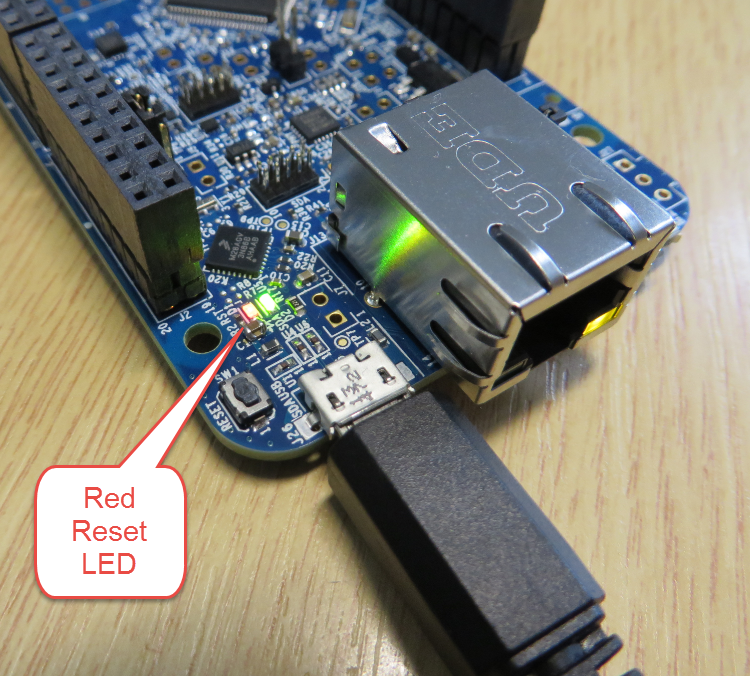
The mbed for FRDM-K64F firmware (http://mbed.org/handbook/Firmware-FRDM-K64F) has great potential. Unfortunately it seems that edges are still very rough: It happens very often that my FRDM-K64F board gets locked up :-(. I can see that the target CPU is constantly resetting: the red reset LED is always on:
Creating New Eclipse Debug Configuration
Eclipse is very powerful. To the point that you can do the same thing in multiple ways. I’m always learning new things, and recently I discovered a new way how to create a new launch or debug configuration.
So far I selected the item (e.g. GDB Hardware Debugging) and used the ‘New’ Icon:
FTF: FRDM-K64F, Kinetis Design Studio and Kinetis SDK
I’m attending the Freescale Technology Forum (FTF) in Dallas this year: As they say here: “everything is bigger in Texas”, that’s the motto of this conference ;-). The conference is packed, and I have a hard time to keep up with all the things going on. My focus is obviously everything around Eclipse and ARM microcontroller. The conference started yesterday afternoon with hands-on labs, and I was in the one were Freescale presented the new ‘Kinetis Design Studio’: a free of charge/unlimited Eclipse tool chain based on Eclipse Kepler, GCC and GDB. Freescale presented their new software library ‘Kinetis SDK’. And: There is a new Freedom board which gets handed out to the attendees: the FRDM-K64F :-).
Variable Debugging with Eclipse Kepler
The current Eclipse Kepler version comes with changes for debugging variables. I have students coming from the earlier Eclipse versions, so here are a few tips for dealing with variables in Eclipse Kepler.
Sharing Debug Configuration with Eclipse
Maybe you had this problem too: you shared a project with somebody, only to realize that your carefully crafted debug configuration was not shared?
Eclipse has the concept to store settings in the ‘framework’. The ‘framework’ is the Eclipse internal data, basically what is inside the .metadata folder of the workspace.
First Steps with the Freescale TWR-K64F120M
Naturally, I have several project ideas lingering around. No time to make them all (for now). One of it is interfacing the Raspberry Pi camera with a microcontroller. To store the images, I need plenty of RAM on the device, and so far the Kinetis microcontroller did not have that. Finally, Freescale announced the K64F120 a few months back, and my ordered TWR-K64F120M board arrived on my desk, waiting to be used: Finally I get an ARM Cortex-M4F with 1 MByte of FLASH and 256 KByte of RAM :-).
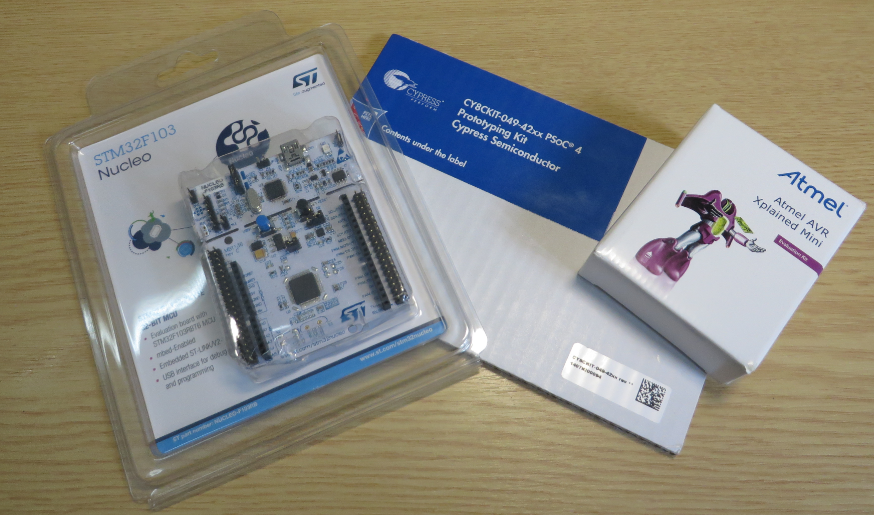
Boards from Embedded World (STM Nucleo, Atmel Xplained Mini, Cypress PSoC 4)
At conferences and shows like the Embedded World in Nürnberg it is not only about gathering the trends of the industry: it is as well about collecting all the goodies handed out to the attendees. I’m less interested in things like pens or the like: what I love most are microcontroller on a board I can use :-). This year STMicroelectronics, Atmel and Cypress all had boards to distribute ‘like candies’ 🙂