‘Nicer Coding’: Ligatures with Eclipse and Visual Studio Code

The choice of IDE is sometimes given by the available tools at hand. And sometimes it is a preference of the look and feel. Or maybe just what one is used to use. And sometimes small changes can make a big difference too.

For example, when I’m starring at my code for hours, a nice font can make all the difference. A cool and nice feature of fonts are ‘Ligatures‘. Maybe you can you can spot them in the following screenshot?

Eclipse with Ligatures
Continue reading

Building a Triumvirate: From Eclipse CDT to CMake, CMD and Visual Studio Code

A Triumvirate is or Triarchy is built by three individuals which lead or rule something. In this article I want to rule a project with Eclipse CDT, Visual Studio Code and with building it from the command line for automated builds.

So what if I have an Eclipse project (say MCUXpresso IDE and SDK), and want to build it on a build server, and and I want to use the same time the project with Eclipse IDE and Visual Studio code?

Key to this is CMake: I’m keeping the Eclipse CDT features, adding CMake with Make and Ninja to the fix, and have it ‘ruled’ by three different ’emperor’: Eclipse, Visual Studio Code and from a shell console:

MCUXpresso SDK CDT project with CMake for Eclipse, Visual Studio Code and Command Line Building
Continue reading

McuOnEclipse Components: 29-Dec-2022 Release

I’m pleased to announce a new release of the McuOnEclipse Processor Expert components, available on SourceForge.

SourceForge

Continue reading

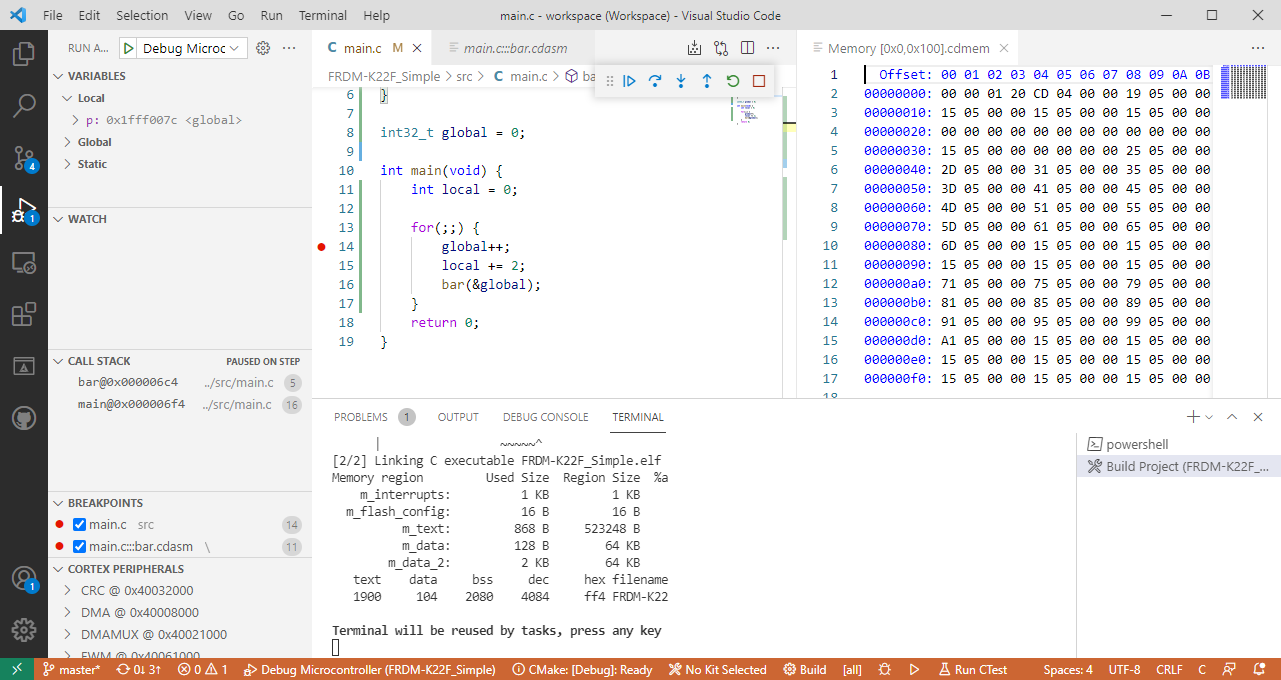
Visual Studio Code for C/C++ with ARM Cortex-M: Part 10 – Assembly Stepping

The Microsoft Visual Studio Code is a great IDE, but does not (yet?) implement features for true embedded usage. Or things are there to some level, but hard to use. One of these things is how to step in the assembly code. This article shows how to do this.

Continue reading

Visual Studio Code for C/C++ with ARM Cortex-M: Part 9 – RTT

For me the Cortex-Debug Visual Studio extension by marus25 is the standard way to use VSC for embedded development. Another ‘standard’ piece I’m using in many of my projects is the SEGGER RTT.

SEGGER RTT Output with Visual Studio Code
Continue reading

Visual Studio Code for C/C++ with ARM Cortex-M: Part 8 – xPack C/C++ Managed Build Tools

This is a new article in my series about using Microsoft Visual Studio Code: After installation, project setup, building, debugging, setting up a kit, IntelliSense and FreeRTOS. This one is about setting up and using the xPack Extension to build cross-platform-multi-tool project with a project manager.

Continue reading

Visual Studio Code for C/C++ with ARM Cortex-M: Part 7 – FreeRTOS

This is a new article in my series about using Microsoft Visual Studio Code: After installation, project setup, building, debugging, setting up a kit and IntelliSense. This one is about setting up and using FreeRTOS:

Microsoft Visual Studio Code with Debugging FreeRTOS application on ARM Cortex-M
Continue reading

Visual Studio Code for C/C++ with ARM Cortex-M: Part 6 – IntelliSense

The previous parts were about installation, project setup, building, debugging and setting up a kit. This one is about setting up IntelliSense for Cross Development in Visual Studio Code which allows for browsing symbols or code completion:

Code Completion in Visual Studio
Continue reading

Visual Studio Code for C/C++ with ARM Cortex-M: Part 5 – ToolKit

The previous parts were about installation, project setup, building and debugging. This one is about defining the ‘tool kit’ so I can make use more of the CMake infrastructure in Visual Studio Code:

Tool Chain loaded in Visual Studio Code
Continue reading

Visual Studio Code for C/C++ with ARM Cortex-M: Part 4 – Debug

The previous parts were about installation, project setup and building. This one is about debugging an ARM Cortex-M Microcontroller with Visual Studio Code:

Cortex-M4 (NXP K22FN512) Debugging with Visual Studio Code
Continue reading