Debugging Variables in Hexadecimal with Eclipse

There are always hidden treasures in Eclipse, and here is one: By default, variables might look like which is not always what I want:

Variables View

Variables View

How to change the format to hexadecimal (or any other format)?

Continue reading

White Space or not, that’s the question

There are times when I want to know *exactly* what is inside my source files. In my article on EHEP explains how to get down to the hex bytes of a source file. But in many cases I’m interested to see the non printable/white characters only. Showing white spaces in the sources is easy in Eclipse: I use the ‘Show Whitespace Characters‘ toolbar icon:

Show Whitespace Characters

Show Whitespace Characters

Continue reading

S-Record, Intel Hex and Binary Files

My earlier posts were around the Kinetis gcc compiler which comes with CodeWarrior for MCU10.3. MCU10.3 comes as well with the Freescale Kinetis compiler as in MCU10.2. In “S-Record Generation with gcc for ARM/Kinetis” I explored how to generate S19 or other output files with gcc. However, you only can produce one file format at a time. What if I need multiple formats or a different format. What if I need to do the same with non-gcc build tools? S-Records are usually easy as supported in the linker. Other formats need a bit more plumbing. So this post is how I can create and manipulate the different output formats, so I can use it with a bootloader.

Continue reading

Code Size Information with gcc for ARM/Kinetis

Working with the Freescale S08 and S12 build tools, there is something I really appreciated: that the linker reports on the console the code size of the application:

S08 Linker reporting the code size

S08 Linker in Eclipse reporting the code size

This is especially handy as it allows you to see the impact on code size immediately e.g. if I change a compiler option or do a source code change. Simple and easy. Yes, I could get that kind of information from the linker map file too. But this means I need to open that file, scroll down/etc: many steps just to find out the code size.

Continue reading

Spaces vs. Tabs in Eclipse

I admit: I’m a ‘space’ person. What I mean is that I prefer ‘spaces’ over ‘tabs’ in my source code. Why? Because I don’t want to relay on the tab width, and I prefer to use ‘two spaces for an intention level’.

I would assume that maybe half of the world is for spaces, and half of the world is for tabs. I don’t want to cause a religious war here. I’m for freedom of choice, and this is what Eclipse and CodeWarrior for MCU (which is Eclipse based) offers. Now as I have outed myself as a ‘spacer’, and given the fact that CodeWarrior comes as ‘tabser’ by default, this is something I have to change as a setting for my workspace. Here is what I do….

Continue reading

S-Record Generation with gcc for ARM/Kinetis

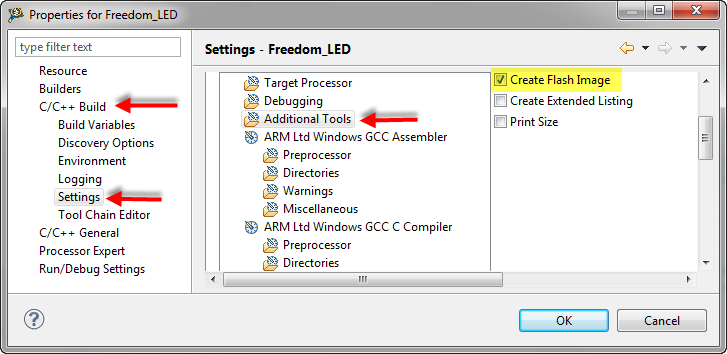
With my Freedom KL25Z board I’m using the GNU/gcc build tools and Eclipse/CodeWarrior. When I wanted to create an S19 file of my application using the GNU tools, this was not that easy to find out. So here are the steps to do this:

I open the project setting using the menu Project > Properties and go to C/C++ Build > Settings > Additional Tools and enable’Create Flash Image‘:

Additional Tools gcc Settings

Additional Tools gcc Settings

Continue reading

Tutorial: Enlightning the Freedom KL25Z Board

The schematics for the Freedom board is now available on the element14 Freedom Board site (you need to log into the element14 community first) as FRDM-KL25Z Schematics (SPF-27556_D).pdf (314.7 K)). So time to write a tutorial how to use the LED on that board.

❗ Note: since this tutorial, the LED component has been simplified. So some of the steps below are much simpler and easer. Please see LED’s for Kinetis, simplified | MCU on Eclipse. I have updated this post with the new instructions and images.

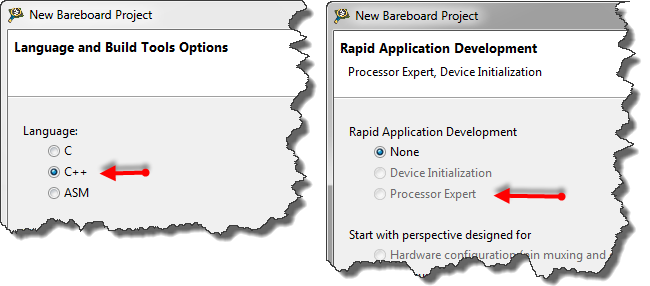
In “FreeRTOS with GCC, Cortex-M0+ and Kinetis KL25Z Freedom Board” and “A Shell for the KL25Z Freedom Board” I have used that board with an RTOS: FreeRTOS. But it is really easy to use that board without an RTOS (‘bare metal’) too. In this tutorial I’m providing step by step instructions to use the RGB LED on the Freedom KL25Z board with Processor Expert and the open source LED component.

Continue reading

Changing the CPU with Processor Expert

I have an example project with Processor Expert and CodeWarrior. The problem I have is that I want to use it for another CPU derivative. So how can I migrate the project?

There are three different approaches:

  1. Change Wizard: In MCU10.2 there is the menu Project > Change Device/Connection. While this sounds promising, it only works for the very simple projects. And it does not change the project in-place: it simply creates a copy of the project and applies some (many times wrong) settings. So I do not recommend to use that option.
  2. New Project Wizard: For me in most cases this is the best way: this creates a new project for the new device, with everything set up correctly. In a second step I copy my source files and compiler settings (if I have changed them). The Processor Expert component I can transfer with using drag&drop.
  3. Changing the CPU: With Processor Expert, I can change the CPU. For this I add a new CPU to the project and change other settings (debugger, build tools settings) as needed.

Continue reading