This post starts a small (or larger?) series of tutorials using the Arduino Motor/Stepper/Servo Shield with the FRDM-KL25Z board. That motor shield is probably one of the most versatile on the market, and features 2 servo and 4 motor connectors for DC or stepper motors. That makes it a great shield for any robotic project :-).
Tag Archives: Tips&Tricks
How to use MCUonEclipse GitHub without Git
Not everyone is familiar with Git, and not everyone wants to use it. Although I think using Git or SVN is something every software engineer today needs to master 😉 To make it easier for the ‘non-Gitter’ to use the Processor Expert components, they are available now as *.PEupd files as described here. However, the *.PEupd files are just a snapshot, and not the latest and greatest. So how to use the latest component sources and example projects without Git?
CMSIS-DAP with IAR and the KL25Z Freedom Board
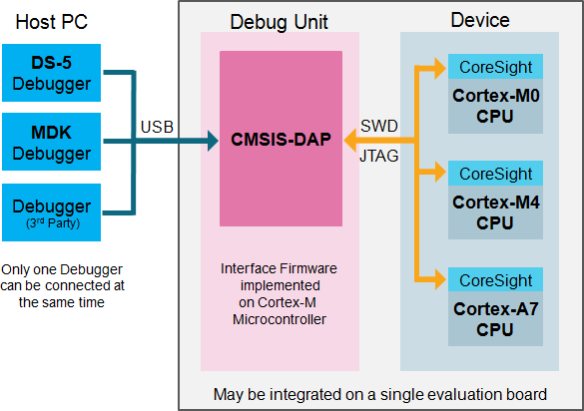
Beside of USBDM, there is another Open Source implementation of a debug interface for the Freedom Board OpenSDA: CMSIS-DAP.

CMSIS-DAP (Source: http://nimblemachines.com/cmsis-dap/)
CMSIS-DAP stands for ‘Cortex Microcontroller Software Interface Standard – Debug Access Port’) has been published by ARM Inc. With this, there is an open source alternative to proprietary implementation (e.g. P&E OpenSDA or Segger OpenSDA).
Beside of the ARM MDK IDE, CMSIS-DAP is supported by Coocox and IAR. And IAR is what I’m using in this post.
Freedom Board with Segger OpenSDA Debug Firmware
Looks like there is some movement on the ‘OpenSDA Front’: After CodeRed has released their RedProbe OpenSDA firmware, now Segger has released an OpenSDA firmware.
With this, I get a low-cost debugging solution similar to the well-known J-Link run control devices. The OpenSDA Segger Firmware is something like a J-Link-lite.
Fix for 3.3V Voltage Drop on FRDM-KL25Z Board
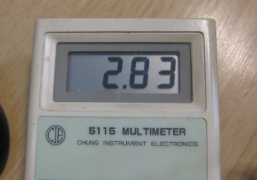
With my Pololu line following robot I had strange problems with the sensor array: the sensor values were very unreliable. Until I have found the problem: Instead of the expected 3.3V, my FRDM-KL25Z RevD board provided 2.8V instead 3.3V on the P3V3 Arduino header pin:
And that voltage even was lower the more current I needed :-(. Luckily there is an easy hardware fix for this.
Continue reading
Low-Level Coding with PDD (Physical Device Driver)
As with any software drivers: they are never perfect. The same applies to the Processor Expert components delivered in CodeWarrior for MCU10 or the DriverSuite too. That’s why I have created many more components which are available on GitHub here. All these components are using other components to reach the hardware. But what if a functionality is not exposed through the low-level component? Or what if I want direct access to the hardware? Up to now I had to choose either the Processor Expert way, or to do it in the ‘traditional’ way using an SDK like CMSIS or vendor supplied header files.
With MCU10.4, I noticed that there is another way: PDD (Physical Device Driver).
Adding/Removing Floating Point Format for S08 Projects
Usually I do *not* use floating point numbers in my projects. For this, I select ‘None’ during the project creation in CodeWarrior for MCU:
But what if I need to change my mind later? How to change such a ‘no-floating-point-needed’ project to one with floating point format support?
Adding USBDM to CodeWarrior for MCU10.4
If you are following my recent posts, then you know I started using USBDM on OpenSDA as an alternative run control solution. Now with the advent of MCU10.4, the question is: how to use USBDM with it, because the USBDM installer obviously only knows the version up to MCU10.3?
Can MCU10.4 recover a bricked OpenSDA Freedom Board?
Ok, this one might not work for everyone. And maybe I’m seeing a ghost. But a nice and real one, at least for me :-). It seems that with the new CodeWarrior for MCU10.4 installation I was able to recover a bricked OpenSDA FRDM-KL25Z board 😯
Switching Processor Package – Simplified in MCU10.4
I continue to uncover new things in CodeWarrior in MCU10.4 :-). Remember my post “Switching Processor Package in Processor Expert” about the steps needed to switch from one microcontroller package to another? Although that’s not something I need to do on a daily base, this process is simplified in the new version 10.4 🙂