Decoding S19 Files

I’m recently dealing again with S19 (S-Record) files. I can easily generate S19 files from my ARM .elf files, but what I need is a simple decoder of the file format.

The good thing is: such a decoder is provided with CodeWarrior for MCU10.x 🙂

That capability is built into the Decoder.exe which is delivered with the Freescale S08 (or S12) tool chain, and is located inside the MCU\prog folder:

Decoder.exe inside MCU prog Folder

Decoder.exe inside MCU prog Folder

Continue reading

Tutorial: Creating a Processor Expert Component for an Accelerometer

If you are a frequent reader of this blog, then you know: I’m a big fan of Processor Expert components. While there are many Processor Expert components delivered with CodeWarrior, it lacks many components and device drivers beside of the normal on-chip peripherals. But value gets added to an embedded project with all the external devices, sensors and actuators. That’s why I have created many more components which are available on my GitHub site. Readers of this blog have asked several times to create a tutorial on how to create a Processor Expert component. So why not working on that on a long Easter weekend full of cold rain and snow?

So here we go: a tutorial how to create a Processor Expert component for the MMA8451Q accelerometer found on the FRDM-KL25Z board:

MMA8451Q Accelerometer on the FRDM-KL25Z Board

MMA8451Q Accelerometer on the FRDM-KL25Z Board

Continue reading

Copy of Processor Expert Components

Many times I have Processor Expert components carefully configured in one project, and then I want to have the same thing in another project. There is actually an easy way to carry out this: to copy components from one project to another.

Continue reading

Version Control with Processor Expert Projects

Using a version control system for software development is a standard procedure today. While things are pretty clear for ‘standard’ Eclipse projects, it is not that easy for Processor Expert projects. I’m using Processor Expert projects with Git and SVN (Subversion). I want to share here tips how to use Processor Expert projects with a version control system. Screenshots and vocabulary are for TortoiseGit and Git, but applicable to any other VCS (Version Control System).

Git Repositories View in Eclipse

Git Repositories View in Eclipse

Continue reading

Compiling C Files with GNU ARM G++

If I want a C++ project for my KL25Z Freedom board, I select C++ during the project creation:

C++ Project Creation for GCC

C++ Project Creation for GCC

This creates a gcc C++ project with all the needed settings.

This worked fine until I added a *.c file to my project which had code in it which was not accepted by the C++ compiler. Wait! Should the *.c not be compiled in C mode, as I was used to with other compilers? It turned out that things are different with gcc (or g++) :-(: the *.c files in my project are compiled in C++ mode. So the question is: how to compile in C mode with the ARM g++ compiler?

Continue reading

Tutorial: PWM with Processor Expert

For many of my applications I’m using a PWM (Pulse Width Modulated) signal. One example is the motor driver used in this project where I use one PWM signal for each motor. Another usage of PWM is to control the brightness of an LED. Processor Expert makes usage of the PWM hardware easier. Still, for some settings it is good to have the resulting signals in mind. So in this post I’m showing how the settings impact the PWM signal generated.

Continue reading

The Quotation Problem

Maybe this article gets the attention of a local optometrist or eye shop: I have a business opportunity for you! ;-).

I ran into a weird problem: I received an ARM GNU gcc project which failed during the generation of the S19 file in strange way:

'Executing target #80 Freedom_Zumo.siz'
'Invoking: ARM Ltd Windows GNU Create Flash Image'
“C:/Freescale/CW MCU v10.3\eclipse\../Cross_Tools/arm-none-eabi-gcc-4_7_3/bin/arm-none-eabi-objcopy”  -O srec Freedom_Zumo.elf "Freedom_Zumo.hex"
' '
Der Befehl "“C:" ist entweder falsch geschrieben oder
konnte nicht gefunden werden.
mingw32-make: *** [Freedom_Zumo.hex] Error 1

Continue reading

Quick Switch Editor in Eclipse

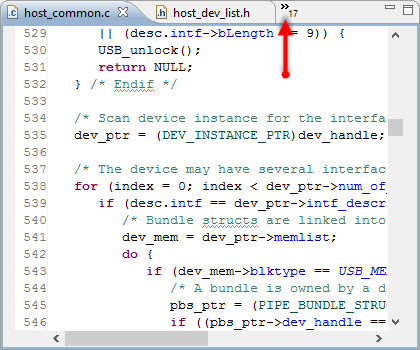
Probably I need to add 3rd monitor to my laptop system, or maybe I’m not organized enough. But as a matter of fact: I want to have as many source files as possible open in Eclipse. But there is simply not enough screen real estate to show them all:

Many source files open

Many source files open

With that many source files open, I need an effective way to switch between the files.

Continue reading

Editor Templates in Eclipse

Eclipse is a good IDE. At a first glance, it does the job. Good enough. At least for myself, I was not that much excited when I used it the first time. I came from the Microsoft Visual Studio world, and have used many other proprietary IDE’s. So Eclipse was just ‘yet another one’. But what Eclipse makes really great is the incredible wealth of functionality which is not visible right away. Yes, this is the same for any other software tool: it takes time to explore, and once you know things well, you do not want to switch or even consider something different. Same for me.

The other thing is: after some time, I get used to things, and I do not appreciate it that much any more. Only until someone reminds me that maybe things are not that well-known? This is what happened to me two days ago: I did some editing in Eclipse, while a colleague was watching me doing this. Then he said something like this

“Hey, what did you do? What was that?!? How did you do that?”

I do not remember his exact words, as I was surprised as well. I did not do anything special? Kinda standard Eclipse thing. Well, maybe not.

Continue reading

Search in Processor Expert Component Properties

Sometimes I’m looking for a functionality, and I cannot find it. But this does not mean that it does not exist ;-).

The Eclipse preference pages have a great filter text field: If I want to change a setting which has something to do with ‘color’, I can enter that text and it will show me all setting pages having something to do with ‘color’:

Eclipse Preference Filter

Eclipse Preference Filter

Continue reading