Enabling/Disabling FXOS8700CQ Device Needs a Delay

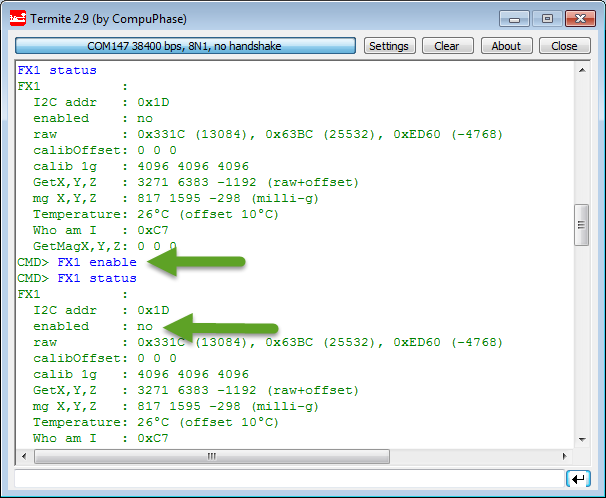
Found an interesting behaviour with the Freescale FXOS8700CQ on the new Sumo Robots (see “Sensor and Communication Shield for Sumo Robot“): when enabling the accelerometer/magnetometer, it actually did not work:

Failed to Enable FXOS8700 Accelerometer

Failed to Enable FXOS8700 Accelerometer

Continue reading

User Interrupt on NMI Pin with Kinetis and ExtInt Component

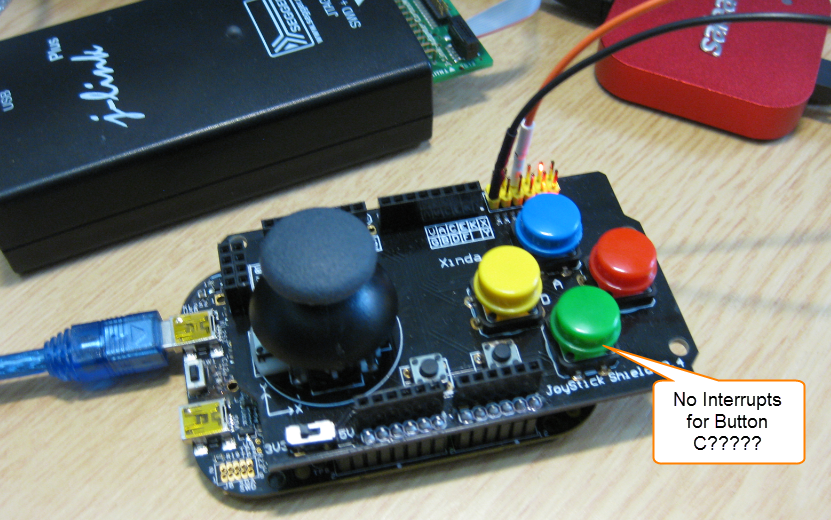
While my beef brisket (see “My First DIY Smoked Beef Brisket: Day 1“) is smoking on ;-), I have time to investigate a problem I was running on in my lecture on Friday: For the Joystick shield (see “JoyStick Shield with the FRDM Board“) on the FRDM-KL25Z board, I wanted to use an interrupt if I press the green button:

No Interrupts for Button C

No Interrupts for Button C

However, that did not work :-(.

Continue reading

Failed to Debug with GDB: Breakpoints or Expressions on non-existing Locations

Sometimes, there are ugly bugs in tools, and without knowing about them, it is likely to spend hours and hours, and of course to be frustrated. Knowing about these issues does not remove the issue, but at least helps to cut time to deal with it. And here is one which was nagging on me for a while with the GNU GDB debugger in Eclipse…..

💡 I have used the Q4 2014 GNU ARM Embedded (launchpad) toolsuite/gdb (4.9-2014-q4-major), and I have found that with that gdb version the issue described is fixed. If you are using Kinetis Design Studio, see “Switching ARM GNU Tool Chain and Libraries in Kinetis Design Studio” how to upgrade the tool chain.

I was happily debugging my project, making some changes, and suddenly I cannot debug it any more. What happens is that I can download the binary with GDB, but it immediately terminates and disconnects:
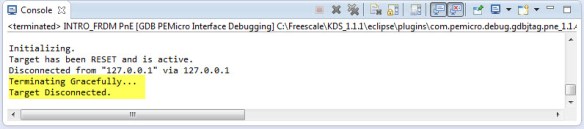
Terminating Gracefully Target Disconnected

Terminating Gracefully Target Disconnected

After digging and doing some trial and errors, I have found what is causing this.

Initializing.
Target has been RESET and is active.
Disconnected from "127.0.0.1" via 127.0.0.1
Terminating Gracefully...
Target Disconnected.

Continue reading

Putting Code of Files into Special Section with the GNU Linker

The GNU Linker (ld) is very, very powerful. This time I wanted to put all my Processor Expert generated code into its own dedicated section. This is useful for example to have a bootloader or a library inside a special area in FLASH. It was not obvious to me how to do this with the linker, with some search on the internet and some trial and errors, I finally managed that. And as always with exploring things, I have learnt something :-). So here is how I’m able to put the code of arbitrary files into its own dedicated section.

Code Section for Generated Code

Code Section for Generated Code

Continue reading

Unlocking and Erasing FLASH with Segger J-Link

When using a bootloader (see “Serial Bootloader for the Freedom Board with Processor Expert“), then I usually protect the bootloader FLASH areas, so it does not get accidentally erased by the application ;-). When programming my boards with the P&E Multilink, then the P&E firmware will automatically unlock and erase the chip. That’s not the same if working with the Segger J-Link, as it but requires extra steps.

Protected FLASH Pages with Processor Expert

Protected FLASH Pages with Processor Expert

Continue reading

Emulating Eclipse ‘Run’ with ‘Debug’ Configuration

Student: “Professor, my application does not work!”
Professor: “What is the problem?”
Student: “I don’t know, but the LED on my board is not blinking.”
Professor: “Can you step through the port initialization sequence and check if the clocks are initialized correctly?”
Student: “I have pressed the ‘Run’ button, I’m not debugging”.
Professor: “Why are you not debugging?”
Student: “I always do a ‘Run’, and I do ‘Debug’ only if needed.”
Professor: “Ahhhhhhrrrrgggg!”

Run and Debug in Eclipse

Run and Debug in Eclipse

Clearly, I’m not immune to the ‘déformation professionelle‘. I very rarely use ‘Run’, because it simply does not offer much value compared to ‘Debug’ during development. If using ‘Run’ and then there is a problem, I have to ‘Debug’ anyway, why not ‘Debug’ from the beginning? It is simply not an efficient way to work for me. Or I’m missing something?

Continue reading

RingBuffer Component with Put/Get/Clear Events

Sometimes I have a good idea how to extend one of my Processor Expert components with an extra feature, but then I step back because why implementing more than I need at the moment? Until another user of the component simply asks for the same thing, and here we go: if one or more can take advantage of a feature, that’s definitely a strong argument to add it :-). This happened with the RingBuffer Processor Expert component I’m using in many projects. And a reader of this blog asked to add some extra event methods: when an item is added or removed to the buffer.

RingBuffer used in USB Component with Extra Events

RingBuffer used in USB Component with Extra Events

Continue reading

Executing Multiple Commands as Post-Build Steps in Eclipse

The GNU ARM Eclipse plugins from Liviu already offer several built-in actions which can be performed at the end of a build: creating flash image, create listing file and printing the code and data size:

GNU ARM Eclipse Extra Post Build Steps

GNU ARM Eclipse Extra Post Build Steps

But what if I need different things, or even more things?

Continue reading

Building Projects with Eclipse from the Command Line

Eclipse has a great user interface (UI). But what if I want to do things from the command line, without the GUI? For example to build one or more projects in the workspace without using the Eclipse UI? With this, I can do automated check-outs and do automated builds.

Performed a command line project build with Eclipse

Performed a command line project build with Eclipse

Continue reading