Eclipse Build Variables

This post is not about variables in my application code (which I debug). It is about using Variables in Eclipse for building projects. Eclipse variables allow me to make my projects ‘position independent’ whenever I cannot use a path relative to my projects or workspace.

Eclipse Variables

Which variables are used where in Eclipse might be sometimes not very clear. Depending in which context variables are used, not everything might be available. This link for example gives a list of variables which can be used to invoke an external tool.

Build Variables

Eclipse comes with many built-in variables, especially for the build system. If I want to see what variables are already defined, I can show them in the project properties, under C/C++ Build > Build Variables with enabled option ‘Show system variables’:

System Build Variables

System Build Variables

Continue reading

Processor Expert CDE: Debug Verbose Mode

I have one rule I try to follow every day: my code shall be warning free. Writing software for multiple compilers gets challenging with this rule, but it avoids the ‘not seeing the forest because of the trees’ problem. This rule extends to writing Processor Expert components with CDE (Component Development Environment). What I have missed (and not used) is a useful option to enable debug output:

Enable Processor Expert Components Debug Verbose Mode

Enable Processor Expert Components Debug Verbose Mode

Continue reading

Processor Expert Component not Showing Up?

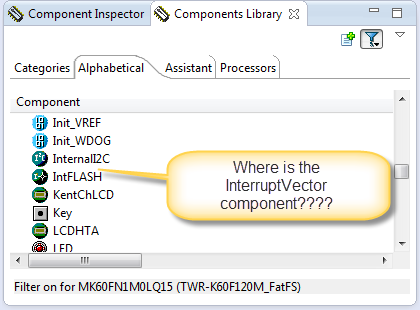
In case you are desperately looking a component in the components library view, but somehow it does not show up? For example I know there is component ‘InterruptVector’, but it is not present in the Components library view?

Where is the InterruptVector Component

Where is the InterruptVector Component

Continue reading

Tutorial: Replacing IAR EW with Eclipse IDE

Are you using IAR tools and you are jealous looking at what others can accomplish with Eclipse? You wish you could use your IAR build tools but taking advantage of Eclipse too?

I do not want to start a religious IDE war here ;-). At least for IAR, there is a way to bring both worlds together: having IAR build and debug tools integrated in Eclipse :mrgreen: :

Using IAR Tools In Eclipse

Using IAR Compiler and Debugger in Eclipse

Continue reading

Review: ThunderBench with the Freescale FRDM Board and Processor Expert

For the Eclipse and Processor Expert lovers of this world: there is another Eclipse based IDE you can use: ThunderBench made by Emprog:

ThunderBench for ARM Eclipse Startup Screen

ThunderBench for ARM Eclipse Startup Screen

They support a range of ARM based devices, including the Freescale ones I’m using. So I downloaded the v3.24 30 day trial from their download page last week. Finally I have found some time to try it out. Could this be an alternative to use my Freescale FRDM boards with Processor Expert?

Continue reading

S-Record Manipulation with GNU objcopy and Burner Utility

In my earlier post “S-Record Generation with gcc for ARM/Kinetis” I documented how to have the ARM GNU gcc toolchain to produce a S19 (Motorola (or now Freescale) S-Record) file. Here are a few more tips on that subject:

  1. Changing length of S-Records
  2. Only using 32bit addresses
  3. Combining S19 files

Continue reading

Eclipse Command Line Code Generation with Processor Expert

Eclipse based IDE’s have typically one limitation: the IDE has not much scripting capabilities. Yes, I can use things like JUnit for testing, but if it comes to build and debug C/C++ applications, then support gets really rare. An exception to this is CodeWarrior for MCU which features a command line version of the IDE which can be used for test automation as I used it in one of my tutorials. What I missed so far is to have a command line interface for Processor Expert to generate code. This is now possible with CodeWarrior for MCU10.5 :-).

Continue reading

How to Avoid Slow Processor Expert Projects

The Eclipse IDE is in my view the best IDE in the world :-). But it is not the fastest one: All the functionality and comfort has a price, and such a Java and highly flexible IDE requires its resources. The Eclipse community is continuously addressing that concern, and for example the Eclipse Juno 4.2 IDE in CodeWarrior for MCU10.5 shows this nicely: things are much smoother compared to the Eclipse Indigo 3.7 in MCU10.4. But if you feel that you do not want to use Processor Expert because it is too slow, then I have a trick how to improve performance by a factor of 10 :-).

Continue reading