Creating New Eclipse Debug Configuration

Eclipse is very powerful. To the point that you can do the same thing in multiple ways. I’m always learning new things, and recently I discovered a new way how to create a new launch or debug configuration.

So far I selected the item (e.g. GDB Hardware Debugging) and used the ‘New’ Icon:

New Debug Configuration with New Icon

New Debug Configuration with New Icon

Continue reading

Tutorial: User Interrupts with Processor Expert

I have been asked this question several times:

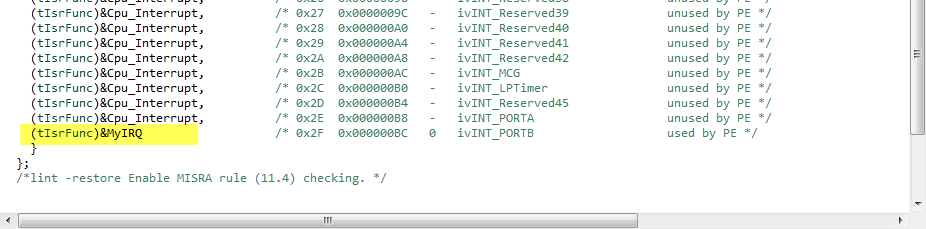
“How can I define my own interrupt vector with Processor Expert?”

So I think it deserves a short tutorial, if more than one person is asking this ;-).

My user interrupt in the vector table

My user interrupt in the vector table

Continue reading

Processor Expert (Driver Suite/Plugins/KDS) V10.4 with new Component Inspector

There has been a lot of new Freescale releases recently around FTF, and I’m trying to catch up. For me as a Processor Expert Lover, it is good news that there is now the new version 10.4 available. And it comes in different ways:

Microcontrollers Driver Suite v10.4

Microcontrollers Driver Suite v10.4

Continue reading

GNU Additional Tools: Create Flash Image, Print Size and Extended Listing Options

One question I have been asked several times here at FTF:

“How can I create an S19/Motorola S-Record with Eclipse?”

The answer depends on which Eclipse you are using. Actually it depends on which (ARM) build  tools plugin you are using, as with Eclipse you have the freedom of choice.

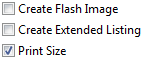
And this is not only about S19/Binary (Flash Image), but covers ‘Extended Listing’ and ‘Print Size’:

Additional Tool Options

Additional Tool Options

Continue reading

FTF: FRDM-K64F, Kinetis Design Studio and Kinetis SDK

I’m attending the Freescale Technology Forum (FTF) in Dallas this year: As they say here: “everything is bigger in Texas”, that’s the motto of this conference ;-). The conference is packed, and I have a hard time to keep up with all the things going on. My focus is obviously everything around Eclipse and ARM microcontroller. The conference started yesterday afternoon with hands-on labs, and I was in the one were Freescale presented the new ‘Kinetis Design Studio’: a free of charge/unlimited Eclipse tool chain based on Eclipse Kepler, GCC and GDB. Freescale presented their new software library ‘Kinetis SDK’. And: There is a new Freedom board which gets handed out to the attendees: the FRDM-K64F :-).

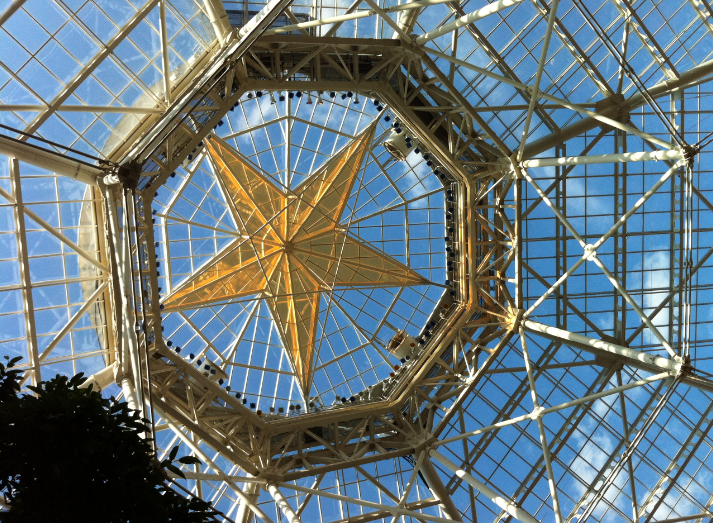
Texas Style Glass Coverage

Texas Style Glass Coverage

Continue reading

Serial Terminal View with Eclipse Kepler

Nearly all of my projects have built-in command line support: using a serial connection, I can send commands or inspect the system status. For this I have my command line Shell which works over serial-to-Bluetooth, serial-to-USB, USB CDC or with a physical serial (COM) port. But what I need on the host system is a Terminal program: I can use either an external program. There are many ones available (Tera TermPuTTY, …) where Termite is my favorite one. But it is possible to extend Eclipse so it has its own Terminal view too :-).

Eclipse Terminal View

Eclipse Terminal View

Continue reading

Variable Debugging with Eclipse Kepler

The current Eclipse Kepler version comes with changes for debugging variables. I have students coming from the earlier Eclipse versions, so here are a few tips for dealing with variables in Eclipse Kepler.

Variables View in Eclipse

Variables View in Eclipse

Continue reading

Sharing Debug Configuration with Eclipse

Maybe you had this problem too: you shared a project with somebody, only to realize that your carefully crafted debug configuration was not shared?

Eclipse has the concept to store settings in the ‘framework’. The ‘framework’ is the Eclipse internal data, basically what is inside the .metadata folder of the workspace.

metadata folder in workspace

metadata folder in workspace

Continue reading

Tutorial: Thermal Printer, Part 1: Hardware Setup with FRDM Board

One of my embedded projects is to measure the running time in a sports event (see “Sports Timing System in a Lunch Box“). The recorded time is stored in an EEPROM plus sent over USB or wireless connection to the host. It would be great if I could print out the time and ranking directly, so if there is no PC, the system can be small and tiny. So here is my next project and tutorial: Printing with the Freedom board!

Hello World on the Printer with FRDM-KL25Z

Hello World on the Printer with FRDM-KL25Z

Continue reading

Generating Static FreeRTOS Source Code

Using Processor Expert is an awesome tool: it generates source code for me, and I can can ‘dynamically’ tune my projects to my needs. Still, sometimes it is better or desirable to have a ‘normal’ or ‘static’ project. This is very well possible with Processor Expert (see “Sneaking from Processor Expert” or “Disable my Code Generation“): I can generate the code one time, and then use it without Processor Expert.

To make this even easier, I have added an option to the FreeRTOS Processor Expert component to generate ‘static’ code I can copy-paste to projects and tool chains which are either not supported by Processor Expert, or just for ‘static’ projects.
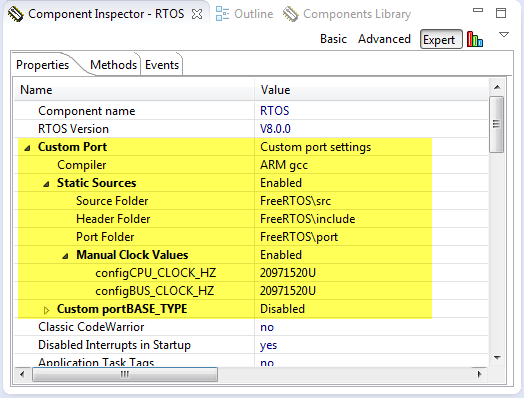
FreeRTOS Custom Port Settings

FreeRTOS Custom Port Settings

Continue reading