Open Source picoLink: Raspberry Pi RP2040 CMSIS-DAP Debug Probe

One essential part of embedded development is the ability to debug the target application. The good thing with the Raspberry Pi Pico RP2040 Eco-system is: One can use another RP2040 Pico board as a debug probe to debug other ARM Cortex-M devices.

But instead using a Raspberry Pi Pico board with some wires, why not building a dedicated board? The result is a small, versatile and open source debugging probe which virtually can debug any ARM Cortex-M device as a standard ARM CMSIS-DAP probe:
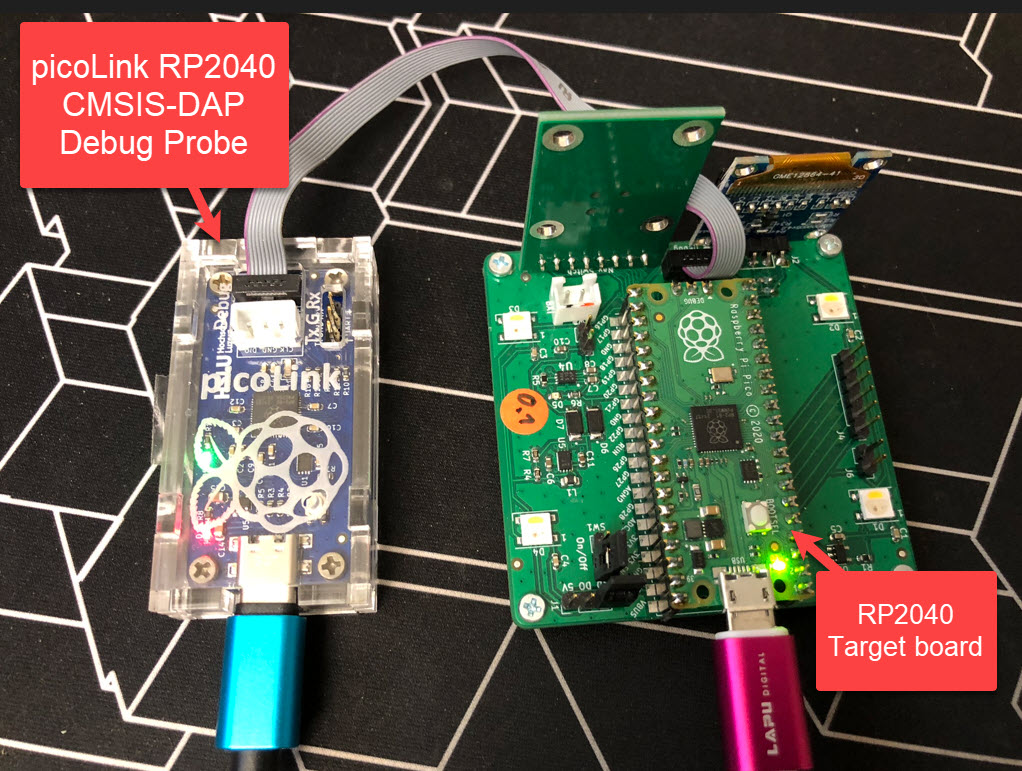
picoLink Debug Probe debugging a Raspberry Pi Pico Board
Continue reading

RP2040 with PIO and DMA to address WS2812B LEDs

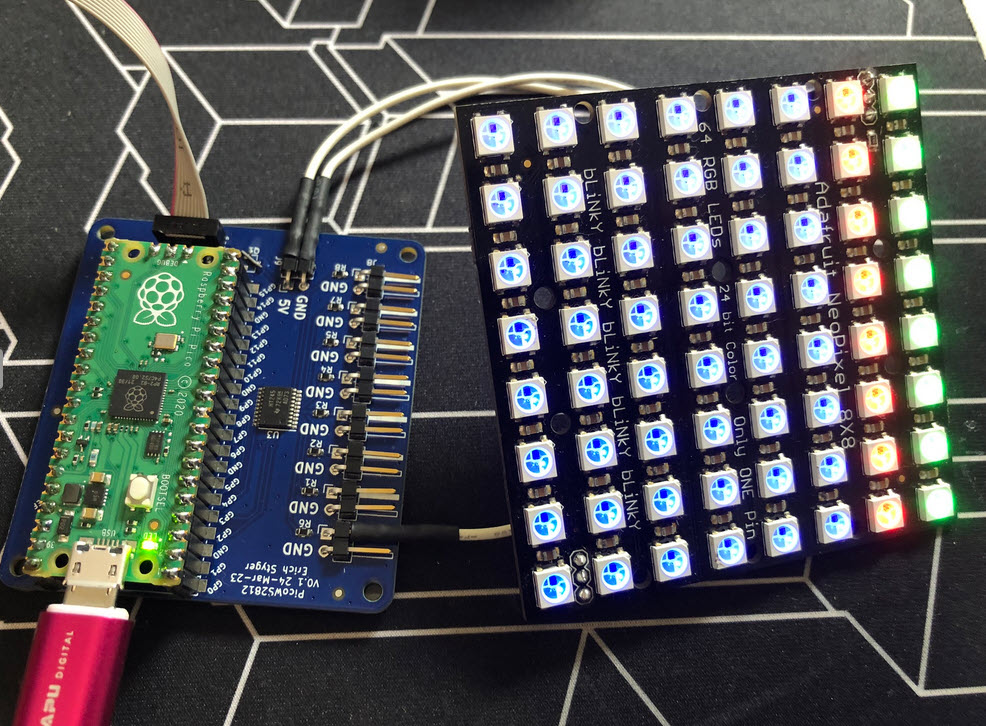
I love the WS2812B (aka SK6812) addressable LEDs: they are inexpensive and available in different packages. I have used them in different projects, including the MetaClockClock one. I used the NXP Kinetis for these projects, but because they are not available any more, for a new project we had to choose a new microcontroller, with the Raspberry Pi Pico RP2040 as the winner.

Raspberry Pi Pico RP2040 driving WS2812B with PIO and DMA
Continue reading

Using a Watchdog Timer with an RTOS

When something goes wrong in an embedded system, a watchdog timer is the last line of defense against a blocked or malfunctioning system. A watchdog is a special timer which needs to be ‘kicked’ in a special way, otherwise the timer will run out and reset the system.

For example, a watchdog is an important safety feature in the E-Vehicle charging controller with Raspberry Pi Pico-W RP2040:

EVCC Controller
Continue reading

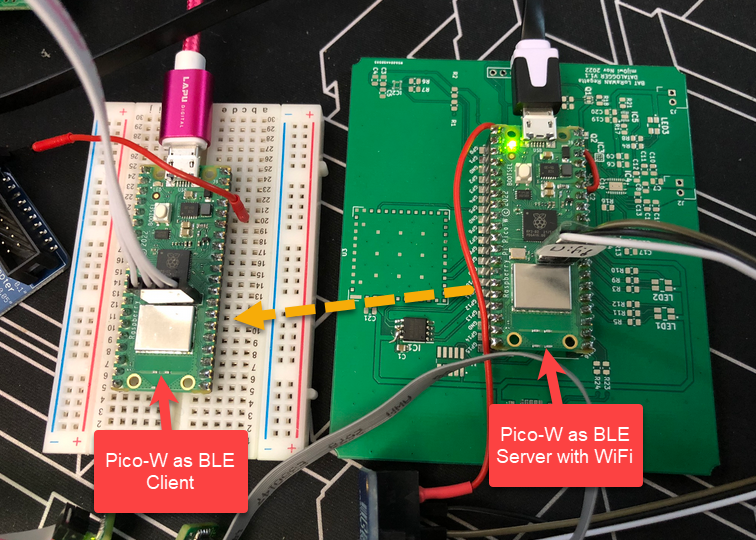
BLE with WiFi and FreeRTOS on Raspberry Pi Pico-W

The Raspberry Pi Pico RP2040 is a very versatile microcontroller. It is not the least expensive or the most powerful microcontroller, but it is one which is available and has an excellent software and tool ecosystem.

This article shows how to use the Raspberry Pi Pico-W with BLE and optional WiFi, running with FreeRTOS.

Continue reading

Controlling an EV Charger with Modbus RTU

The year 2022 is coming to an end, and I have spent some time today on a little side project. It is about making an Electrical Vehicle (EV) wallbox charger accessible over Modbus RTU. It is not finished yet, and I plan to publish more articles on it, but I can share that I’m able to access and control the Heidelberg EV charger with a Raspberry Pi Pico W (Dual Core Cortex M0+), NXP K22FN512 (Cortex M4F) and LPC845 (Single Core Cortex M0+):

Continue reading

Add extra Storage to the Raspberry Pi Pico with W25Q128 and LittleFS

The RP2040 Pico board comes with 2 MByte onboard FLASH memory. While this is plenty of space for many embedded applications, sometimes it needed to have more storage space. Having the ability to adding an extra SPI FLASH memory with a useful file system comes in handy in such situations. This makes the RP2040 ideal for data logger applications or otherwise store a large amount of data. In this article I’ll show you how to add an extra 16 MByte of memory to the Raspberry Pi Pico board, running FreeRTOS, a command line shell and using LittleFS as the file system.

Continue reading

Advent Calendar 2022

It is already December 1st, and time for a new Advent Calendar. This year the design includes birch plywood with PMMA, SK6812 RGBW LEDs running with a Raspberry Pi Pico board, building a small village.

Continue reading

Picoprobe: Using the Raspberry Pi Pico as Debug Probe

In Getting Started: Raspberry Pi Pico RP2040 with Eclipse and J-Link I used a SEGGER J-Link EDU for debugging: unfortunately, probably because of silicon shortage, these EDU probes are out of stock everywhere. Luckily, there is a solution: just use another Raspberry Pi Pico!

SWD Debugging with PicoProbe

This turns a $5 Raspberry Pi Pico board in to a very usable and versatile debug probe.

Continue reading

Getting Started: Raspberry Pi Pico RP2040 with Eclipse and J-Link

In this time where many micro-controllers have 100+ weeks estimated delivery time, it makes sense to look at alternatives. So it is not a surprise that the Raspberry Pi RP2040 gets used more and more in projects. It is not only inexpensive, it is (at least for now) available which makes all the difference. The RP2040 is the first microcontroller from Raspberry Pi: a dual-core ARM Cortex-M0+ running up to 133 MHz, 264 KByte on-Chip RAM and up to 16 MByte external FLASH.

Raspberry Pi Pico with J-Link, with a NXP sensor board

It is a very versatile microcontroller, with a rich eco-system and set of tools. It can be easily used with C/C++ or MicroPython, and the Raspberry Pi Pico board only costs around $5. There are plenty of tutorials out there, for example how to use the Pico board as debug probe to debug another Pico board. While this is great, there is an easy way to use any existing J-Link and Eclipse IDE too, so this is what this article is about.

Continue reading