Naturally, I have several project ideas lingering around. No time to make them all (for now). One of it is interfacing the Raspberry Pi camera with a microcontroller. To store the images, I need plenty of RAM on the device, and so far the Kinetis microcontroller did not have that. Finally, Freescale announced the K64F120 a few months back, and my ordered TWR-K64F120M board arrived on my desk, waiting to be used: Finally I get an ARM Cortex-M4F with 1 MByte of FLASH and 256 KByte of RAM :-).
Category Archives: CodeWarrior
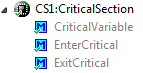
CriticalSection Component
I have created and published on GitHub a new component ‘CriticalSection’:
This component is a wrapper between my components and the problematic current implementation in Processor Expert (see EnterCritical() and ExitCritical(): Why Things are Failing Badly). It uses a flexible approach and uses macros to either use my modified version of EnterCritical() and ExitCritical(), or simply defaults to the original implementation.
Debugging the same Project Multiple Times in Parallel with Eclipse
I have I project which I want to debug on multiple boards the same time. So how can I download and debug the same application to multiple boards/processors, and debug them all the same time from within the same workspace and Eclipse IDE?
This is a typical scenario I have with my RNet stack: the same application runs on multiple boards, and I want to debug all the boards with the same project with the same Eclipse. For example to wireless sensor nodes with the RNet nRF24L01+ stack as in the picture below:
Eclipse Build Variables
This post is not about variables in my application code (which I debug). It is about using Variables in Eclipse for building projects. Eclipse variables allow me to make my projects ‘position independent’ whenever I cannot use a path relative to my projects or workspace.
Eclipse Variables
Which variables are used where in Eclipse might be sometimes not very clear. Depending in which context variables are used, not everything might be available. This link for example gives a list of variables which can be used to invoke an external tool.
Build Variables
Eclipse comes with many built-in variables, especially for the build system. If I want to see what variables are already defined, I can show them in the project properties, under C/C++ Build > Build Variables with enabled option ‘Show system variables’:
Processor Expert Component not Showing Up?
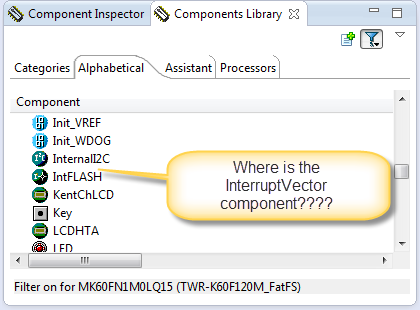
In case you are desperately looking a component in the components library view, but somehow it does not show up? For example I know there is component ‘InterruptVector’, but it is not present in the Components library view?
Workaround for Processor Expert ‘Components’ View Synchronization
CodeWarrior for MCU10.5 comes with a new Eclipse and new Processor Expert. Things are working very well so far. But I have spotted an issue which seems to be related to the new Eclipse Juno used: sometimes the Processor Expert ‘Components’ view is not correctly showing the current project used.
Eclipse Command Line Code Generation with Processor Expert
Eclipse based IDE’s have typically one limitation: the IDE has not much scripting capabilities. Yes, I can use things like JUnit for testing, but if it comes to build and debug C/C++ applications, then support gets really rare. An exception to this is CodeWarrior for MCU which features a command line version of the IDE which can be used for test automation as I used it in one of my tutorials. What I missed so far is to have a command line interface for Processor Expert to generate code. This is now possible with CodeWarrior for MCU10.5 :-).
Link Order: Using Multiple Definitions with ARM GNU Linker and Eclipse
Sometimes I have ‘multiple definitions’ in my projects: this means that I have functions defined in one source files, and I need to ‘overwrite’ one or more with a version in another source file. For example I have a source file with utility functions (Utility.c), and I want to overwrite some of these functions with a different implementation in a different file (MyUtility.c). How can I do this?
Compiling Documentation and Presentations: LaTeX
If you are not in the academic world, then you might wonder about that ‘LaTeX‘ in the title. and no, it is not about that latex rubber material ;-), it is about ‘la-tek’ 🙂
In short, it is a programming language and tool set to ‘compile’ documents. Originally, TeX has been designed and mostly written by Donald Knuth and released in 1978. Since then, it has been evolved and TeX (or LaTeX) is widely used in academia.
Changing Initialization Sequence in Processor Expert
Now I have implemented a watchdog with Processor Expert for my system. But what I have found out? I ended up with a looping system, and the watchdog did not fire 😦
What went wrong?