Eclipse has a nice feature to ‘shut up’ dialogs: In many dialogs I can select an option so that dialog does not show up again:
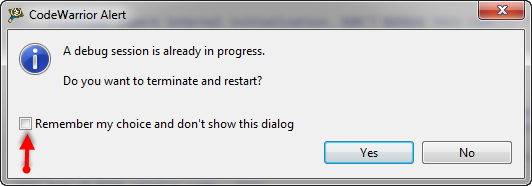
‘Dont’ show Again’ in Dialog
But what if I change my mind later on and what to have this dialog to show up again?

Eclipse has a nice feature to ‘shut up’ dialogs: In many dialogs I can select an option so that dialog does not show up again:
‘Dont’ show Again’ in Dialog
But what if I change my mind later on and what to have this dialog to show up again?
In “Tutorial: Accelerating the KL25Z Freedom Board” I used the MMA8451Q accelerometer on the FRDM-KL25Z board in a very primitive way: I’m reading directly some low-level registers from the device through an I2C low-level component. No calibrating, no special device feature setting, only raw values. Since then, things have been evolved: In “Tutorial: Creating a Processor Expert Component for an Accelerometer” I started to create a driver for this accelerometer, and since then a lot more functionality has been added.

Traced Accelerometer Values to the Shell
It happens to me many times: I’m stepping with the debugger through my code, and ups! I made one step too far!

Debugging, and made one step over too far
What now? Restart the whole debugging session?
Actually, there is a way to go ‘backwards’ 🙂
Continue reading
“As an engineer, you should ask for the best tools available. Spending money for better tools can make the difference between finding a problem quickly, or wasting days or weeks, and ultimately failing a project.” (unknown)
I had to learn it the hard way: some ‘hard-to-find-problems’ sometimes only can be found with some amount of luck, or with using a good trace solution. CodeWarrior already supports trace, such as using the MTB on the Cortex-M0+. But with this I’m limited to the on-chip trace buffer or on-chip RAM, which is better than nothing. But to solve the real hard problems, a bit of more power and memory is needed. And here where the P&E Tracelink comes into play: with 128 MByte trace buffer it would allow me to record a lot more trace data :-).
I’m using Version Control Systems like Git and SVN on a daily base. Because this gives me the opportunity to revert my changes and go back in time in my project. A VCS is incredible useful as well if I have deleted files or settings: restoring it is just a matter of a few mouse clicks.
But even without using a VCS, Eclipse has a built-in simple version control system: the Local History.

Eclipse History View
I’m recently dealing again with S19 (S-Record) files. I can easily generate S19 files from my ARM .elf files, but what I need is a simple decoder of the file format.
The good thing is: such a decoder is provided with CodeWarrior for MCU10.x 🙂
That capability is built into the Decoder.exe which is delivered with the Freescale S08 (or S12) tool chain, and is located inside the MCU\prog folder:

Decoder.exe inside MCU prog Folder
 MCU on Eclipse