FRDM Board Bootloader fails with Windows 8.1 Preview

Microsoft has released the Windows 8.1 Preview. So you can try out the next update of Windows 8. In short: Do NOT use Windows 8.1 Preview if you are using a Freescale FRDM board! Otherwise you will not be able to change the OpenSDA firmware (MSD or debug application).

❗ Update: P&E has released a new firmware v114 which combines USB CDC, MSD bootloader and debug application, and this firmware fixes the issue described in this post.

Well, I have not used it personally: I never use ‘test’ or ‘preview’ versions on my ‘production’ machine. It is ok to try things out on separate ‘scratch’ machines, but not on something I need to have stable for my work. Well, some of the students in my INTRO class were not able to resist and downloaded and installed Windows 8.1 Preview on their machines. With the result that the OpenSDA Bootloader does not work with Windows 8.1 Preview:

❗ It seems that the problem exists as well with the Windows 8.1 ‘final’ release.

Continue reading

FRDM Board not responding? Check your Virus Scanner!

In case you have this problem with the FRDM boards: You are using the FRDM bootloader mode (it shows up as BOOTLOADER) or the MSD mode (e.g. it shows up as FRDM-KL25Z) (see OpenSDA on the Freedom KL25Z Board) and it does not respond any more, or does not work as expected, then read on…

Continue reading

Compiling Documentation and Presentations: LaTeX

If you are not in the academic world, then you might wonder about that ‘LaTeX‘ in the title.  and no, it is not about that latex rubber material ;-), it is about ‘la-tek’ 🙂

In short, it is a programming language and tool set to ‘compile’ documents. Originally, TeX has been designed and mostly written by Donald Knuth and released in 1978. Since then, it has been evolved and TeX (or LaTeX) is widely used in academia.

Continue reading

Changing Initialization Sequence in Processor Expert

Now I have implemented a watchdog with Processor Expert for my system. But what I have found out? I ended up with a looping system, and the watchdog did not fire 😦

What went wrong?

Continue reading

Optimized BitIO_LDD Programming with Processor Expert

In my tutorial “Bits and Pins with Kinetis” I showed how to use the BitIO_LDD approach for Bit I/O access. I do not like this LDD (logical device driver) approach for several reasons:

  1. It requires an extra ‘device handle’ passed to the functions, even if such a device handle is not needed or desired.
  2. The code efficiency/size is negatively impacted by this.

Luckily, there is a way to hack around this 🙂

Continue reading

The Freescale OpenSDA Trap: “No Device Available”, or something like that….

Self-Motivation: I write this post in the hope to cut the number of ‘please help me’ emails in my inbox ;-):

If you want to debug one of the Freescale boards with OpenSDA (FRDM-KL25Z, FRDM-K20, FRDM-KL05Z, FRDM-KL46Z48M, FRDM-KL02Z, TWR-KL47Z48M, …), and if you get this dialog …

No Device Available

No Device Available

… then read on.

Continue reading

Fail! The Zumo Shield Blade Problem

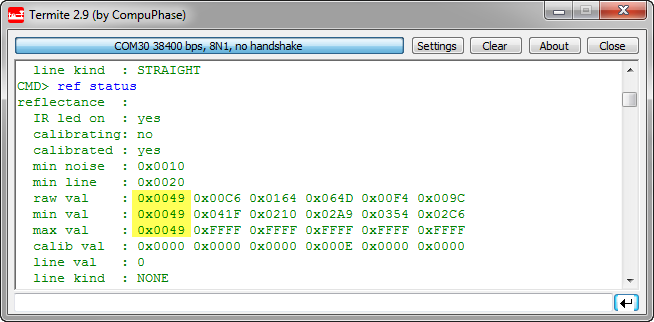
Ahhhhrg! I admit: I’m not immune to all the silly problems an engineer can face in his life. And sometimes it is about the most basic things. This morning was again such a day: One of the infrared sensors of my Zumo Robot reported wrong values:

Sensor wrong values

Sensor wrong values

Continue reading

Optimized FreeRTOS: Stack Check and SysTick for ARM Cortex Cores

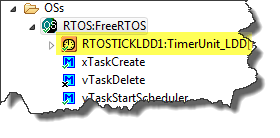
The ARM Cortex specification includes the ‘SysTick’ (System Tick Timer): a dedicated system timer which is intended to be used as time base for an RTOS. While technically it would be possible to use any periodic interrupt timer, I’m using as well the SysTick for my FreeRTOS ARM ports. And because Processor Expert includes a nice timer interface, I’m using the TimerUnit_LDD:

TimerUnit LDD for SysTick

TimerUnit LDD for SysTick

While this is great for flexibility, it has its price in efficiency. That TimerUnit_LDD adds overhead. So I want to get rid of the TimerUnit_LDD and use a more efficient way.

Continue reading

Tutorial: FreeMASTER Visualization and Run-Time Debugging

“A picture says more than 1000 words.”

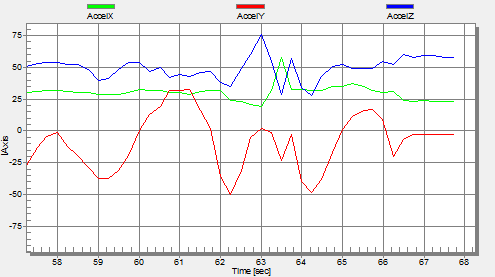
I don’t know the source of that quote, but for sure it is true for every developer and engineer too. Engineers need to work a lot with numbers. But numbers can be transformed into pictures and graphs which can make complex things and relationships easier to understand. Verifying proper functionality of a PID closed loop controller or watching sensor values with a nice plot is definitely something very useful. Would it not be great to watch sensor data changing over time in a chart like the one below?

Accelerometer Graph

Accelerometer Graph

One way is to export data and then show it e.g. in Excel (which has been great chart functions). But even better, if this could be done directly with data provided from the target board? If you think this is hard to do, then I can show you how this can be done in a few steps with the help of a very nice tool: FreeMASTER 🙂

Continue reading

Driver for Microchip 24xx Serial EEPROM

For many projects I need to store configuration or sensor data. For this I’m using either an SD card or program the internal flash memory of the microcontroller. Using the internal flash is a good thing as it does not need an external component. However, the typical number of programming cycles is limited to 10k-50k which is a limiting factor if data has to be recorded over a long time or very often. That’s why I’m using the very popular external 24xx external EEPROM devices from Microchip.

24LC512 connected to FRDM-KL25Z

24LC512 connected to FRDM-KL25Z

Continue reading