Tutorial: FreeRTOS with the Kinetis SDK and Processor Expert

Freescale had announced at FTF back in April this year that they will use Kinetis Design Studio  and the Kinetis SDK for all new Kinetis devices. The switch from CodeWarrior to Kinetis Design Studio (see “Comparing CodeWarrior with Kinetis Design Studio“) was not much of big deal for my projects (although CodeWarrior still has better features), and projects are rather easily portable. However, the move to the Kinetis SDK has been massively disruptive: Before it was easy to move projects from one device to another with Processor Expert, even from S08 to ColdFire to Kinetis. Now with the Kinetis SDK everything is very different. At least Freescale now officially supports FreeRTOS, and for myself as a big fan of that open source RTOS, that was some good news.

Blinking Red LED with FreeRTOS Task using Kinetis SDK, FreeRTOS and Processor Expert

Blinking Red LED with FreeRTOS Task using Kinetis SDK, FreeRTOS and Processor Expert

So in this tutorial I’m showing how FreeRTOS can be used with the Kinetis Design Studio. That makes at least using the Kinetis SDK bit more familiar to me :-).

Continue reading

Debugging Failure: Check List and Hints

I think the biggest frustration point for any new or even seasoned engineer is the debugging phase: my application finally builds fine, but I’m not able to connect and download it to the target board :-(. In my view the debugging part is the most fragile part of the development process. I’m always very relieved if I can connect to a brand new board, because I know if it does not work, then the problem could be a very bad one, costing my several hours or even days to overcome it.

Remote Communication Error

Remote Communication Error, what now?

Continue reading

RAM Target with Kinetis Design Studio and FRDM-K64F

Newer microcontroller have increase RAM areas, making it suitable to run the application from RAM instead of FLASH. For the FRDM-K64F board and the Kinetis Design Studio (V1.1.1), I have explored how to run the application out of RAM instead of FLASH memory, both for P&E and Segger connections.

MK64FN1M0VLL12

MK64FN1M0VLL12

Continue reading

Illustrated Step-by-Step Instructions: Updating the Freescale Freedom Board Firmware

I have received a bunch of Freescale FRDM boards to be used in an Embedded Systems programming crash course. There are multiple issues with the boards coming from the factory:

  1. They come with an old bootloader which is not compatible with Windows 8.x
  2. They have an old and outdated firmware on the board only supports a MSD bootloader

This post is a step-by-step instruction how to update Freescale FRDM boards (e.g. FRDM-KL25Z) to the latest firmware.

FRDM Board

FRDM Board

Continue reading

Unlocking and Erasing FLASH with Segger J-Link

When using a bootloader (see “Serial Bootloader for the Freedom Board with Processor Expert“), then I usually protect the bootloader FLASH areas, so it does not get accidentally erased by the application ;-). When programming my boards with the P&E Multilink, then the P&E firmware will automatically unlock and erase the chip. That’s not the same if working with the Segger J-Link, as it but requires extra steps.

Protected FLASH Pages with Processor Expert

Protected FLASH Pages with Processor Expert

Continue reading

P&E Eclipse Update Site for GNU ARM Eclipse Plugins

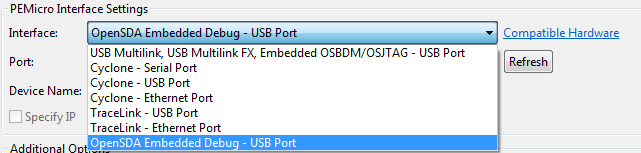
P&E has just released a new version of their Eclipse plugins for the set of GNU ARM Eclipse debug plugins. The GNU ARM Eclipse plugins from Liviu support OpenOCD and Segger J-link, so with this update or extension it adds P&E support to it. With this, I can use the P&E debug devices (P&E Multilink, Tracelink) or as well the Freescale OpenSDA with it.

PnE Debug Interfaces

PnE Debug Interfaces

Continue reading

Flashing a new Android Image to the RIoT Board

I understand the challenges of board vendors: they produce many boards, and typically they have an early/first firmware version on it. And when that board gets shipped to customers, that firmware typically is old and outdated :-(. Same for the RIoT board I have received: I was desperately trying some advanced features, only to realize that the firmware on the board is an older one from this year. So time to update the Android on that board.

Freescale RIoT Board

Freescale RIoT Board

Continue reading

FILLing unused Memory with the GNU Linker

In many of my applications I use a CRC/checksum to verify that the code/flash on the target is not modified. For this, not only the code/data in flash counts, but as well all the unused gaps in the memory map. Instead to leave it up to the flasher/debugger (which usually erases it to 0xFF), I want to fill it with my pattern. The GNU linker is using the pattern 0x00 for unused bytes inside sections. So this post is about to use the GNU linker to ‘fill’ the uninitalized FLASH memory with a pattern.

FLASH with DeadBeef Pattern

FLASH with DeadBeef Pattern

Continue reading

Preventing Reverse Engineering: Enabling Flash Security

Now I have invested a lot of time into my application, ready to be flashed on the devices and shipped. But wait: I don’t want that someone can read out the code from my device and have it reverse engineered. For this, I can ‘secure’ the device.

Flash Security Settings

Flash Security Settings

Continue reading

Configuration Data: Using the Internal FLASH instead of an external EEPROM

Many applications need to store persistent (non-volatile) data at runtime: configuration data, error logs, sensor data, calibration values, etc. The question is: where to store that data? If it is only a few kBytes, an SD card or similar is an overkill. Adding an external EEPROM? Sure, that works, but adds an extra part to the design. Some microcontroller have internal EEPROM. But what if not? Why not using the microprocessor internal flash memory?

Internal FLASH vs. external EEPROM

Internal FLASH vs. external EEPROM

Continue reading